Downloadable Files
You can download Candysomnia for free from the bottom of this page.
Turn Animation into Sound Effects Automatically
This After Effects plugin creates sound effects based on the movement in your composition. It detects when objects move, appear, stop, or cross the screen and generates sounds that match those moments.
Candysomnia can produce pings, bells, risers, whooshes, and percussion. The sounds are synthesised from the detected motion, rather than taken from a sound library. They play directly in the After Effects preview and are included when you render the composition.
The plugin works through an adjustment layer. Add the effect, press Generate, and it analyses the animation to find where sounds should play.
Six Sound Styles for Different Animations
Candysomnia includes six styles. Each one produces a different sound while following the same movement in your composition.
Style | Sound |
|---|---|
Candy | Bright pings and bells |
Dream | Soft, low sounds with long tails |
Wood | Marimba and plucked string sounds |
Bubbles | Pops and soft sine tones |
Glitch | Chopped, reversed, and scattered sounds |
Foley | Clicks and rustles without musical notes |
You can switch between these styles without generating the motion analysis again. The sounds change, but their timing stays connected to the original animation.
How Candysomnia Generates Sound
The plugin uses optical flow to detect motion in your composition. It analyses the frames and identifies events such as objects starting, stopping, landing, or moving across the screen.
The process has three main steps:
Add and Generate: Apply Candysomnia to an adjustment layer and press Generate. The plugin analyses the composition in the background. Progress appears in Effect Controls and the viewer.
Adjust the Sound: Change the sound style, sensitivity, or individual sound levels. The changes can be heard in the next preview without another analysis.
Regenerate After Editing: If you change the animation or its timing, press Generate again. The plugin processes only the frames that have changed.
The analysis is saved in the After Effects project. According to the developer's example, an 8.4-second 1080p composition takes 2.6 seconds to analyse on a MacBook Pro M1 Pro using the CPU.
Match Sound Effects to Music
Candysomnia can match its musical sounds to the music in your composition.
Select a music layer, and the plugin uses its key and the chord playing at each moment. This keeps the generated notes connected to the soundtrack.
You can also choose the musical settings manually using Key, Octave, and Octave Mode.
The Foley style is different because it produces non-musical sounds such as clicks and rustles rather than notes.

Control Individual Sound Layers
Candysomnia separates its sounds into several categories. Each category has its own on/off switch and volume level.
These include:
Accents: Sounds that highlight moments in the animation.
Risers and Downers: Sounds for rising and falling motion effects.
Shimmers and Swarm: Additional sound textures.
Transitions: Sounds connected to changes in the animation.
Body and Whooshes: Sounds that add weight and movement.
Percussion: Rhythmic sounds and impacts.
The plugin also includes Reverb, Delay, and Stereo Width controls for adjusting the overall sound.
Sensitivity and Seed Settings
The Sensitivity setting controls how much movement is needed before Candysomnia generates a sound. It determines whether smaller movements are detected.
The Seed setting changes the generated notes while keeping the same sound events and timing. This gives you different musical results without changing the animation.
Stereo Movement and 3D Audio
Candysomnia can make sounds move across the stereo field based on the movement of objects.
When an element travels from one side of the frame to another, its sound can follow that direction. Fast movement can produce a whoosh, while a hard landing can trigger an impact sound.
For 3D compositions, sound can follow a layer's position relative to the composition camera. It can move left, right, closer, or farther away as the object moves through the scene.
The 3D Amount setting controls this spatial behaviour.
Visual Motion Overlay
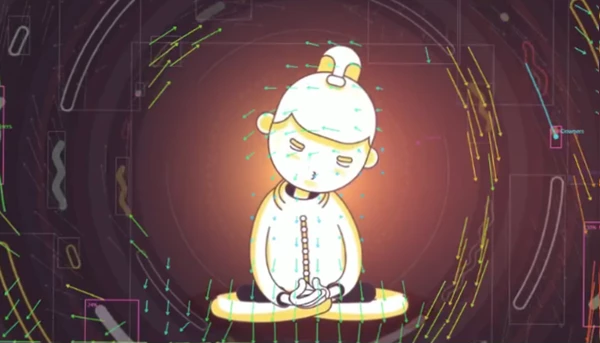
Candysomnia includes an overlay that shows the motion detected during analysis.
Coloured marks and arrows appear in the After Effects viewer, helping you see which movements the plugin follows.
The overlay appears only when the effect is selected and is not included in the final render.
Where Candysomnia Works Best
Candysomnia is designed for animations where visual movement needs matching sound effects.
It can be used for:
UI and product animations: Adding sounds to moving interface elements and product graphics.
Logo animations: Matching short musical sounds and impacts to a logo's movement.
Explainer videos: Adding audio to animated shapes, text, and characters.
Title sequences: Creating musical notes when words appear or move.
Social media edits: Adding sound effects to quick transitions and animated graphics.
The plugin can also handle a full animated scene through a single adjustment layer, including movement from different objects.
Sound Synthesis Without Samples or AI
Candysomnia does not use a built-in sound library or machine learning.
Its motion detection is based on classic optical flow, and the audio is created through synthesis. No sound samples are included with the plugin.
This means the generated sounds are based on the movement detected in your composition rather than manually placed audio clips.
The sound remains part of the After Effects composition, so you can hear it during preview and include it in the final render.

Files Password : gfxplugin.com OR 123456