Downloadable Files
You can download Time Warper for free from the bottom of this page.
Smooth Slow Motion from Regular Footage
Time Warper is an AI slow-motion plugin for After Effects, Premiere Pro, DaVinci Resolve, and Nuke. It creates new frames between the original frames of your video, helping slow-motion footage play smoothly.
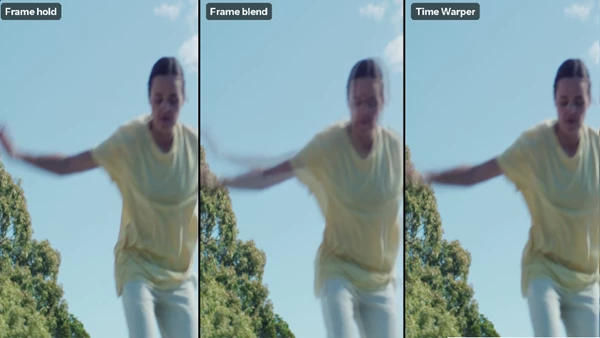
When you slow down a normal video, there may not be enough frames to keep the movement smooth. Your editor may repeat or blend existing frames, which can cause stuttering or ghosting.
Time Warper uses AI to analyze movement between frames and generate the missing images. It can slow footage to 25%, 10%, or even lower speeds without relying only on repeated frames.
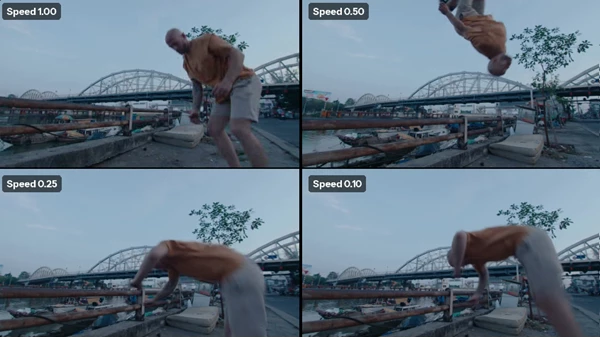
How Time Warper Creates New Frames
Time Warper looks at two frames and analyzes how objects move between them. Its AI model then generates additional frames to fill the gaps.
These new frames help maintain continuous movement when the video plays at a slower speed.
For example, slowing a clip to 25% makes it play four times longer than the original. Time Warper generates intermediate frames to fill the extra time, rather than simply holding each original frame longer.
This approach is useful when you want slow motion from footage that was not originally recorded at a high frame rate.
Speed Control and Key Features
Time Warper keeps its controls simple. The main setting is a single Speed slider, which determines how slowly the footage plays.
Feature | Description |
|---|---|
AI Frame Generation | Creates intermediate frames based on movement in the original footage. |
Speed Control | Adjusts playback speed using one slider. |
Minimum Speed | Supports speeds as low as 1% of the original. |
Frame Rate Handling | Automatically handles mixed frame rates. |
Repeated Frame Handling | Merges repeated frames automatically. |
Bit Depth Support | Maintains precision in 16-bit and 32-bit projects. |
Understanding the Speed Settings
Different speed values produce different levels of slow motion.
50% Speed: The clip plays at half its original speed.
25% Speed: The clip plays four times slower.
10% Speed: The clip plays ten times slower.
1% Speed: The clip plays one hundred times slower.
The Speed slider gives you control over how much the footage slows down. Time Warper generates the additional frames needed for the selected speed.
Where Time Warper Can Be Used
Time Warper is designed for video projects that need smooth slow motion without requiring footage captured specifically for that purpose.
It can be used for:
Action footage: Slowing fast movement to show more detail.
Sports videos: Extending important moments in a movement or action.
Cinematic edits: Creating longer slow-motion shots from existing clips.
Creative video projects: Changing the timing of footage for a specific visual effect.
Its AI frame generation is particularly relevant when normal speed adjustments produce visible stuttering or ghosting.
Supported Editing Software
Time Warper works with four video editing and compositing applications:
Adobe After Effects
Adobe Premiere Pro
DaVinci Resolve
Nuke
The plugin also supports 16-bit and 32-bit projects, preserving their precision during processing.
Time Warper focuses on one task: generating the frames needed for smoother slow motion. With a single Speed control and automatic frame handling, it offers a straightforward way to slow down footage directly inside supported editing and compositing software.

Files Password : gfxplugin.com OR 123456