Downloadable Files
You can download Culprit for free from the bottom of this page.
Find the Layer Behind a Failed Render in After Effects
Culprit is an After Effects tool that helps you find the layer or effect that may be causing a render failure. It focuses on a single frame that fails repeatedly and runs a series of tests to narrow down the possible cause.
When a composition has many layers and effects, finding the source of a render problem can be difficult. Culprit checks different parts of the composition and gives you a likely candidate to inspect.
The tool does not repair the problem automatically. Its job is to help you find where to look.

How Culprit Diagnoses a Failed Frame
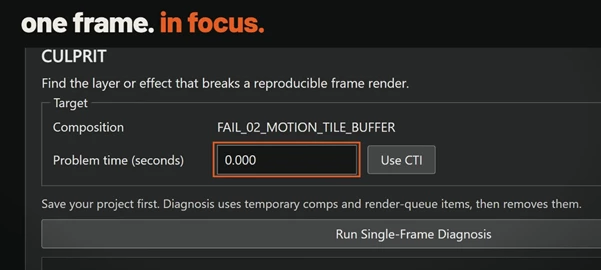
Culprit uses a step-by-step process to check the failed frame. Before starting, save your After Effects project and open the composition that contains the problem.
1. Select the Problem Frame
Choose the exact frame where the render fails. The Use CTI button copies the current-time indicator position into the Problem time field, which uses seconds.
Culprit will focus its tests on this selected frame rather than checking the entire animation.
2. Verify the Render Failure
Before searching for the cause, Culprit renders the selected frame twice.
These two tests check whether the failure happens consistently. If the frame sometimes renders correctly, Culprit can report an intermittent problem instead of treating it as a repeatable failure.
3. Isolate Layers and Effects
After verification, Culprit begins testing the enabled layers in a temporary copy of the composition.
It uses controlled binary tests to narrow down the possible problem. Once a likely layer is found, the tool can continue checking its enabled effects where possible.
This process helps identify a specific area of the composition that needs attention.
4. Review the Diagnosis Result
Culprit does not always return a single layer or effect. The result depends on what happens during testing.
| Diagnosis result | What it means |
|---|---|
| Likely layer or effect | A possible source of the render failure was identified. |
| Not reproduced | The selected failure did not occur during testing. |
| Intermittent | The frame does not fail consistently. |
| Interaction | The problem may involve interactions between elements. |
| Multiple cause | More than one cause may be involved. |
| Composition-level | The failure may be related to the composition rather than one isolated layer. |
These results provide evidence for further investigation. They do not guarantee that the exact root cause has been found.
5. Reveal the Problem Layer
When Culprit identifies a likely layer, the Reveal Culprit command selects that layer in the original composition.
You can then inspect its source or the named effect and decide what needs to be changed.
Temporary Testing and Project Protection
Culprit performs its diagnosis using disposable composition copies, temporary render-queue items, and temporary output files.
Your original composition is kept for inspection rather than being used directly for the isolation tests.
During normal completion or a handled error, Culprit removes its diagnostic items and restores the previous states of existing queued renders.
However, this cleanup process has limits. A hard crash, GPU reset, or forced termination may interrupt it. Saving your project before diagnosis is important.
Important Limitations
Culprit is designed for a specific type of render problem. Understanding its limits can help you decide when to use it.
Single-frame testing: It checks one selected frame, not an entire frame range.
Reproducible failures: It works best when the same frame fails consistently.
Frame-range problems: Errors that only appear while rendering a sequence may not reproduce.
Encoding problems: Failures caused only by final encoding may not appear during diagnosis.
No automatic repair: Culprit identifies possible causes but does not fix them.
No guaranteed root cause: Some failures involve several elements or interactions.
Synchronous rendering: Tests must finish before diagnosis is complete. There is no background, pause, or cancel workflow.
No crash recovery: The tool cannot guarantee cleanup after a hard crash or forced termination.
The time needed for diagnosis depends on the complexity of the project and how long each test render takes.
When Is Culprit Useful?
Culprit is intended for After Effects projects where a particular frame repeatedly fails to render.
It can help when a composition contains many enabled layers or effects and you cannot easily tell which one is responsible.
It is also useful when the problem may involve several elements. Even if Culprit cannot identify a single cause, its diagnostic results can help you understand what kind of failure needs further investigation.
The main purpose is to narrow the search from an entire composition to a more focused problem area, giving you a clearer starting point for fixing the render.

Files Password : gfxplugin.com OR 123456