Downloadable Files
You can download GrainForge for free from the bottom of this page.
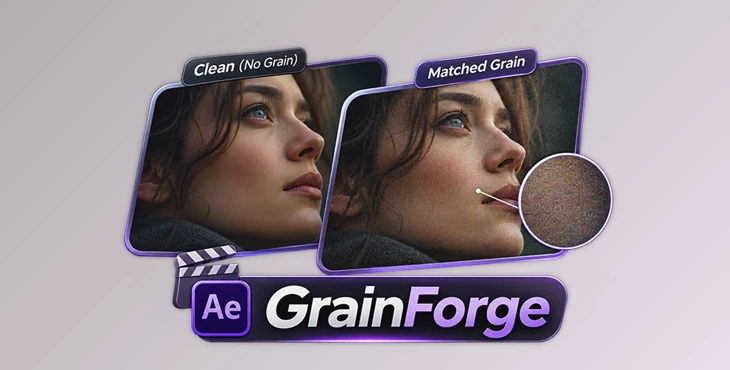
Match Film Grain to Your Original Footage
GrainForge is an After Effects plugin that matches the grain in your original footage and applies it to clean composites, digital matte paintings, and VFX elements. It analyzes the grain in your video and recreates its characteristics, helping new elements blend with the original shot.
Even when the colors and lighting match, different grain patterns can make a composite look unnatural. GrainForge handles this by studying the original footage alongside a matching version with the grain removed.
The plugin works with After Effects 2024 and later on 64-bit Windows systems.
How GrainForge Analyzes Film Grain
GrainForge needs two reference plates to analyze the grain correctly: the original footage and a matching degrained version.
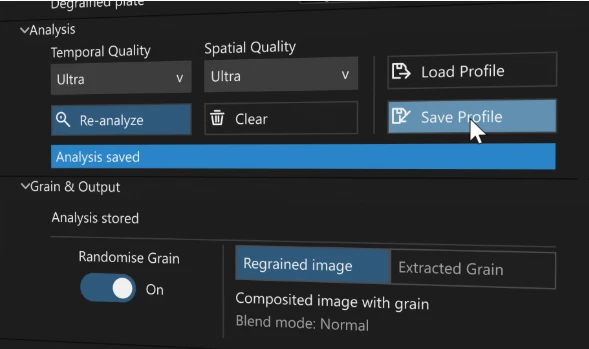
After selecting both plates, you can choose the analysis quality and start the process.
The workflow has three main steps:
Select Reference Plates: Choose your original footage and its matching degrained version.
Set Analysis Quality: Select from four Temporal and Spatial Quality settings.
Click Analyze: GrainForge measures the grain characteristics and prepares them for use in your composite.
This process captures the grain response from your actual footage rather than relying on a general grain effect.
Two Ways to Apply Grain
GrainForge includes two output modes. Each mode gives you a different way to work with the analyzed grain.
Output Mode | Description |
|---|---|
Regrained Image | Applies the matched grain directly to your image. |
Extracted Grain | Outputs the grain separately, giving you more control during compositing. |
Regrained Image is suitable when you want the grain applied directly to your composite.
Extracted Grain is designed for projects where the grain needs to remain separate from the image.
Grain Randomization and Reusable Profiles
GrainForge includes additional controls for working with analyzed grain.
Randomize the Grain Pattern
The Randomise Grain feature rearranges the grain pattern taken from your original footage.
It creates different grain variations while using the grain information extracted during analysis.
Save and Load Grain Profiles
GrainForge supports reusable grain profiles in the .gfp format.
After analyzing a shot, you can save its grain response as a profile. The saved profile can be loaded later without repeating the analysis.
This is helpful when several VFX elements need to match the grain characteristics of the same footage.
GPU Processing and Project Support
GrainForge uses GPU-first processing and includes CPU fallback support.
It works with the following project bit depths:
8-bit
16-bit
32-bit float
Where GrainForge Works Best
GrainForge is designed for compositing work where new elements must have the same grain characteristics as the original footage.
Its main uses include:
VFX Compositing: Match the grain of added visual effects to the original shot.
Digital Matte Paintings: Apply the footage's grain to painted backgrounds and environments.
Clean Composites: Restore matching grain to processed or grain-free elements.
Multi-Element Composites: Use saved grain profiles to maintain consistent grain across different elements.
The main advantage of GrainForge is its reference-based grain analysis. It measures the grain from the footage itself, then gives you options to apply, separate, randomize, and reuse that grain during compositing.

Files Password : gfxplugin.com OR 123456