Downloadable Files
You can download Variation Storm for free at the bottom of this page.
Creating Multiple After Effects Versions (Without Rebuilding Every Composition)
Many times, when creating creatively, you may want to have multiple versions of the same video with different text, image, or video content. You may want to have four different videos with five different headlines for a marketing campaign, resulting in 20 different videos that would individually need to be copied, text updated, media relinked, and ensured that the original composition still functions properly.
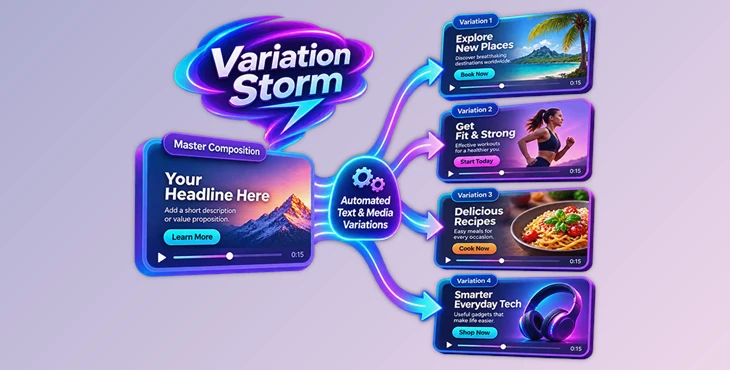
Using Variation Storm, you can copy one composition, update specific text and media items, and automatically create every possible combination with one click. This way, you can have multiple compositions without having to individually rebuild the content for every variation.
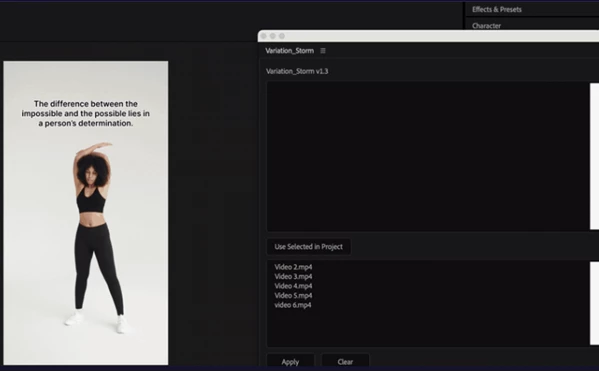
Creating Every Possible Combination of Text and Media
Variation Storm can also automatically create every possible combination of multiple pieces of text and media.
By inputting multiple headlines, choosing videos, and using Variation Storm, you can automatically create every combination like:
5 headlines × 4 videos = 20 compositions
Only text: Create a composition for every different piece of text.
Only media: Create a composition using every possible image, video, or precomp.
Both: Create both variations in one step.
This is great for individuals looking to create multiple creatively different ads and not having to manually build every combination, as Variation Storm can automatically copy and update the content as needed.
Replace Multiple Text Layers at Once
Variation Storm also supports replacing two text layers simultaneously. This is useful when your composition contains a headline and a subheadline that need to change together.
To use this feature, place a single + between two text lines. Each generated composition will receive its own pair of text variations.
For example, you can prepare different headline and subheadline combinations and let the tool apply them to the duplicated compositions. This keeps related text elements together and avoids having to update each layer separately.
Swap Media Without Changing the Animation
Replacing footage in an animated composition can be time-consuming, especially when the original layers already contain carefully arranged keyframes and effects.
Variation Storm can replace videos, images, and precompositions while preserving the existing animation. The keyframes, effects, and timing remain untouched, so you don't have to recreate the animation after changing the source media.
This is useful when you're working with an After Effects template and need to produce multiple versions using different footage while keeping the same visual structure.
A Simple Workflow Inside After Effects
Variation Storm keeps the variation process straightforward. Once your master composition is ready, you can generate the required versions through five steps:
Select the layers: Choose the text layers, media layers, or both that you want to replace.
Enter text variations: Add the different text versions you want to use.
Choose media files: Select your images, videos, or precompositions, or provide a list of media files.
Click Apply: Start the automatic variation process.
Get your compositions: The tool creates the required compositions based on your selected text and media.
Another useful detail is its Undo support. One Undo action reverts the entire operation, making it easier to return to the previous project state if you need to change your selections.
Where Variation Storm Fits into Your Workflow
If you need to create multiple creative versions of the same piece, you should use Variation Storm. Some primary purposes for using this tool are:
Creative Testing - To create multiple advertising creatives by combining various headlines and videos
Meta and TikTok Ads - To create multiple video ads with the same animation but different content and videos
A/B Testing - To create various videos to test different creativities
Localization - To create variations of a creative by changing the text to suit different languages or markets
Marketing Campaigns - To create multiple campaign variations without manually creating each one
Template Production - To convert one creative into multiple personalized versions

Files Password : gfxplugin.com OR 123456