Downloadable Files
You can download Cosmic for free at the bottom of this page.
🎨 Cinematic Animated Gradients for Text and Shapes
Using Cosmic you can apply cinematic animated gradients to both text and shape layers in After Effects and Premiere Pro. By using a carefully chosen set of color palettes combined with film grain, optical diffusion, and a glow Cosmic applies all in one effect.
Rather than working with separate effects to build a gradient-based look, you can control these visual elements through Cosmic and adjust the colors to match your project. It works on any text or shape layer, making it suitable for animated titles, graphic elements, motion design and colorful backgrounds.
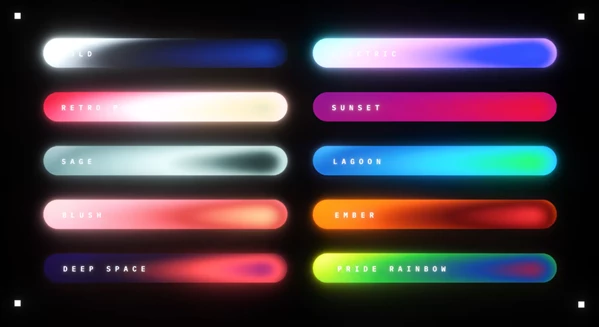
🌈 Customizable Color Palettes and Gradient Animation
Cosmic features a variety of carefully chosen color palettes - from Sunset to Deep Space - allowing you to either choose one for use or adjust each color to better match your project.
Beyond just using a static color palette as a gradient, Cosmic also allows you to fine tune and animate gradients using multiple options:
Gradient Angle - control how the gradient is angled
Gradient Cycles - control how many cycles the gradient goes through
Gradient Phase - control the phase of the gradient angle animation
Offset Animation - control how the gradient moves to add motion
Being able to keyframe just one option to create a continuous loop is one of the most helpful tools as it allows you to create an animated gradient with minimal keyframes rather than having to create a more complex series.
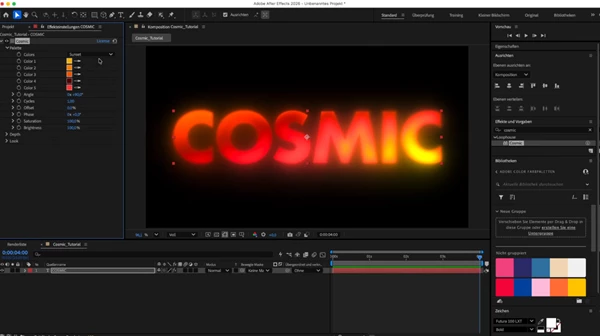
🔵 Depth, Bulge and Turbulence Controls
Cosmic can add a sense of volume to otherwise flat text and shapes through its Depth and Bulge controls.
The Depth Field bends gradient bands into domes and curved surfaces, giving the colors a more dimensional appearance. The Bulge control adds further shaping to this effect, while Rounding helps adjust the resulting forms.
You can also use Turbulence to introduce organic movement into the gradients. Combined with the angle animation, these controls make it possible to create flowing, shifting color patterns rather than keeping the gradient completely flat.
✨ Glow Engine and Film Grain
Cosmic includes a glow engine designed specifically for gradient-based visuals. It provides three main controls:
Radius: Adjust the spread of the glow.
Exposure: Control the glow's intensity.
Threshold: Determine which highlights contribute to the glow.
The glow is calculated in linear light, with highlight protection to prevent bright colors from becoming overly intense or losing their definition.
🎨 Animated Gradients for Shapes and Text
Using Cosmic you can apply cinematic animated gradients to both text and shape layers in After Effects and Premiere Pro. By using a carefully chosen set of color palettes combined with film grain, optical diffusion, and a glow Cosmic applies all in one effect.
🌈 Choose Your Color Palette and Animate Gradients
Cosmic features a variety of carefully chosen color palettes - from Sunset to Deep Space - allowing you to either choose one for use or adjust each color to better match your project.
Beyond just using a static color palette as a gradient, Cosmic also allows you to fine tune and animate gradients using multiple options:
Gradient Angle - control how the gradient is angled
Gradient Cycles - control how many cycles the gradient goes through
Gradient Phase - control the phase of the gradient angle animation
Offset Animation - control how the gradient moves to add motion
Being able to keyframe just one option to create a continuous loop is one of the most helpful tools as it allows you to create an animated gradient with minimal keyframes rather than having to create a more complex series.

Files Password : gfxplugin.com OR 123456