Downloadable Files
You can download AiBow Manga Toner for free from the bottom of this page.
Add Manga-Style Lines and Effects to Your Videos
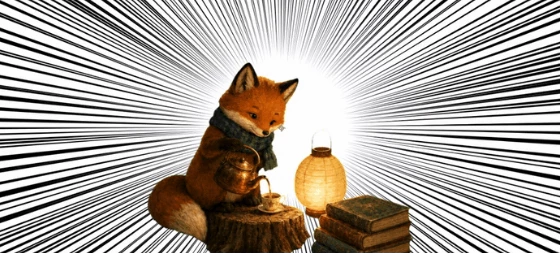
This After Effects plugin adds manga-style effects to videos and animations, including focus lines, speed lines, hatching, screentones, and sparkles.
AiBow Manga Toner can add a hand-drawn manga effect to your animations, add patterns to a background, or create dramatic action effects. It features 89 presets and 27 types of drawing.
Because it uses vector shapes to draw all dots and lines, the effect remains crisp at any resolution. Additionally, you can control the output using animated jitter, coloring, and layering.
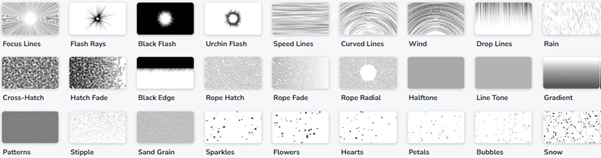
Explore 27 Manga Drawing Types
AiBow Manga Toner brings several manga drawing styles into one effect. Each type has its own settings, and the panel only shows the controls needed for the selected type.
The available drawing types include:
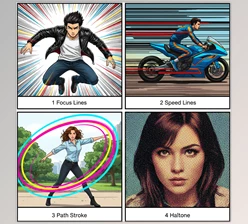
Focus Lines: Draw lines toward a central point to bring attention to a subject.
Flash Rays, Black Flash, and Urchin Flash: Create different styles of manga flash effects.
Speed Lines and Curved Lines: Add a sense of movement to action scenes.
Wind, Drop Lines, and Rain: Create directional lines and weather effects.
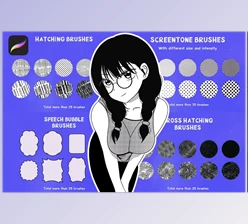
Cross-Hatch, Hatch Fade, and Black Edge: Add shading and textured edges.
Rope Hatch, Rope Fade, and Rope Radial: Produce different rope-style hatching patterns.
Halftone, Line Tone, and Gradient: Add manga-style shading and tonal effects.
Patterns, Stipple, and Sand Grain: Create patterned surfaces and dotted textures.
Sparkles, Flowers, Hearts, Petals, Bubbles, and Snow: Add decorative elements to a scene.
These drawing types cover both action effects and background details. You can use focus lines for dramatic moments, hatching for shading, or decorative shapes for softer scenes.
Choose from 89 Presets
The plugin includes 89 presets for creating different manga looks.
Selecting a preset changes the drawing type, settings, color, and background together. You don't need to set each option separately.
One useful feature is that the center position stays in place when you switch presets. After choosing your subject with the Center control, you can test different styles without selecting the same point again.
There are also three controls for exploring different results:
Gacha: Generates a new look.
Mutate: Creates variations of the current look.
New Shape: Generates a different shape.
These options help you explore different designs before choosing one for your animation.
Create Backgrounds with 19 Screentone Patterns
AiBow Manga Toner includes 19 traditional and graphic patterns for manga-style backgrounds.
Some of the available designs are Seigaiha, hemp leaf, kagome, shippo, meander, bricks, and stars.
The patterns support three main adjustments:
Control | What it does |
|---|---|
Tiling | Repeats the pattern across an area |
Scale | Changes the size of the pattern |
Rotation | Changes the pattern's angle |
These controls let you change the appearance of a pattern without choosing a different design.
Combine Multiple Effects on One Layer
You can apply several instances of AiBow Manga Toner to the same layer.
For example, you can create focus lines with one instance, add sparkles with another, and place a screentone pattern behind them.
Each instance has independent controls for color, opacity, background, and composite mode.
There are also options for handling white areas, including cutting them out or filling them with white.
This means different drawing styles can be combined while keeping their settings separate.
Animate Manga Effects with Boil
The Boil effect applies a hand-drawn jitter to the shapes created
Rather than leaving each shape perfectly in place, Boil redraws each shape every N frames to create the slight movement between shapes typical of hand-drawn animation
Using a redraw interval allows you to adjust how frequently the shapes will appear to move. Every two frames will give you an animated-on-twos effect
Additionally, Boil also features deterministic seeds which ensure that repeating the render or scrubbing across the timeline will yield the same frames
How to Use AiBow Manga Toner in After Effects
To use this effect, follow these steps:
Create a solid: In your After Effects composition, create a new solid.
Apply the effect: Select Effect > AiBow Tools > Manga Toner.
Set the center: Click the crosshair beside Center and click where you want to draw your subject on the composition.
Pick a drawing type or preset: Choose from various presets or drawing types or click Gacha to create your desired look.
Layer additional effects (optional): To add sparkles, hatching, screentones, and more, simply add additional Manga Toner effects.
Once you’ve applied the effect, you can adjust the settings and color of the effect or turn on Boil to add hand-drawn animation.

Files Password : gfxplugin.com OR 123456