Downloadable Files
You can download Skin Details Kit for free from the bottom of this page.
Create Realistic Skin Details for 3D Characters
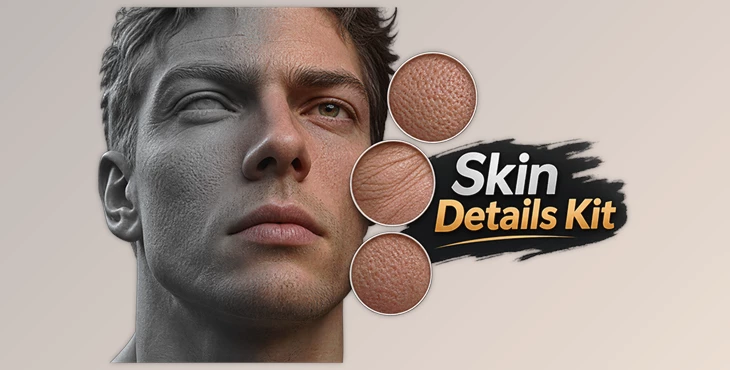
Creating realistic skin for digital characters takes more than adding a few basic textures. Small pores, fine wrinkles, and surface bumps all help give skin a more natural appearance. Skin Details Kit provides a collection of brushes and textures made for adding these details to 3D characters.
The kit was created by a digital artist who developed these assets by hand while working on different character projects.
Add Realistic Skin Details to 3D Characters
Skin Details Kit focuses on the final detailing stage of character creation. It includes tools for working on skin pores, wrinkles, fine lines, and small surface details.
The kit combines ZBrush brushes with tiling textures. The brushes are designed for sculpting skin details, while the textures provide displacement and normal maps for adding surface information.
These assets can be used together or separately, depending on the software and the character project.
What's Included in Skin Details Kit?
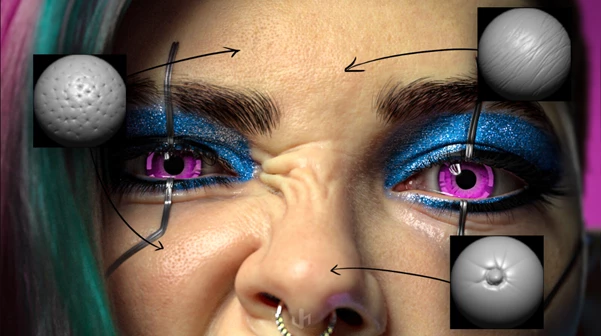
The package contains 10 ZBrush brushes, 7 tiling textures, and 3 video demonstrations. The brush alphas are also available as separate textures for use in other software, as references, or as a starting point for creating original brushes.
10 ZBrush Brushes
The brushes cover several types of skin surface details.
| Brush | Detail |
|---|---|
| Pore A | Skin pore details |
| Pore B | Skin pore details |
| Pore C | Skin pore details |
| Pore D | Skin pore details |
| Pore E | Skin pore details |
| Pore F | Skin pore details |
| Pore Group | Groups of skin pores |
| Skin Surface | General skin surface details |
| Fine Wrinkles | Small skin wrinkles |
| Fine Line | Fine lines on the skin |
The six Pore brushes provide different options for creating pore details. The other brushes focus on groups of pores, surface texture, wrinkles, and lines.
7 High-Quality Tiling Textures
The kit also includes seven 2048 × 2048, 16-bit tiling textures.
These textures are divided into displacement and normal maps.
Displacement textures:
Pores Large Displacement
Pores Medium Displacement
Micro Wrinkle Displacement
Skin Bumps Displacement
Normal maps:
Pores Medium Normal
Micro Wrinkle Normal Map
Skin Bumps Normal
The displacement textures provide information for skin surface depth, while the normal maps describe smaller surface details.
The collection includes different types of pores, micro wrinkles, and bumps, giving artists several options for building skin surfaces.
Video Demonstrations and Workflow
Skin Details Kit includes three videos showing how the creator uses the assets in different software.
ZBrush Workflow Demo: Demonstrates the creator's workflow in ZBrush.
Arnold Workflow Demo: Shows how the assets are used with Arnold.
Marmoset Toolbag Workflow Demo: Demonstrates their use in Marmoset Toolbag.
These videos provide examples of the creator's own process and help users understand how the included assets fit into character detailing.
Software Compatibility
Skin Details Kit is designed for use with several 3D sculpting, texturing, and rendering tools.
The supported software includes:
ZBrush
Arnold
Marmoset Toolbag
Blender
Substance Painter
Mudbox
The included sculpting brushes are ZBrush brushes. However, the separate brush alpha textures provide another way to work with the skin details outside ZBrush.
This is an important part of the package for artists who use different programs during character creation.
Using the Kit for Character Skin
The main purpose of Skin Details Kit is to help artists add the smaller details that make digital character skin look more natural.
The ZBrush brushes help you add skin pores, small wrinkles, and other details to your 3D models. You can also use the displacement and normal maps to add more skin details when working with textures.
The kit is particularly relevant to artists working on detailed 3D characters who want to use a collection of handmade skin assets rather than create every pore and wrinkle texture from the beginning.
Because the package includes both brushes and textures, artists can choose the assets that fit their preferred software and workflow.

Files Password : gfxplugin.com OR 123456