Downloadable Files
You can download proRadiance for free from the bottom of this page.
Bring Natural 2D Global Illumination to After Effects
This After Effects plugin brings 2D global illumination into your compositions using Radiance Cascades technology. It creates indirect lighting, soft shadows, and natural color interactions without the noise and flicker often found in traditional lighting methods.
Create Natural Lighting with Radiance Cascades
proRadiance uses Radiance Cascades to calculate how light moves through a 2D scene. Light can spread across objects, affect nearby colors, and create soft shadows based on the position of different elements.
The technology uses a hierarchical probe system to capture indirect lighting. Unlike traditional ray tracing or path tracing, it does not depend on random sampling or heavy denoising to produce clean results.
This gives you stable lighting across animation frames, even when objects and light sources are moving.
Radiance Cascades was developed by Alexander Sannikov from Grinding Gear Games.
Lighting Controls in After Effects
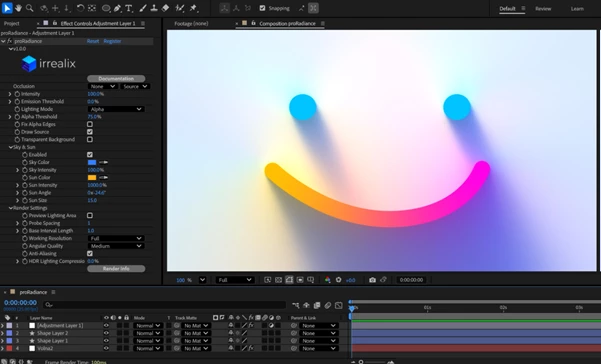
You can apply proRadiance directly to an Adjustment Layer in After Effects. The plugin provides several controls for changing the lighting and adjusting the render quality.
Main Lighting Settings
Intensity: Change the overall strength of the lighting effect.
Emission Threshold: Decide which pixels produce light and which pixels only create shadows.
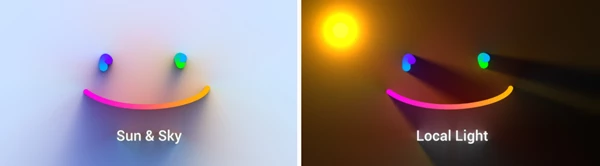
Sky & Sun: Adjust the color, intensity, angle, and size of the sky and sun lighting.
Render Settings: Control the working resolution, angular quality, and anti-aliasing.
These settings help you create different lighting conditions within the same composition. You can change the atmosphere of a scene by adjusting the light colors, direction, and intensity.
Key Features of proRadiance
Multiple Lights Without Increasing Render Time Significantly
proRadiance is designed to handle many light sources without a large increase in rendering time.
Its Radiance Cascades system does not use the number of rays as the main factor affecting performance. Because of this, the cost of calculating global illumination stays largely consistent as more lights are added or the scene becomes more complex.
Clean Lighting Without Denoising
Traditional path-tracing methods can produce grainy results that need additional denoising.
proRadiance captures radiance intervals directly, producing clean lighting without a separate denoising process.
The results are also stable between frames, which helps prevent visible flickering in animated compositions.
Dynamic Lighting for Animated Scenes
proRadiance recalculates global illumination for every frame.
When an object moves or a light source changes position, the lighting updates to match the new scene.
There is no need to bake lighting or calculate it before the animation. This makes the plugin suitable for compositions with moving objects, changing lights, and animated shadows.
Realistic Soft Shadows
The plugin creates soft shadows with natural transitions between bright and dark areas.
Shadow softness changes based on the distance between objects. This helps create a stronger sense of depth in 2D compositions.
Unlike basic screen-space ambient occlusion, proRadiance calculates indirect lighting to produce more natural shadow gradients.
Adjusting Performance and Render Quality
proRadiance includes quality controls that let you choose between faster previews and higher-quality final renders.
Two important options are:
Cascade Levels: Adjust the Radiance Cascades calculation settings.
Probe Scaling: Change the probe settings to balance performance and visual quality.
You can also use the working resolution, angular quality, and anti-aliasing settings to control the final appearance.
For example, you can use lower-quality settings while working on an animation and increase the quality when preparing the final render.

Files Password : gfxplugin.com OR 123456