Downloadable Files
You can download Crucible for free from the bottom of this page.
Create Realistic 3D Smoke and Fire Directly in After Effects
This After Effects plugin lets you create realistic 3D smoke and fire using GPU acceleration. You can simulate, light, and render these effects directly inside After Effects without moving your project to another 3D application.
Crucible works with volumetric smoke and fire, so the effects have real depth and react to light. It also supports moving emitters, particle-driven explosions, wind, and obstacles. You can use it for burning text, smoke trails, fire effects, and explosions.
Create 3D Smoke and Fire Inside After Effects
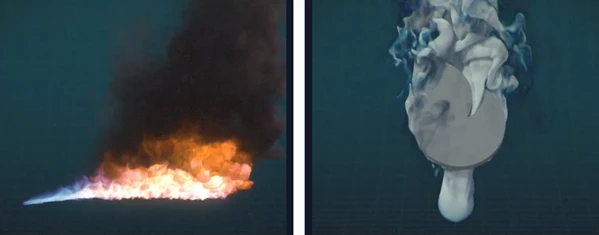
Crucible simulates smoke and fire as 3D volumes rather than flat 2D effects. The smoke can move naturally through a scene, while flames react to combustion settings and leave soot behind.
One important feature is its simulation system. Crucible only uses GPU memory in areas where smoke exists. It also has no fixed simulation boundaries, so smoke can continue spreading without hitting the walls of a simulation box.
You can create different effects by controlling three main properties:
Density: Controls the amount of smoke.
Temperature: Controls the heat added to the simulation.
Flame: Controls the fire. Setting Flame to zero creates smoke without flames.
The plugin also includes five example shots: Smoke Plume, Candle, Log Fire, Incense, and Explosion.
Emit Smoke and Fire From Layers
Crucible can use footage or precompositions as smoke and fire sources. This means you can create effects directly from elements already in your After Effects project.
When you move, rotate, or scale the source layer, the smoke emitter follows its transformation.
Two settings give you more control over the result:
Color From Layer: Transfers the colors of the source layer into the smoke.
Inherit Motion: Passes the movement of the source layer into the simulation.
For instance, you can use a text precomposition as an emitter to create burning letters or a title that disappears into smoke.
You can also use several emitters in one simulation, making it possible to create multiple torches, vents, or smoke trails in the same shot.
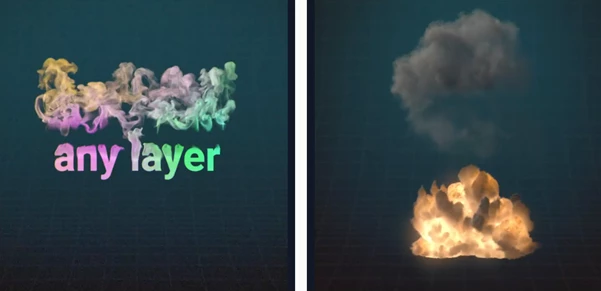
Particle-Driven Explosions and Fire Effects
Crucible uses particles to control how smoke, heat, and flames enter the simulation. These particles travel along paths, release gas, and push the surrounding smoke as they move.
The plugin provides several particle burst types:
Burst type | Effect |
|---|---|
Stream | Continuous particle emission |
Explosion | Explosive particle burst |
Blast | Strong burst of particles |
Shockwave | Outward-moving burst |
You can control smoke, heat, flame, and particle size with over-life curves.
Particles can also bounce, stick to surfaces, or continue burning after landing.
Control Flame Movement
Crucible includes several settings for shaping fire.
Flame Lifespan controls how long flames remain active and affects their height. Soot Release controls how much smoke the burning material produces.
You can also use turbulence, shredding, and disturbance to create more detailed flame movement.
Wind supports world-space turbulence, allowing smoke and flames to react to changing gusts.
Make Smoke Interact With Objects
Smoke does not always move freely through a scene. Sometimes it needs to hit a surface, collect near the ground, or flow around an obstacle.
Crucible supports a floor and up to three colliders in its simulation. These objects affect how the smoke moves.
In After Effects 2026 and later, you can also use extruded shapes and meshes as collision objects.
This is helpful for effects where smoke needs to move around 3D objects rather than simply pass through them.
Lighting and Rendering Controls
Crucible includes physically grounded volumetric lighting. Smoke can scatter light, create self-shadows, and receive illumination from lights in your After Effects composition.
Fire also produces a glow that passes through the surrounding soot.
For compositing, the plugin supports:
Straight alpha output
Holdouts behind up to four layers
Shadows cast onto other layers
Ambient occlusion (AO)
Separate smoke, fire, scatter, depth, and normals passes
These options help you combine simulated effects with existing footage. Separate render passes also give you more control when adjusting the final image.
Simulation Detail and VDB Support
Crucible includes a Voxel Scale setting that controls simulation detail. You can work at lower detail while developing an effect and increase it for the final render.
The available detail range goes from 256³ to 1024³. Changing Voxel Scale adjusts the resolution without changing the intended simulation behavior.
Bake and Re-Light Simulations
Crucible supports baking simulations to .vdb and .nvdb files.
It also includes Crucible Render, which can load VDB simulations created in Crucible or other digital content creation (DCC) applications.
With Crucible Render, you can change the lighting and appearance of an existing simulation without running the simulation again.
This is useful when the smoke movement is already correct but you still need to adjust its final look.

Files Password : gfxplugin.com OR 123456