Downloadable Files
You can download Inkguard Prepress Studio for free from the bottom of this page.
Prepare Print-Ready CMYK Files with Ease
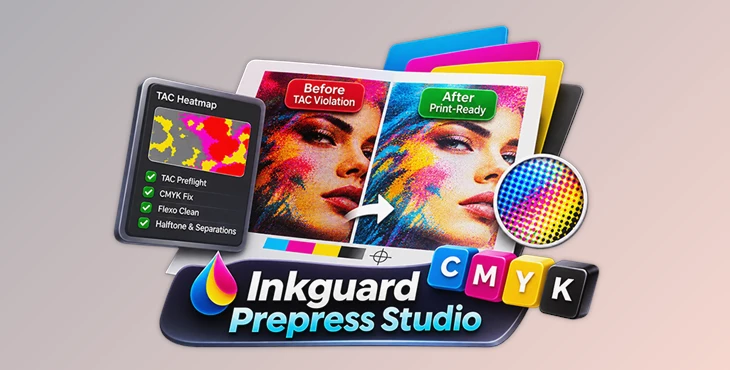
This Photoshop plugin helps you check and fix CMYK files before printing. It finds areas with too much ink, corrects color problems, cleans flexographic printing plates, and creates halftone separations for screen printing.
Preparing files for printing can be difficult when ink levels are too high or small unwanted dots appear in the design. Inkguard Prepress Studio brings these checks and corrections into one panel, so you can prepare your files without using several separate Photoshop tools.
Check Ink Coverage Before Printing
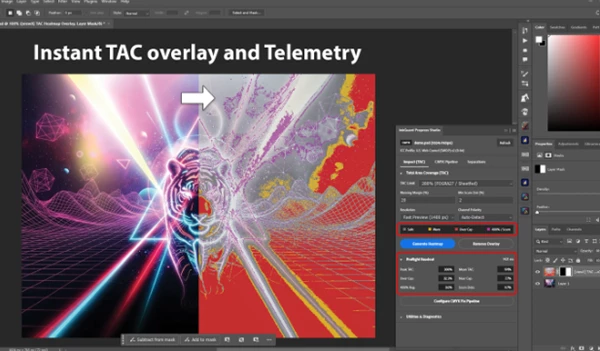
One of the main features of Inkguard Prepress Studio is its ViewX Total Ink (TAC) Heatmap. It scans your CMYK image and shows where the total ink coverage may cause printing problems.
The heatmap uses four colors to explain the results:
Red: Pixels that exceed the selected ink coverage limit.
Yellow: Areas approaching the warning threshold.
Magenta: 400% registration blacks or small unwanted flexo dots.
Gray: Areas with safe ink coverage.
The plugin also displays detailed information about your file, including:
Max TAC %: The highest total ink coverage in the image.
Mean TAC %: The average ink coverage.
Over-Cap %: The percentage of pixels above the selected limit.
400% Reg Black %: The percentage of pixels using full coverage in all four CMYK channels.
Scum Dot %: The percentage of unwanted small dots detected in the file.
You can choose from several built-in printing presets instead of entering every ink limit manually.
| Printing preset | TAC limit |
|---|---|
| Newsprint | 240% |
| Uncoated Offset | 260% |
| FOGRA27 | 280% |
| SWOP/FOGRA39 Coated | 300% |
| High-Gloss | 320% |
These settings help you check your design against the ink coverage limit required for different printing conditions.
Fix CMYK Problems in One Pass
Inkguard Prepress Studio includes a Single-Pass CMYK Correction Engine. You can select the corrections you need and run them together in one operation.
The plugin applies the changes to a new CMYK layer instead of changing the original layer. It also keeps the embedded ICC color profile and image resolution (PPI) unchanged.
The correction system includes four main tools.
Rich Black Standardizer
Some CMYK designs contain areas where Cyan, Magenta, Yellow, and Black are all set to 100%. This creates 400% registration black, which may exceed the ink limits of the printing press.
The Rich Black Standardizer detects these areas and over-inked shadows. It then changes them to a selected black formula.
Available options include:
Neutral Black (60/40/40/100)
Conservative Black (40/40/40/100)
Cool Blue-Black
Warm Packaging Black
Pure 100K
FlexoFix
FlexoFix is designed for flexographic printing. It removes unwanted third-channel ink from colors that should use only two CMYK channels.
It also adjusts midtones to compensate for dot gain, which happens when printed dots become larger during printing.
Hard GCR TAC Ceiling Clamp
This tool reduces excessive ink coverage in dark areas by replacing some Cyan, Magenta, and Yellow ink with Black.
It follows the TAC limit you select, helping keep the total ink amount within your printer's requirements.
FlexoClean Plate Sanitizer
FlexoClean handles small dot problems in flexographic plates.
It can remove or adjust tiny 1%–3% highlight dots that may create dirty edges during printing. It also fills shadow pinholes at 97% coverage or higher to create solid 100% areas.
This correction runs last in the pipeline, after the other selected adjustments.
Screen Printing Separations and Halftone Dots
Inkguard Prepress Studio also includes tools for preparing artwork for screen printing.
Its simulated-process separation feature generates five full-resolution film-positive plates for T-shirt printing:
Underbase White with adjustable Choke
Ruby Red
Lemon Yellow
Royal Blue
Shadow Black
The plugin also has a Binary Halftone Generator that converts a layer into sharp black-and-white halftone dots for film output.
You can control the halftone pattern using these settings:
| Setting | Available options |
|---|---|
| Frequency | 35–65 LPI |
| Screen angles | 22.5°, 45°, 15°, 75° |
| Dot shapes | Elliptical, Round, Diamond, Linear |
The different screen angles help reduce moiré patterns, while the dot shapes give you control over how the halftone pattern looks.
Test Your Printing Settings with a Calibration Chart
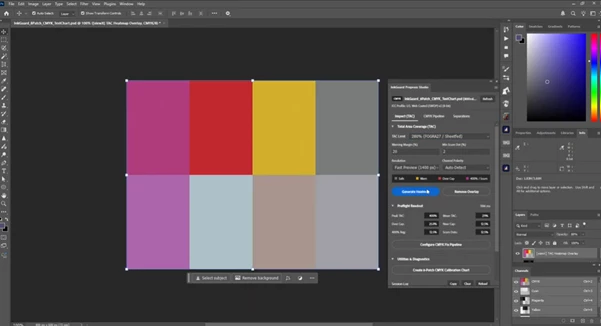
The plugin includes a built-in 8-Patch CMYK Calibration Chart.
You can generate this chart with one click and use it to test three important printing settings:
Total ink coverage limits
Rich black formulas
Minimum dot cutoffs
The chart gives you a practical way to check your selected settings before using them in a printing job.
Where Inkguard Prepress Studio Fits into Your Workflow
Inkguard Prepress Studio is designed for several types of print preparation.
For offset printing, you can scan CMYK artwork, find areas with excessive ink coverage, and correct rich black values.
For flexographic packaging and labels, FlexoFix and FlexoClean help prepare colors, highlights, and shadows for printing plates.
For screen printing, the separation and halftone tools help prepare film-positive artwork for T-shirt production.
All these tools work directly inside Adobe Photoshop, bringing CMYK inspection, ink correction, plate cleaning, and halftone preparation into one workspace.

Files Password : gfxplugin.com OR 123456