Downloadable Files
You can download Mini Bread for free from the bottom of this page.
Export Multiple Formats with Less Effort
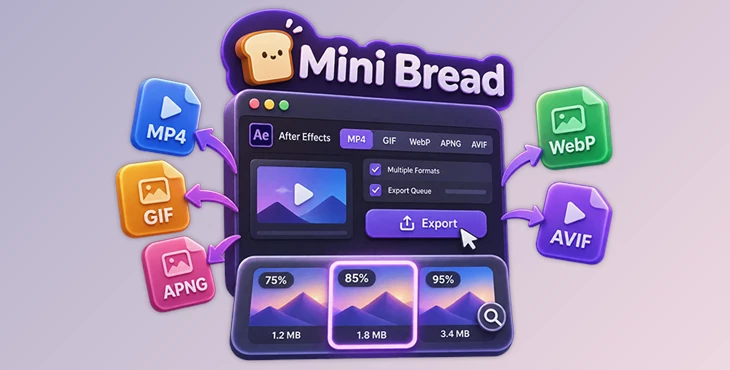
Mini Bread is an export panel for Adobe After Effects that helps you render compositions in different formats from one place. You can export MP4, WebP, GIF, APNG, and AVIF files, compare output quality, and manage several compositions in a queue.
It also lets you check file sizes before choosing your final output. This is helpful when you need a smaller file but still want to keep good image quality.
Export Multiple Formats from One Panel
Some projects need more than one output format. You might need an MP4 for video review, a WebP for a website, and a GIF to share online.
Mini Bread lets you select several formats and export them together. You can drag across the format tabs or use Shift-click to select the formats you want.
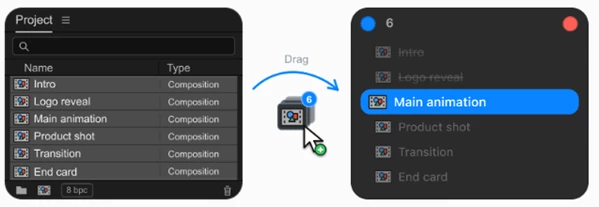
You can also drag compositions directly from the After Effects Project panel into Mini Bread. After choosing the output formats, start the export and the queue will process each composition one by one.
This keeps your export tasks together and reduces the need to repeat the same steps for every composition.
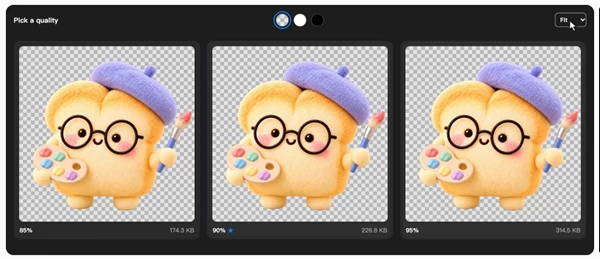
Compare Export Quality Before Choosing
Choosing the right quality setting is not always easy. A file exported at 85% quality may look almost the same as one at 95%, but the file sizes can be different.
Mini Bread includes a comparison mode that shows three real exported results side by side. Each preview also displays its actual file size.
You can:
Compare three different quality settings.
Zoom and pan all previews together.
Check the actual size of each output.
Choose the result that looks best for your needs.
After you confirm your choice, the selected file is already ready to use. You do not need to encode it again.
Important: Quality comparison works with a single composition in WebP, GIF, APNG, MP4, or AVIF format. It is not available during batch or multi-format exports.
Control File Size with Target Size
Mini Bread also has a target-size option for projects with file-size limits.
Rather than changing quality settings several times, you can enter the file size you want. In comparison mode, the tool creates different candidates based on that target.
You can then compare the results and choose the one with the best balance between quality and file size.
The final size is not always exact. It depends on the selected format, the content of your composition, and the export settings.
Native MOV Export for Master Files
For professional MOV exports, Mini Bread uses After Effects' native output modules.
This keeps the export process inside After Effects' own rendering system rather than using a third-party encoder.
It is designed to preserve the expected codec, color, and alpha channel behavior when creating master files.
Choose Your Panel Layout and Shortcuts
Mini Bread offers two interface modes:
| Mode | Description |
|---|---|
| Standard | Keeps the main export controls visible in one panel. |
| Minimal | Uses a smaller, gesture-driven button to take up less workspace. |
You can also customize the panel to match your workflow.
The available options include:
Show the export formats you use most often and hide the others.
Add your frequently used shortcuts.
Remove shortcuts you do not need.
Change the panel colors.
Set quality adjustments to move in 5% steps.
Choose whether inputs are confirmed when the pointer leaves them.
These settings help you keep the controls you need close without filling your After Effects workspace with extra buttons.
Where Mini Bread Fits into Your Workflow
Mini Bread is designed for After Effects users who need to deliver compositions in several formats or check output quality before sharing files.
For a project with several compositions, you can add them to the export queue and let the panel process them in order.
For a single animation that needs a smaller file size, you can use comparison mode to examine different outputs before making a final choice.
And when you need a master MOV file, you can use the native After Effects output modules through the same panel.
The main advantage of Mini Bread is having format selection, export queues, quality comparison, and file-size controls in one workspace.

Files Password : gfxplugin.com OR 123456