Downloadable Files
You can download ConnectO for C4D for free from the bottom of this page.
Build Dynamic 3D Networks with ConnectO
ConnectO is a procedural tool for Cinema 4D that creates connections between points, objects, and MoGraph clones. It can turn a simple group of points into a 3D plexus, neural network, circuit board pattern, or metro-style diagram.
The tool also creates moving pulses along connections and animated nodes that react when signals pass through them. Everything works procedurally, so you can change the network and its animation without using keyframes or baking a cache.
Create Procedural 3D Networks with ConnectO
ConnectO works with several types of sources, including Matrix objects, Cloners, polygon points, spline points, and regular Cinema 4D objects.
You can connect points within the same group, between different groups, or in a specific order. The tool provides separate distance and connection limits for links inside and between groups.
ConnectO has three main modules:
ConnectO Lines: Creates and controls the connections between points.
ConnectO Pulses: Sends animated signals along the connections or other splines.
ConnectO Nodes: Places objects at network points and animates their reactions to signals.
These modules can work together to create networks where connections, moving signals, and node reactions are controlled procedurally.
Four Connection Styles
ConnectO includes four connection types that change the appearance of the network without changing its source points.
| Connection Type | Appearance |
|---|---|
| Linear | Straight connections for classic plexus effects |
| Node (S-curve) | Smooth curved links similar to node-editor wires |
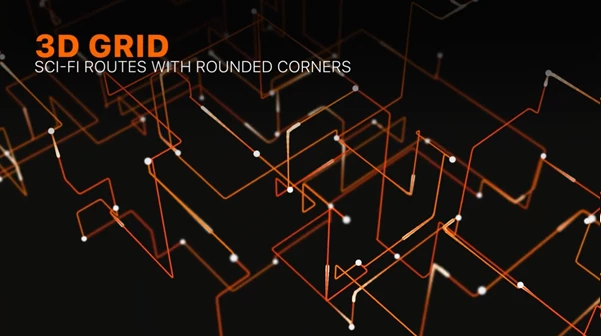
| Orthogonal (Sci-Fi) | Stepped, axis-aligned paths resembling circuit traces |
| Diagonal (Metro) | Straight paths with diagonal sections, similar to transit maps |
Additional controls include Corner Offset, Offset Variation, Corner Radius, Diagonal Angle, and Angle Variation.
For rendering, ConnectO can output real splines compatible with Sweep, Hair materials, deformers, and other spline tools. It also offers a Spline + Mesh option with built-in Round, Square, and Flat Ribbon profiles, along with thickness controls.
Control Network Randomness and Connections
A network made from identical grids can look very regular. ConnectO includes several controls for creating more varied structures.
Random Pick changes how points select their connections, moving from nearby neighbors toward more random partners.
Connections Variation gives different points different numbers of links. Some points can become busy hubs, while others have only a few connections.
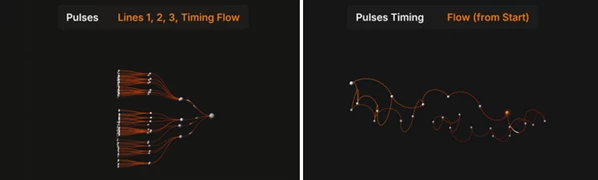
Reconnect Speed changes connection partners over time. Each link follows its own timing, creating animated network patterns without keyframes.
Randomness remains stable for a given Seed value, allowing you to control the generated result.
You can also use Cinema 4D's Random Effector to change a regular arrangement of points into a more organic plexus structure.
Animate Signals with ConnectO Pulses
ConnectO Pulses creates moving signals along ConnectO Lines or any spline. Pulses follow the connection paths, including curves and corners.
The module provides several controls for signal movement:
Timing: Random, Wave by Layer, and Flow modes.
Pulses per Link: Controls how many pulses travel along a connection.
Active Links: Controls which connections carry pulses.
Speed and Speed Variation: Adjusts signal movement and timing differences.
Direction: Controls the direction of travel.
Trails: Creates render-ready tubes with adjustable length, radius, taper, and fillets.
Trail shapes include comet, cylinder, capsule, drop, and spindle.
You can also replace the pulse appearance with your own 3D object. ConnectO places the object on the moving pulse and aligns it with the direction of travel, without requiring a separate Cloner.
Create Layered Neural Network Animations
ConnectO can build neural network diagrams using several objects as layers.
In Sequential mode, each layer connects to the next one. This works for structures containing input, hidden, and output layers.
With Wave by Layer timing, signals move through the layers one after another. Layer Delay and Wave Interval control the timing between these signal waves.
Each layer can use Matrix objects, Cloners, meshes, or splines, giving you control over the shape of the network.
Make Nodes React to Moving Pulses
ConnectO Nodes places a sphere, cube, or custom object at every point in the network. Custom objects can be placed as fast render instances.
Nodes can react when a pulse arrives, leaves, or both.
You can shape each reaction using an Animation Curve and Duration setting. Scale Amount controls how much the node changes size during the animation.
ConnectO also supports smooth color transitions between Rest Color and Active Color. These colors can be read through the MoGraph Color Shader in Standard, Physical, and Redshift rendering.
Two additional settings help control the appearance of the network:
Size by Connections: Makes nodes with more connections larger.
Hide Unconnected: Hides points that have no active connections.
These controls help distinguish important network hubs from less connected points.
Build Radial, Arc, and Multi-Level Structures
ConnectO supports more than simple point-to-point networks. Its connection controls can create different types of 3D structures.
Radial Fans
Radial Fans creates connections that extend outward from a central point.
With Main Axis Radial, the ends of Node curves follow rays from the center. The Tension setting controls how far each curve follows its ray before bending toward its destination.
Combined with Wave by Layer pulses, this creates signals that travel from the center toward outer branches.
This structure is suitable for radial infographics, tree diagrams, and data-center visualizations.
Arcs
Arc connections turn links into rounded arches that bend above or below their paths.
Arc Side offers Up, Down, and Both Sides options. Height Variation gives individual arches different heights.
Pulses and custom objects can travel along these curved connections, making them suitable for bridges, cable runs, and other arched network designs.
Multi-Level Networks
You can combine several ConnectO Lines objects to build larger networks with multiple connected levels.
Multiple Lines objects can be added to the Sources list of ConnectO Pulses and the Lines list of ConnectO Nodes.
In Flow timing mode, a pulse continues through connected nodes and into the next network level. Its movement is timed according to the actual length of the path.
The Start Object defines where the signal begins, while Node Delay adds a pause at each node. Interval controls how often the flow repeats.
This system supports branching structures where one signal travels through several connected levels.

Files Password : gfxplugin.com OR 123456