Downloadable Files
You can download Liquid Glass UI Elements for free from the bottom of this page.
30 Animated Glass Interface Elements for After Effects
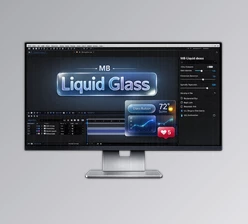
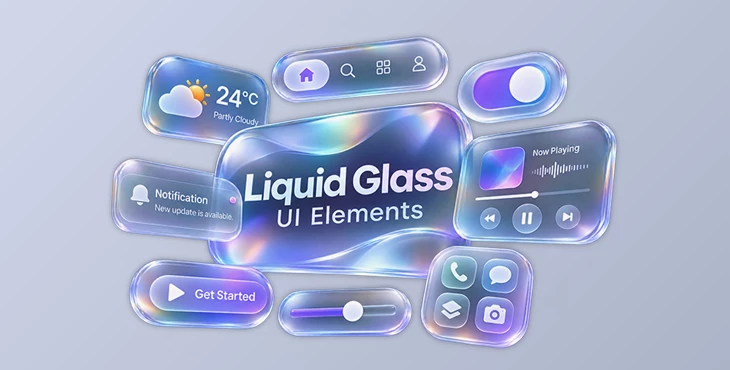
Liquid Glass UI Elements is a collection of 30 animated glass interface elements for Adobe After Effects. The elements use realistic glass effects that bend, magnify, and reflect light from the background. They also have smooth, elastic animations that make buttons, menus, widgets, and other UI designs feel more natural.
You can use this pack to make videos for apps, products, websites, and social media. Each element has simple controls, so you can change the glass look and animation. You can also use the elements with a transparent background.
30 Animated UI Elements in 6 Categories
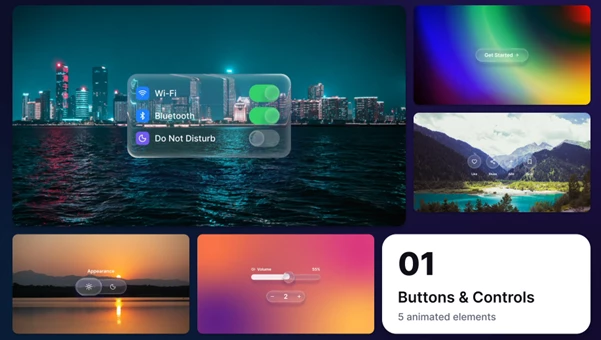
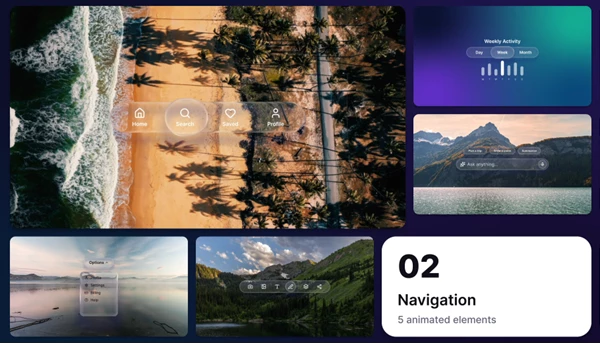
The pack includes 30 elements divided into six categories. Each category contains five designs for different interface needs.
| Category | Included Elements |
|---|---|
| Buttons & Controls | Pill Button, Icon Buttons, Liquid Toggle, Light Dark Switch, Slider and Stepper |
| Navigation | Tab Bar, Segmented Control, Search Prompt, Dropdown Menu, Floating Toolbar |
| Widgets | Weather Widget, Alarm Clock, Calendar Event, Fitness Rings, Finance Stats |
| Media | Music Player, Now Playing, Voice Message, Video Controls, Smart Home |
| Notifications & Cards | Notification Stack, Chat Bubbles, Profile Card, Sign In Modal, Payment Card |
| Glass Effects | Glass App Icons, Lens Over Text, Liquid Blobs, Glass Title, Glass Cursor |
These elements cover different parts of a digital interface. You can use navigation controls to present an app layout, widgets to display information, or glass effects to add a modern look to titles and text.
Realistic Liquid Glass Effects
The main feature of Liquid Glass UI Elements is its glass appearance. The elements do more than use a transparent color. They change how the background looks through the glass, creating a realistic lens effect.
You can adjust the appearance using these controls:
Glass Color: Change the main color of the glass.
Tint: Add a color tint to the glass surface.
Refraction: Control how the glass bends the background.
Magnify: Adjust how much the content behind the glass is enlarged.
Frost: Create a frosted glass appearance.
Shadow: Change the shadow around the element.
Highlights: Adjust the light reflections on the glass.
Every element also includes a transparent background option, so you can place it over your own footage, images, or interface designs.
Smooth Animations with Simple Timing Controls
Each element has three parts to its animation: a springy intro, a short interaction, and a clean outro.
The Elasticity control changes how the element moves. You can create soft and calm motion or make the animation more springy.
You can also turn the intro and outro animations off when you do not need them.
How to Customize an Element
Every element is stored in its own composition with a Controls layer. The main settings are organized in this single layer.
Open the element composition.
Use the Controls layer to adjust its position and scale.
Change the glass colors, refraction, and other visual settings.
Adjust Elasticity and enable or disable the intro and outro.
Drag the Controls layer to set the animation timing.
The animation follows the length of the Controls layer. This means you can change its timing by adjusting one layer rather than editing multiple keyframes.
Replaceable Media and Easy Element Selection
Liquid Glass UI Elements includes 41 replaceable media placeholders. These are used for content such as backgrounds, album artwork, avatars, videos, and cards.
The pack also provides two ways to find and select elements:
Extension Panel: Browse animated previews and click an element to add it.
Preview Browser: View all available elements in a web browser before choosing a design.
These options help you find the right interface element without opening every composition separately.
Technical Details and Compatibility
| Specification | Details |
|---|---|
| Software | Adobe After Effects |
| Total Elements | 30 |
| Resolution | 3840 × 2160 (4K) |
| Frame Rate | 30 fps |
| Duration | 10 seconds per element |
| Media Placeholders | 41 |
| Required Plugins | None |
| Expressions | Universal, compatible with any After Effects language |
| Font | Inter |
The pack does not require additional plugins. It uses universal expressions, so the controls work with different language versions of After Effects.
Where to Use Liquid Glass UI Elements
The pack works well in projects that need animated digital interfaces.
For app promotions, you can show buttons, switches, menus, and notification cards. In technology explainers, elements such as search prompts, finance statistics, and widgets can help present information visually.
For product videos and website showcases, glass titles, floating toolbars, and navigation elements can create a modern interface style.
The media elements, including music players, voice messages, and video controls, are also suitable for social media videos that show digital products or app features.
Liquid Glass UI Elements is especially focused on combining realistic glass refraction with ready-made interface animations. Its centralized controls let you customize the appearance and timing of each element while keeping the original animation structure.

Files Password : gfxplugin.com OR 123456