Downloadable Files
You can download Vortex for free from the bottom of this page.
Smarter Shape Rigging and Path Animation in After Effects
Vortex is a shape layer rigging tool for Adobe After Effects that gives you control over individual path points, Bezier handles, and groups of vertices. Instead of creating a separate controller for every point, you can select only the points you want to animate.
The tool also includes Pivot controls, path followers, and options to change shape layers. These features make it easier to animate shapes and paths without adding too many controls to your timeline.
Precise Shape Rigging with Vortex
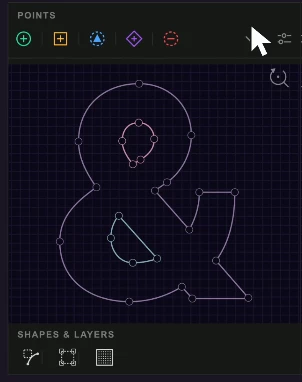
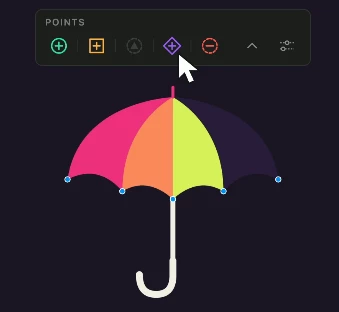
Vortex lets you build shape rigs directly from selected vertices. You can choose points in the After Effects Composition viewer or use the plugin's preview panel.
The preview displays multiple shape layers at the same time. It also supports selecting points on paths that already have a Vortex rig.
This selective approach is one of the main differences between Vortex and the built-in Create Nulls From Paths tool. You decide which vertices need independent controls, keeping the rig smaller and easier to manage.
Control Bezier Handles
Vortex can create controls for the two Bezier handles connected to a selected point. You can choose between two control methods:
Mask controls: Bezier handles appear as masks inside the point controller.
Layer controls: Each handle becomes a separate layer connected to its point by a visible line.
You can switch between these methods after creating the rig. Missing handle controls can also be added to points that are already rigged.
This provides more direct control over curved paths and their animation.
Animate Multiple Points with Pivot Controls
The Pivot feature connects several vertices to one controller. Moving, rotating, or scaling the Pivot transforms all connected points together.
A Pivot can control points across different shape layers. For example, when two shapes share a corner, one Pivot can move their connected vertices together while keeping the edges closed.
This approach works well for low-poly character faces, folding boxes, and other designs where several points need coordinated movement.
Vortex also includes Pivot Offset, which changes the center of rotation and scaling without moving the artwork itself. The offset can be animated for more complex transformations.
Attach Objects with Path Followers
Vortex includes followers that connect other elements to a shape path or a group of vertices.
There are two main follower options:
| Follower | Function |
|---|---|
| Path Follower | Attaches an element to a selected path point and provides an Offset slider to move it along the path |
| Average Follower | Follows the center of a group of points and can also respond to their rotation and scale |
Path followers include a Follow Rotation option that aligns the attached element with the direction of the path.
These controls can be used to attach text, objects, or effects to animated shapes without manually matching their movement.
Extract and Merge Shape Layers Without Losing the Rig
Vortex supports changing the structure of a composition after rigging.
You can extract shapes into separate layers or merge multiple shape layers into one. Existing point controls, Pivots, and followers remain connected to their shapes.
The plugin also checks whether Extract and Merge operations affect expressions on other layers. If an operation changes their results, Vortex reverses it.
Other rigging protections include:
Expression protection: Vortex does not rewrite expressions created by other tools or rig paths that already have another rig.
Stable connections: Renaming or reordering controllers does not break their connections.
Single-step undo: Each operation can be reversed with one undo action.
Visual identification: Points, handles, Pivots, and followers have different shapes and colors that can be customized in Preferences.
These features help maintain working rigs as a composition becomes more complex.
Vortex vs. Create Nulls From Paths
Both tools provide ways to control shape paths in After Effects, but Vortex offers additional rigging options.
| Feature | Create Nulls From Paths | Vortex |
|---|---|---|
| Point controls | Every point | Selected points only |
| Bezier handle controls | No | Yes |
| Group control | No | Pivot across multiple layers |
| Followers | One per point | Selected-point followers with Offset or Average follower |
| Preserve rigs when splitting or merging shapes | No | Yes |
| Remove rig while preserving animation | No | Delete with bake |
The main advantage of Vortex is the ability to create a rig around the specific points and movements your animation requires.
Working with the Vortex Panel
Vortex provides a compact panel that can be docked beside the After Effects timeline.
The panel can collapse into two rows of buttons to save workspace space. You can select vertices in the Composition viewer and use the Create, Follow, or Pivot commands.
When you need a larger view of your paths, the preview can be reopened with one click.
Sharing and Baking Animations
Vortex rigs use standard After Effects expressions and effects stored inside the project.
Other users can open, edit, and render an existing rig without having Vortex installed, provided the Vortex Links effects remain on the shape layer.
For projects that no longer need live rig controls, the Delete with bake command removes the rig while preserving the shape animation as standard path keyframes.

Files Password : gfxplugin.com OR 123456