Downloadable Files
You can download SquishyFX for free from the bottom of this page.
Real-Time Soft-Body Deformation and Collision Effects in Blender
SquishyFX is a Blender tool that creates live soft-body deformation without baking simulations. It lets you make meshes squish, bulge, jiggle, and ripple when they interact with other objects. Powered by Geometry Nodes, the tool shows deformation directly in the Blender viewport, making it easier to control soft surfaces during animation.
Create Real-Time Soft-Body Effects in Blender
SquishyFX works by adding a modifier to a mesh and using a collider to control its deformation. When the collider touches or moves against the surface, the mesh reacts immediately.
The tool supports animated, parented, and rigged colliders, so the deformation can follow moving objects and characters. You can also paint a vertex group to limit the effect to a specific area while keeping the rest of the mesh unchanged.
Unlike workflows that require simulation baking, SquishyFX calculates its effects live. Its non-destructive Geometry Nodes system also works alongside other Blender modifiers. Disabling the effect returns the mesh to its original shape.
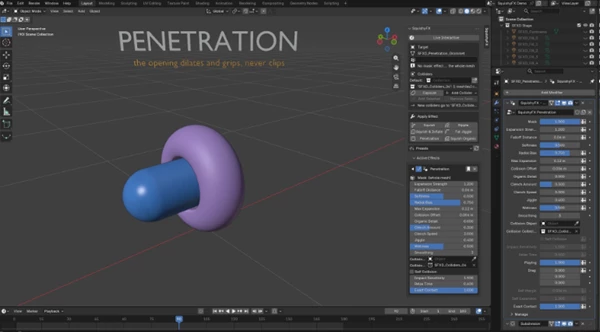
Six Deformation Effects in SquishyFX
SquishyFX includes six effects that create different types of reactions to contact and movement.
| Effect | How It Works |
|---|---|
| Squish | Compresses the mesh at the contact point and creates a volume ring around the pressed area. |
| Squish & Inflate | Moves displaced volume into other parts of the mesh to maintain a fuller shape. |
| Squish Organic | Creates a raised rim and soft creases that follow the moving collider. |
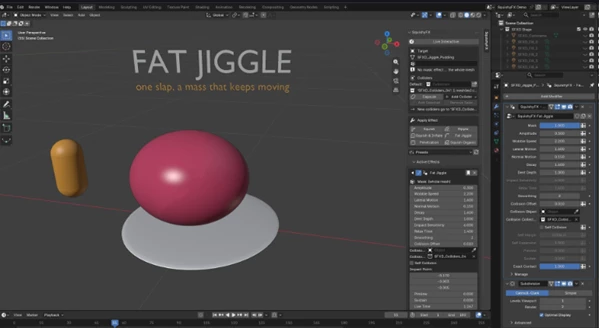
| Fat Jiggle | Produces a wobbling reaction in the direction of an impact that gradually settles. |
| Ripple | Generates waves from the impact point that continue after the collider moves away. |
| Penetration | Makes the surface opening expand and grip around an inserted collider without clipping. |
These effects cover different types of soft-material behavior, from simple compression to moving waves and secondary motion.
The toolkit also includes 12 ready-made presets, such as Soft Flesh, Memory Foam, Glute Jiggle, Squishy Jelly, and Bouncy Rubber.
Mutual Soft-Body Collisions
One of the important features of SquishyFX is its Soft Bodies system, which lets two meshes with effects deform against each other.
Instead of having one object act as a fixed collider, both meshes react to contact. Their surfaces compress together, form a smooth contact area, and preserve their volume.
This system supports interactions such as two characters hugging or two soft objects pressing against each other. Even during deeper contact, the surfaces are designed to remain smooth without clipping or unstable vertices.
Setting Up Soft Bodies
The setup follows four steps:
Apply an effect: Select each mesh and choose an effect from Apply Effect. Any SquishyFX effect can be used.
Add the meshes: Select both objects and choose Soft Bodies > Add Selected. Each receives a Mutual Contact modifier.
Create the interaction: Move, pose, or animate the objects together to see their surfaces deform.
Adjust the contact: Use the available settings to control how the two meshes react.
The Mutual Contact modifier includes several controls:
Yield: Determines which body is firmer during contact.
Volume Preservation: Controls how the mesh maintains its volume.
Bulge Spread: Adjusts how the deformation spreads around the contact.
Cushion: Shapes the contact between the surfaces.
For character meshes, a mask can keep selected parts of the body firm while allowing other regions to deform.
Where SquishyFX Works Best
SquishyFX helps you create soft and natural movements in Blender. You can use it to make parts of a character, like cheeks and bellies, move and change shape. The Fat Jiggle effect adds extra movement after something hits the body. The Ripple effect creates waves that keep moving after contact.
For stylized animation, the Squish and Squish & Inflate effects provide different ways to show pressure and compression. The Soft Bodies system is also suited to scenes where two deformable characters or objects interact directly.
Because these effects work in the viewport without simulation baking, animators can adjust poses, move colliders, and inspect the deformation while working.
SquishyFX combines six deformation effects, mutual soft-body collisions, and adjustable contact controls in one Geometry Nodes-based toolkit. Its main advantage is the ability to create and modify soft-body reactions directly during animation without relying on baked simulations.

Files Password : gfxplugin.com OR 123456