Downloadable Files
You can download Physic3D for free from the bottom of this page.
Create Realistic 3D Physics Animations in After Effects
Physic3D is a 3D physics simulation plugin for Adobe After Effects. It lets you create objects, simulate realistic collisions, and turn the results into editable 3D animations. You can build scenes with shapes, text, imported models, or your own After Effects layers. The simulations run inside the plugin's panel, so you can see objects fall, bounce, swing, or break before adding the animation to your composition.
Unlike tools that export simulations as rendered images, Physic3D creates native After Effects 3D layers with real keyframes. This means you can still change the timing, materials, lighting, and camera after exporting your simulation.
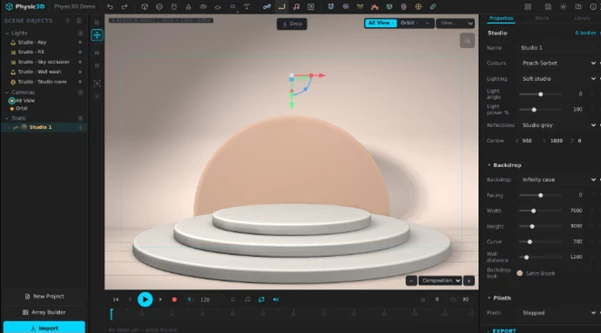
Build and Simulate 3D Scenes in After Effects
Physic3D gives you different ways to build a physics scene. You can start with basic shapes, use ready-made objects, or import your own content.
The plugin includes cubes, spheres, cylinders, cones, tori, and flat shapes. You can also create 3D text using any font. Each letter has its own collision shape, including the holes inside letters. This means objects can fall through the center of an O or move between letters.
There is also a library of 260 ready-made 3D models, including furniture, vehicles, toys, stands, and other props. These models already have collision shapes, so they are ready for simulation.
You can import images, videos, solids, shapes, and text layers from your After Effects composition. External 3D models in glTF, GLB, and OBJ formats are supported, including their textures.
The Array Builder helps you arrange objects into grids, rings, and other patterns. You can control their size, rotation, and entry timing before running the simulation.
Physics Tools: Forces, Joints, Fracture, and Emitters
Physic3D includes several tools for controlling how objects move and interact.
Tool | What it does |
|---|---|
Forces | Creates explosions, wind, turbulence, vortices, and attraction effects |
Joints | Connects objects using hinges, springs, ropes, sliders, and welds |
Fracture | Breaks objects into physical pieces on impact or at a chosen time |
Emitters | Releases multiple objects with different sizes, rotations, and materials |
Cages and Portals | Keeps objects inside an area or sends them to another location |
The fracture system lets you choose where an object breaks by moving its impact point. Each broken piece becomes a separate physical body that can move and collide with other objects.
Emitters can release hundreds of shapes, models, or layers. The plugin also includes ready-made effects such as confetti, sparks, bubbles, snowfall, fountains, and falling letters.
Ready-Made Assemblies and Interactive Environments
Physic3D includes complete physics setups called Assemblies. These are built from connected objects and can be adjusted for different animations.
Some examples include:
Wrecking Ball: A heavy ball connected to a physical chain.
Domino Run: A line of dominoes arranged along a custom path.
Ragdoll: A figure with connected body parts that move through joints.
Car: A vehicle with four motor-driven wheels.
Catapult: A mechanical setup that launches a ball.
Newton's Cradle: A system of swinging balls.
Jelly: Connected beads and springs that create wobbling movement.
Bowling: A ball and ten pins ready for collision.
The plugin also includes cities, streets, forests, canyons, bridges, and brick walls. These environments contain separate physical objects, so you can create scenes where buildings collapse or objects react to impacts.
For domino animations, you can draw paths with control points and curves. Preset paths include spirals, zigzags, S-curves, and U-turns.
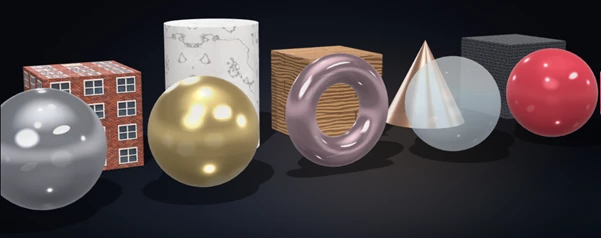
Materials, Lighting, and Studio Scenes
Physic3D is not limited to physics movement. It also provides tools for building the visual appearance of your scene.
Materials and textures
The plugin includes 95 materials and 80 textures. You can choose from metals, glass, plastic, stone, wood, satin, clay, and other surfaces. You can also import your own texture images.
Lighting and environments
There are 36 lighting rigs, including three-point lighting, softboxes, product lighting, sunset, neon, and window daylight. You can also add individual lights and use HDR environments for reflections.
Studio setups
Physic3D includes 16 ready-made studios with backdrops, platforms, panels, colors, and lighting. You can adjust the studio parts separately or apply a complete style that changes selected visual settings.
These options are suitable for product animations, object presentations, and scenes that need both physical movement and controlled lighting.
Audio-Driven 3D Animation
Physic3D also includes an Audio section for creating animations that respond to music.
You can build equalizers, circular audio displays, pulse rows, beat stacks, and sound walls. These are made from physical 3D objects that move with the beat of your audio track and can interact through collisions.
This feature gives you another way to combine music and 3D motion inside After Effects.

Files Password : gfxplugin.com OR 123456