Downloadable Files
You can download Streak Warp for free from the bottom of this page.
Create Dynamic Speed Streaks from Position Keyframes
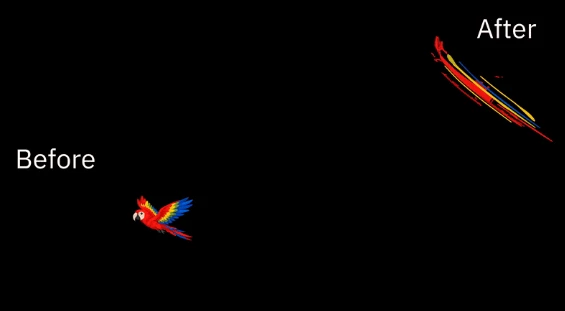
This After Effects plugin turns Position animations into colorful speed streaks that follow the movement of your artwork. It creates stretched color bands along the motion path and brings them back to the original image when the movement ends.
Streak Warp helps motion designers create fast movements and smooth transitions without drawing every frame by hand. You can also edit the streak effects and make changes without affecting your original artwork.
Turn Position Keyframes into Speed Streaks
Streak Warp uses the Position keyframes already applied to a layer. You don't need to create a separate animation path for the effect.
To generate a streak:
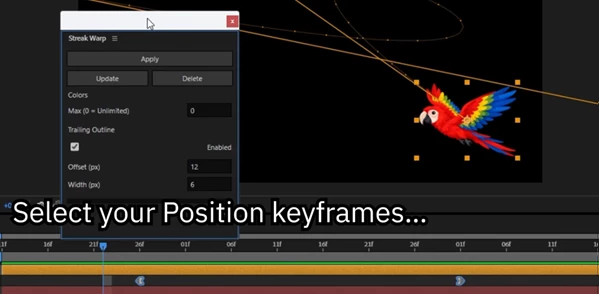
Select a 2D image layer or precomposition with an animated Position.
Select at least two Position keyframes.
Click Apply in the Streak Warp panel.
The plugin generates color bands that follow the selected movement.
The streak follows the existing motion path, including curved movements and changes in speed. This means the effect is based on the animation you've already created rather than a fixed direction.
One important detail is how the animation ends. During movement, the artwork stretches into colored bands. At the final position, those bands settle back into the original image.
This creates a continuous transition between the moving streak and the artwork itself.
Editable Shape Layers and Effect Controls
Streak Warp generates its results as regular After Effects shape layers rather than a single flattened effect.
The generated shapes are placed inside a precomposition directly above the source layer. Your original layer stays in the composition but is switched off while the streak is active.
You can adjust the generated effect using several controls:
Color Limit: Restrict the number of colors used in the streak.
Trailing Outline: Add or adjust the outline that follows the movement.
Update: Rebuild the streak in place after changing its settings.
Delete: Remove the generated streak and automatically turn the original layer back on.
The Apply operation can also be reversed with a single Undo.
Because the output uses regular shape layers, the generated result remains editable within After Effects.
Creating Streak Animations for Text and Logos
Streak Warp can also work with text, logos, and shape-based artwork, but text and shape layers must be precomposed before applying the effect.
The process is straightforward:
Precompose the text or shape layer.
Animate the Position of the new precomposition.
Select two or more Position keyframes.
Apply Streak Warp to generate the animation.
The streak begins with the original artwork and returns to it at the end of the movement.
This approach works well for animated logo entrances, moving titles, and graphic transitions where the object needs to remain recognizable after the motion finishes.
For example, a logo can fly across the composition as stretched color bands before returning to its normal appearance at its final position.
Compatibility and Important Limitations
Streak Warp has specific technical requirements that are important to check before using it.
| Requirement | Details |
|---|---|
| Software | Adobe After Effects 2025 and newer |
| Operating system | Windows only |
| Supported input | 2D image layer or precomposition |
| Animation | At least two Position keyframes |
| Text and shape layers | Must be precomposed first |
| macOS | Not supported |
There are also some limitations to how the plugin reads animations.
Unsupported Position setups: Parented layers, separated Position dimensions, and Position expressions are not supported.
Scale animation: If a layer changes scale during its movement, the generated streak does not follow those scale changes.
Artwork sampling: The streak is generated from the appearance of the layer at the first selected Position keyframe. This is important when working with artwork that changes visually during the animation.
These limitations mean Streak Warp is best suited to standard 2D Position animations with keyframes that directly control the layer's movement.
Where Streak Warp Fits into Motion Design
Streak Warp is particularly suited to animations where movement needs a strong visual impact.
Its motion-based color bands can be used for fast graphic entrances, logo reveals, swooshes, and transitions between animated elements.
The plugin's main advantage is that it works from existing Position keyframes. You can create the movement first, then generate a streak that follows its timing and path.
Streak Warp adds speed effects to your animation without changing the original artwork. The effect returns to the original look when the movement ends. You can also use the Update button to make changes whenever you need.

Files Password : gfxplugin.com OR 123456