Downloadable Files
You can download StemSplitter for free from the bottom of this page.
Separate Music into Six Audio Stems
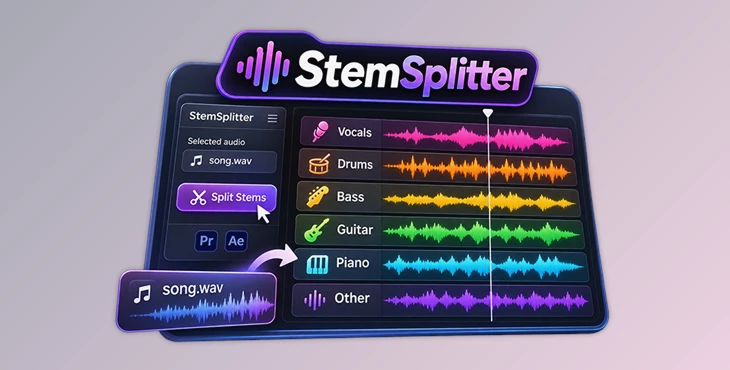
This plugin separates a song into six individual audio stems directly inside Adobe Premiere Pro and After Effects. It identifies vocals, drums, bass, guitar, piano, and other sounds, giving editors more control over the different parts of a music track.
StemSplitter works with audio already placed in your project. You don't need to open another editor or upload your music to an online service. The entire separation process runs locally on your computer.
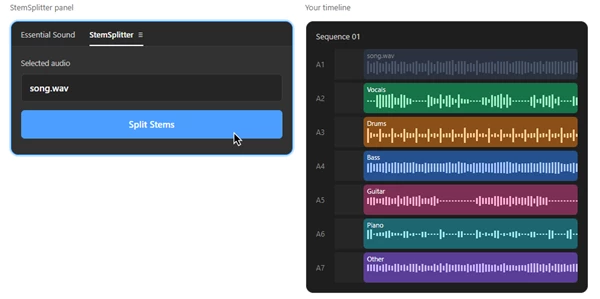
Split One Song into Six Separate Tracks
StemSplitter is designed for editors who need to work with individual instruments or vocals from a complete song. Its main feature is one-click audio stem separation, which creates six parts from a selected audio clip.
The plugin separates audio into these categories:
Audio stem | Content |
|---|---|
Vocals | Singing and vocal parts |
Drums | Drum sounds and percussion |
Bass | Bass elements |
Guitar | Guitar sounds |
Piano | Piano parts |
Other | Sounds not included in the five main categories |
The six-stem system gives editors access to more specific musical elements than a basic vocal and instrumental separation.
For instance, you can work with the drum track independently while keeping the vocals and other instruments available on separate tracks.
How StemSplitter Works in Premiere Pro and After Effects
StemSplitter includes a dedicated panel with a Split Stems button. The process starts with an audio clip that is already in your editing project.
Select audio clip
Split Stems
Six audio stems
In Premiere Pro, the plugin places the six separated stems on individual audio tracks in the timeline. Each track is aligned with the original song, so the musical elements remain synchronized.
The original audio clip is switched off rather than deleted. This means it stays in the project alongside the separated tracks.
In After Effects, StemSplitter creates six audio layers beneath the original layer, following a similar arrangement.
This workflow keeps the separated audio inside the editing environment without requiring an additional application.
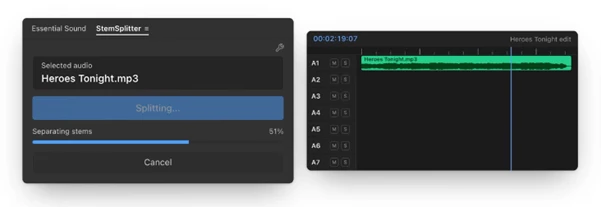
Local Audio Processing Without Uploading Files
One important feature of StemSplitter is that audio processing happens entirely on your computer.
Unlike browser-based stem separation services, the plugin does not require you to upload a song to a remote server.
This is particularly relevant when working with:
Unreleased music that should remain private.
Client audio files that cannot be shared externally.
Music editing projects that require local audio processing.
StemSplitter also runs without clip-count limits, so editors can process multiple audio clips on their own machines.
Where StemSplitter Fits into Music and Video Editing
StemSplitter is suitable for projects where individual musical elements need to be edited separately.
In a music-focused video, an editor might want to work with the vocals independently from the instrumental parts. Separating the song provides individual tracks for that purpose.
The six-stem arrangement also supports projects that require access to specific instruments, such as drums, bass, or piano, without treating the entire instrumental mix as a single audio track.
Because the plugin operates directly in Premiere Pro and After Effects, these audio elements can remain part of the existing video editing or motion graphics project.

Files Password : gfxplugin.com OR 123456