Downloadable Files
You can download Swatches for free from the bottom of this page.
Manage Your Color Palettes Across Adobe Apps with Swatches
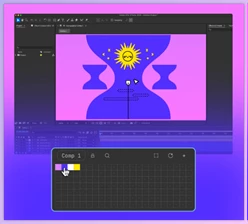
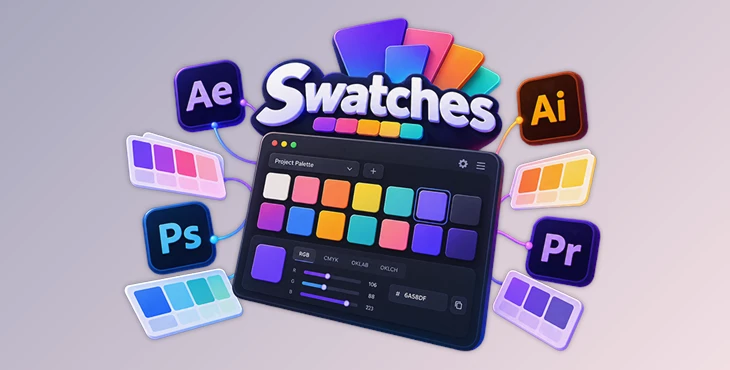
Swatches is a color palette management panel for After Effects, Illustrator, Photoshop, and Premiere Pro. It keeps your project colors, brand palettes, and favorite shades in one place, so you can use the same saved colors across different Adobe applications.
You can create palette presets, organize colors in a visual grid, edit individual swatches, and share palettes through JSON files. The panel also supports one-click color application in After Effects, Illustrator, and Photoshop.
Organize Colors into Reusable Palette Presets
Swatches lets you create separate presets for different projects. Each preset contains a collection of colors displayed in a grid, making it easy to see how the colors work together.
You can drag and drop swatches to change their order, compare different shades, and switch between saved palettes.
For projects that use specific brand colors, keeping those colors in a dedicated preset helps maintain a consistent palette across your designs.
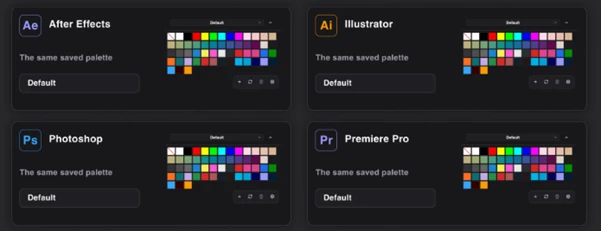
The same saved palettes are accessible in all four supported Adobe applications, so you don't need to create a separate collection for each workspace.
Apply Colors to Artwork with One Click
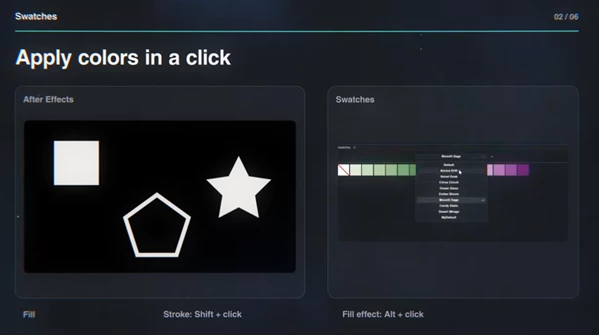
One of the main features of Swatches is its ability to apply saved colors directly to selected artwork.
The panel supports different click actions depending on how you want to use a color:
Click: Apply the selected color as a fill.
Shift-click: Apply the color as a stroke.
Alt-click: Apply the color using a Fill Effect in After Effects.
These shortcuts are available in After Effects, Illustrator, and Photoshop, with the Fill Effect action specifically designed for After Effects.
You can quickly compare different color choices on artwork, such as testing several variations of a typography design.
Premiere Pro has an important limitation: You can manage palettes and edit colors in the panel, but click-to-apply functionality is not currently supported.
Edit Colors Using RGB, CMYK, OKLAB, and OKLCH
Swatches includes a color editor for creating and adjusting individual colors. It supports four color models:
| Color model | Description |
|---|---|
| RGB | Edit colors using red, green, and blue values. |
| CMYK | Work with cyan, magenta, yellow, and black values. |
| OKLAB | Adjust colors using a perceptual color model. |
| OKLCH | Edit colors through lightness, chroma, and hue. |
The editor keeps the original source color alongside its display preview. You can also inspect color values and copy HEX codes when you need to use a specific color elsewhere.
Having these models in one editor gives you different ways to refine a color without leaving the palette panel.
Export and Import Palettes as JSON
Swatches supports JSON import and export, making it possible to transfer saved palettes between team members or workstations.
The sharing process follows three steps:
Export: Select the palette presets you want to save as a JSON file.
Share: Send the exported file to another team member or move it to another workstation.
Import: Preview the palettes in the file, resolve any matching preset names, and import the selected presets.
You can export only the presets you need rather than sharing your entire collection.
JSON export also provides a way to keep backups of your palette presets.
Customize the Panel for Your Workspace
The Swatches interface includes several display settings that help it fit into different Adobe workspaces.
You can:
Adjust the size of individual color swatches.
Change the overall interface scale.
Choose between light, dark, and host-based themes.
Collapse the preset selector to free up panel space.
Switch between saved palette presets.
These settings are particularly relevant when working with a crowded interface where panel space is limited.
Compatibility and Important Color Behavior
Swatches uses CEP 11 and requires the following minimum Adobe application versions:
| Adobe application | Minimum supported version |
|---|---|
| After Effects | 2021 (18.4) |
| Illustrator | 2021 (25.3) |
| Photoshop | 2022 (23.0) |
| Premiere Pro | 2021 (15.4) |
Earlier point releases within these application year versions are not supported.
There are also two important details about how Swatches handles colors.
Applied colors are not linked to their original swatches. When you apply a color to artwork, the result is a snapshot. Changing the saved swatch later will not automatically update the artwork. You need to apply the revised color again.
Color appearance may vary between applications. The displayed result can depend on the Adobe application, the selected target, and the document's color space.
Swatches is designed for managing and reusing color palettes across Adobe projects. Its main advantage is keeping those palettes organized and transferable while providing direct color application in the three supported design and motion graphics applications.

Files Password : gfxplugin.com OR 123456