Downloadable Files
You can download Filmic Plus for free from the bottom of this page.
Complete Film Emulation for Blender
Filmic Plus is a procedural film emulation tool for Blender that brings the look and behavior of real photography into 3D renders. It combines Fujifilm-inspired film simulations, camera controls, physically accurate halation, film grain, and lens effects in a single node group.
Designed for Cycles and EEVEE, Filmic Plus gives artists a complete film-style post-processing pipeline without needing separate add-ons or complex node setups. You can start with ready-made photographic presets or control individual effects to create your own look.
Fujifilm-Inspired Film Simulations
Filmic Plus reproduces the color response and tonal characteristics of Fujifilm-style film simulations. These affect more than basic color grading. Each simulation changes how colors shift, how contrast appears, and how highlights transition into brighter areas.
The tool includes a collection of photographic styles, ranging from neutral and soft portrait looks to cinematic, high-contrast, and monochrome finishes.
Some of the available simulations include:
| Film Simulation | Visual Style |
|---|---|
| Proven | Standard, neutral colors |
| Velvet | Saturated, punchy colors |
| Astra | Soft portrait tones |
| Classy Chromium | Muted, editorial appearance |
| Really Aced | Balanced, modern look |
| Portrait Neg Hi | Contrasting portrait style |
| Portrait Neg Std | Flatter portrait tones |
| Classical Negative | Matte finish with character |
| Nostalgia Negative | Warm, amber tones |
| Eternal Cinema | Flat cinematic appearance |
| Eternal Bleach Bypass | Harsh, silver-toned contrast |
| ACRO | Rich black-and-white |
| Monochrome | Neutral black-and-white |
| Sepia | Warm, toned monochrome |
An ungraded reference option is also available for comparing the original render with the processed result.
Ready-Made Film Recipes and Presets
Alongside the film simulations, Filmic Plus provides presets inspired by real photographic film stocks and cinematic color styles.
These include looks such as Kodak Gold 200, Kodak Portra 160, Kodak Portra 400, Superia, Golden Chrome, Cinematica, and Summer of 76.
You can select a preset as a starting point and then adjust the settings to suit your scene. This approach combines familiar photographic looks with the flexibility of Blender's procedural workflow.
Physically Accurate Halation
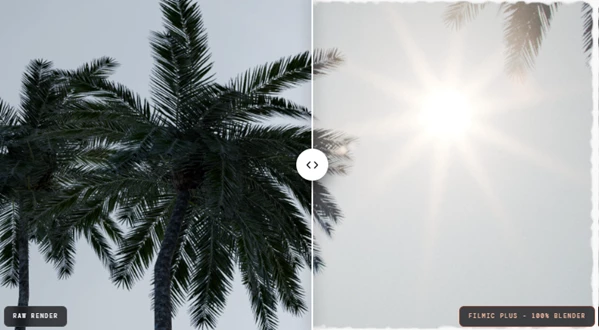
One of the more distinctive features of Filmic Plus is its approach to halation.
Halation is the reddish glow that can appear around bright areas in photographs captured on film. It happens when light passes through the film's emulsion layers, reflects from the back of the film base, and exposes the red-sensitive layer again.
Filmic Plus recreates this behavior rather than applying a simple orange glow around every bright object.
The effect responds to the brightness and color of the light source. For instance, white light can produce a red edge, while pure blue light creates very little halation because it contains almost no red light to re-expose the film layer.
This gives bright lights and highlights a more realistic film response while avoiding the uniform appearance of a standard glow effect.
Procedural Film Grain That Responds to Exposure
Filmic Plus uses procedural grain designed to behave like grain in exposed photographic film.
Unlike a fixed noise overlay, its grain distribution changes across the image:
Shadows: Grain is more visible in darker areas.
Highlights: Grain becomes less noticeable as exposure increases.
Animation: Grain changes from frame to frame rather than remaining fixed.
Image detail: The procedural effect maintains its appearance when viewed at 100%.
You can also match the grain settings of a Fujifilm camera or create a custom grain style.
This gives artists control over film texture without relying on a static grain image.
Real-Time Lens Effects and Optical Characteristics
Filmic Plus also simulates optical effects associated with physical camera lenses. These effects help reproduce the way light interacts with glass, rather than only changing the colors of the final render.
Its lens effects include:
Lens flares: Light artifacts produced by bright sources.
Reflections and ghosting: Secondary light shapes associated with internal lens reflections.
Bloom: Soft light spreading around bright areas.
Vignetting: Darkening toward the edges of the image.
Chromatic dispersion: Separation of light into different colors.
Glints and radial streaks: Directional light patterns around highlights.
Procedural Flares with Chromatic Dispersion
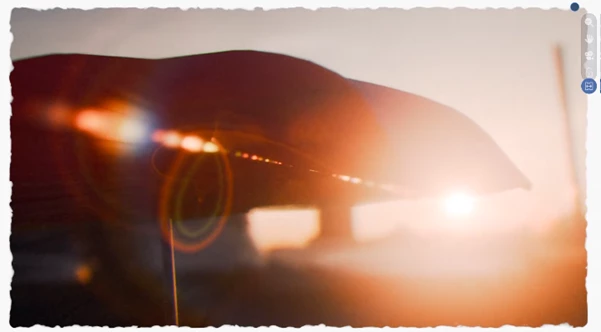
The lens flare system is fully procedural and updates in real time as the camera moves.
It includes spectral separation across flare elements, so rings, ghosts, and streaks can display different colors rather than appearing as simple flat shapes.
Because these effects do not depend on pre-baked image textures, they remain adjustable within the node-based workflow.
A Complete Film Finishing Pipeline in One Node
Instead of requiring several independent tools, Filmic Plus organizes its post-processing features into one node group with labeled control panels.
The pipeline contains seven main stages:
Film Simulation: Select the photographic film response.
Tone & Colour: Adjust the image's tonal and color characteristics.
Camera Controls: Work with camera-related settings, including shutter speed.
Bloom & Halation: Control light spreading and film halation.
Film Grain: Add exposure-responsive photographic texture.
Lens Effects: Apply optical effects such as flares, ghosting, and dispersion.
Frames & Overlays: Add photographic framing and overlay elements.
Each stage can be enabled when needed, allowing you to work with specific effects without using the entire pipeline.
The single-node-group design also keeps these controls together, making it easier to manage the photographic finish of a render.
Using Filmic Plus in Blender Projects
Filmic Plus works well for Blender projects where you want your renders to look like real photos.
For portrait renders, you can use softer film styles and portrait presets to create different colors and tones. You can also add grain and halation to give shadows and bright areas a more natural, film-like look.
For cinematic scenes, the flatter film looks, lens flares, and bloom controls offer ways to develop a film-inspired appearance.
It can also be used for stylized photography and animation, particularly when a project needs vintage film colors, monochrome imagery, or optical effects that respond to camera movement.
The main advantage is that these photographic characteristics can be combined and adjusted inside Blender, with the film simulations, grain, lens behavior, and final image controls all available in the same procedural system.

Files Password : gfxplugin.com OR 123456