Downloadable Files
You can download Fast Movement FX for free from the bottom of this page.
Add Fast Shakes and Zooms to Your Videos in Premiere Pro
Fast Movement FX by Tiny Tapes is a collection of more than 15 ready-made shake and zoom presets for Adobe Premiere Pro. It helps video editors create fast camera movements around cuts without building motion animations with keyframes.
The pack includes different movement styles, from quick shakes to zoom-in and zoom-out effects at several speeds. You can apply these effects to an adjustment layer above your clips, keeping the original footage untouched.
What's Included in Fast Movement FX?
The pack contains 15+ movement presets stored in a single .prfpset file for Premiere Pro.
The available effects include:
Fast Movement: A shake preset for adding quick movement to your footage.
Faster Movement: A faster movement option for more intense motion.
Zoom In: Presets that zoom into the footage at fast, medium, or regular speed.
Zoom Out: Presets that zoom out of the footage at fast, medium, or regular speed.
The different speed options help you choose how quickly the movement happens. You can use a faster zoom for a sharp cut or select a slower option when the transition needs less speed.
All these effects are prepared in advance, so you don't need to create the motion from the beginning.
How to Use Fast Movement FX in Premiere Pro
Fast Movement FX uses adjustment layers to apply movement effects around your cuts. The process is simple and doesn't require manually animating each movement.
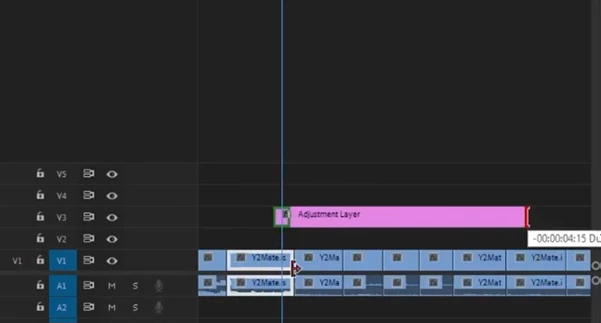
Create an adjustment layer: Place an adjustment layer on the video track above your clips.
Position it over the cut: Move the adjustment layer to the point where two clips meet.
Trim its duration: Shorten the adjustment layer to a few frames around the cut.
Apply a preset: Drag your chosen shake or zoom preset onto the adjustment layer.
{Video Clips → Adjustment Layer → Trim Around Cut → Apply Preset}
The movement is applied through the adjustment layer rather than directly to the video clips. This keeps the original footage untouched and separates the movement effect from the source material.
Create Movement Effects Without Manual Keyframing
One of the main reasons to use Fast Movement FX is to reduce the time spent creating repeated movement animations.
According to Tiny Tapes, building a shake or zoom from scratch can take around 5 to 10 minutes, including adjustments and drafts. Repeating that process across multiple cuts can take considerable editing time.
Fast Movement FX provides prepared animations that can be applied with a drag-and-drop action.
This approach is particularly helpful when editing videos with many cuts that need similar movement effects. You can focus on choosing the movement style and its placement rather than rebuilding the animation for every transition.
Where Can You Use Fast Movement FX?
Fast Movement FX is designed for edits that need quick motion between shots or around cuts.
Its presets can be used for:
Music video editing: Add shakes and rapid zooms around cuts to create more energetic transitions.
Fast-paced video edits: Use quick movements to connect short clips.
Social media videos: Add zoom and shake effects to short-form content.
Montages: Apply consistent movement styles across several cuts without creating separate keyframe animations.
The choice between Fast Movement, Faster Movement, and the different zoom speeds depends on how much motion you want around each cut.
File Format and Compatibility
Fast Movement FX is made for Adobe Premiere Pro and includes its presets in one .prfpset file.
The pack is intended to work through Premiere Pro's preset and adjustment-layer workflow. It is not described as a standalone application.
Tiny Tapes also provides setup guidance for preparing the files before editing. Users should check the product's compatibility information when choosing an edition for their editing software.
Fast Movement FX is mainly focused on one task: adding prepared shake and zoom movements to video cuts. Its combination of multiple movement speeds, a single preset file, and an adjustment-layer workflow makes it a practical option for editors who want to create these effects without repeatedly working with keyframes.

Files Password : gfxplugin.com OR 123456