Downloadable Files
You can download Softie Collision System for free at the bottom of this page.
Create Soft Object Collisions in Blender with Softie Collision System
Softie Collision System is a Geometry Nodes-based tool for Blender that creates surface deformations when objects collide. It handles interactions such as two soft spheres pressing against each other or a hand grabbing a deformable object, without requiring complex lattice setups, shape keys, or traditional soft body simulations.
The system also supports self-collision, multiple interacting objects, and adjustable hardness, giving you control over how meshes respond to contact.
Control How Objects Deform During Collisions
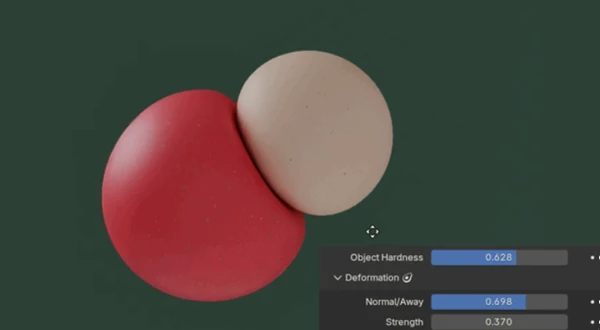
One of the main features of Softie Collision System is its Object Hardness control. This slider determines how much an object maintains its original shape when interacting with another mesh.
You can adjust the hardness to create different collision behaviors. At a value of 0.5, both interacting objects behave as soft objects, allowing them to deform against each other.
For more detailed control, the system supports Variable Hardness through custom attributes or weight-painted vertex groups.
A hardness weight of 1 represents a hard area, while 0 represents a soft area. This means different parts of the same mesh can respond differently to collisions.
Variable hardness attributes can also be assigned to the modifier object, taking priority over attributes assigned to the collision collection.
Self-Collision and Multiple Object Interactions
Softie Collision System isn't limited to collisions between two separate meshes. It also includes tools for handling more complex interactions.
Self-Collision for Character Animation
Self-collision helps prevent different parts of the same mesh from intersecting during deformation.
This is particularly relevant for character animation, where parts of a model may overlap as the character moves or changes pose.
The system also includes an automatic check and fix for non-manifold self-collisions.
Collisions Between Multiple Objects
You can add multiple collision objects to a scene rather than restricting the setup to a single collider.
This makes it possible to create interactions involving several meshes, including situations where multiple objects press against or deform one another.
Simulation-Based Collisions
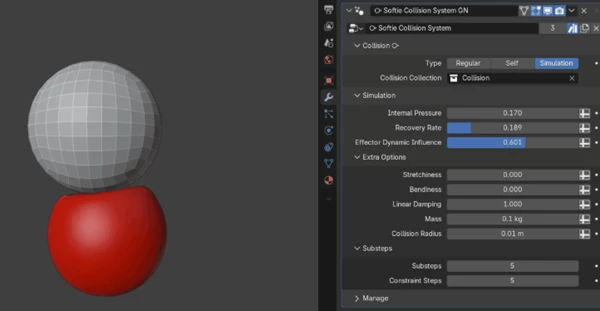
Alongside its instant deformation system, Softie Collision System includes an experimental Simulation collision type.
This mode builds on Blender's XPBD cloth dynamics solver and introduces additional controls for simulated interactions.
Its main capabilities include:
Custom Pin Algorithms: Provide control over how parts of the simulated geometry are constrained.
Custom Force Algorithms: Handle forces within the collision simulation.
Pressure Controls: Allow pressure to be adjusted during simulation.
Recovery Controls: Provide control over deformation recovery.
Dynamic Masking: Control which areas are affected during simulation.
The Simulation collision type requires Blender 5.2 and is provided as a separate modifier from the main collision system.
Custom Masks and Deformation Controls
Softie Collision System provides several options for limiting where deformations occur.
You can use a named group attribute in the Mask Group field to specify which parts of a mesh should be affected by the modifier.
There is also a Custom Mask + Distance option, which combines custom masking with distance-based control.
For visual feedback, the Show Affected toggle highlights the mesh regions involved in collisions. This is particularly helpful during sculpting workflows, where identifying the affected geometry can make adjustments more straightforward.
Custom attributes, including variable hardness settings, are organized under the Custom Attributes/Masks dropdown in the modifier panel.
Real-Time Performance
Softie Collision System is designed for responsive interaction directly in Blender's viewport.
According to the developer's testing, simple geometry setups involving multiple collision objects can achieve tree calculation times below 10 milliseconds on an Intel Core i7-14700F.
Performance depends on the complexity of the geometry and collision setup, but the system is primarily designed for quick surface deformation rather than full physical simulation.
Important Limitations
Although Softie Collision System can handle a range of collision interactions, it is not intended to replace a universal physics-based collision solver.
There are two important limitations to consider:
Mesh Geometry: Simple manifold objects are recommended for the best visual results.
Collision Depth: The system is designed for surface deformations. Extremely deep mesh penetrations can cause its raycast vectors to break, producing incorrect deformation results.
The instant collision system does not perform the per-frame velocity and history evaluation required to handle every possible collision scenario.
For projects involving surface contact, adjustable softness, and character self-collision, Softie Collision System provides a Geometry Nodes-based approach that can be used without building a traditional soft body simulation from scratch.

Files Password : gfxplugin.com OR 123456