Downloadable Files
You can download NeuRenamer for free at the bottom of this page.
AI Layer Renaming for After Effects
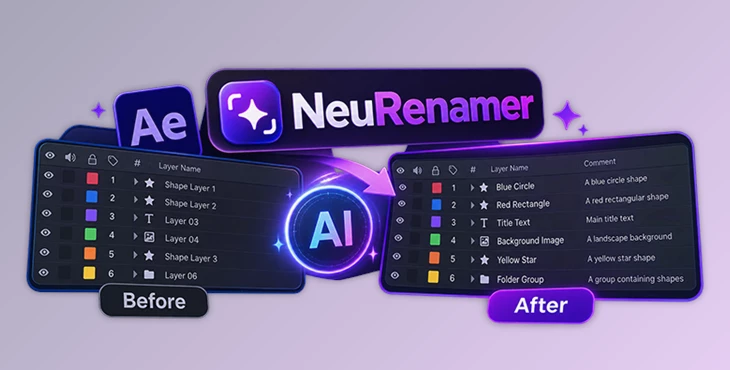
NeuRenamer is an AI-powered plugin for Adobe After Effects that automatically renames layers based on their visual content. It examines what appears in each layer, creates a clear name, and adds a one-line description to the Comment field. It also works with Project panel items and groups inside shape layers. The AI model runs locally on your computer, so your frames are not uploaded to an external server.
Rename After Effects Layers Based on Their Content
An After Effects composition can contain dozens or hundreds of layers. When those layers have generic names or unclear labels, finding the right element becomes difficult, especially in projects created by someone else.
NeuRenamer addresses this problem by examining the actual image content rather than relying on existing layer names.
For instance, a layer containing a visible object can receive a name that describes that object. The plugin also writes a short description in the layer's Comment field, providing more information without making the layer name unnecessarily long.
This creates two levels of information:
Layer Name: A short, readable label based on the visual content.
Layer Comment: A one-line description that provides additional context.
The main difference from conventional renaming tools is that NeuRenamer uses AI vision to identify what a layer contains. You do not need to prepare a list of names or manually identify every selected element.
How to Use NeuRenamer in After Effects
The plugin is designed around a single menu command, so the basic process does not require a complicated setup.
Open your composition in After Effects.
Select the layers you want to rename.
Go to Layer > Do NeuRename.
Let the AI model examine the selected content.
Check the generated names and descriptions in your timeline.
To access additional settings, hold Shift while clicking the Do NeuRename command.
The same naming functionality also supports selected Project panel items and groups within shape layers.
Work with Shape Layers and Project Panel Items
NeuRenamer is not limited to ordinary timeline layers. It can also identify and name content in other parts of an After Effects project.
Shape Layer Groups
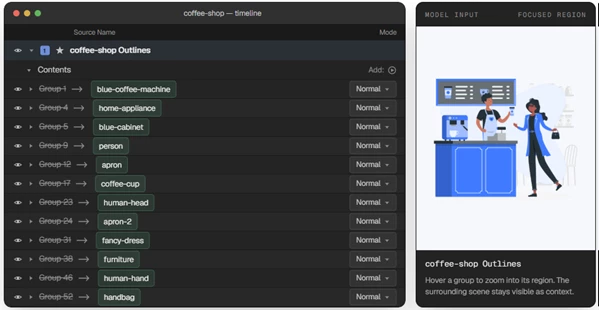
Shape layers can contain multiple groups, making it difficult to understand their structure when the group names are unclear.
NeuRenamer supports renaming these internal groups based on their visual content. You can also hover over a group to see its region in context, helping you identify which part of the shape layer it represents.
Project Panel Items
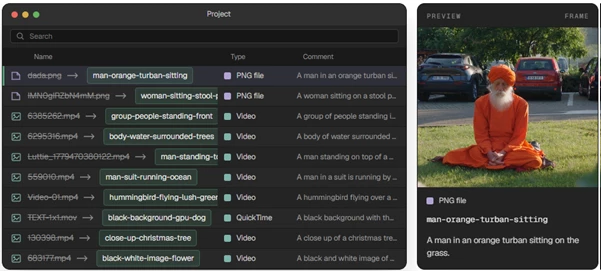
The plugin also works in the After Effects Project panel.
It can generate names and comments for selected Project items based on the frames it examines. When you hover over an item, you can see the frame used for analysis along with its generated comment.
This provides a visual reference for understanding why a particular name was assigned.
Local AI Processing and Offline Support
One of NeuRenamer's important characteristics is that its AI vision model runs directly on your computer.
During the first run, the plugin downloads the required model. After that initial download, it can operate offline.
The processing workflow is straightforward:
Select Content → Analyze Frames Locally → Generate Names → Add Comments
Because the analysis happens locally, the frames remain on your machine rather than being uploaded to an online AI service.
This approach is particularly relevant when working with project footage that should remain on your computer.
Choosing the Right Input Size
NeuRenamer includes an input size setting that affects how much image detail the AI model receives during analysis.
For most projects, the smallest input size is recommended. Increasing the resolution usually has little effect on the generated names but requires more processing time.
A larger input size becomes more relevant when the model needs to recognize:
Small text appearing within a frame.
Fine visual details that may be difficult to identify at a lower resolution.
Choosing the smallest suitable size helps avoid unnecessary processing without significantly affecting typical naming results.
Where NeuRenamer Fits into an Editing Workflow
NeuRenamer comes in handy when you're working with compositions full of layers that have vague or automatically generated names.
It helps keep busy timelines organized, makes it easier to identify groups within shape layers, and lets you find what you're looking for in the Project panel without guessing what each item contains.
Its main purpose is not to change the appearance of a composition or modify its animation. Instead, it improves how visual content is labeled and described inside After Effects.
For editors and motion designers working with large or unfamiliar compositions, NeuRenamer provides a way to make project structures more understandable without naming every element individually.

Files Password : gfxplugin.com OR 123456