Downloadable Files
You can download Comic Vision for free at the bottom of this page.
Turn Your Footage into Animated Comic Art with Comic Vision
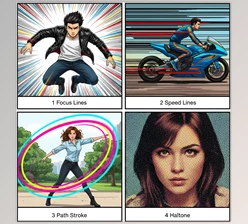
Comic Vision is a GPU-accelerated plugin that transforms regular video footage into animated comic-book visuals inspired by Spider-Man: Into the Spider-Verse. It combines AI subject detection, bold ink outlines, halftone patterns, motion-based colour misregistration, and speed lines to create a hand-drawn appearance directly in your editing timeline.
The plugin works with Adobe After Effects, Premiere Pro, DaVinci Resolve, and Nuke. Its effects can react to movement in the footage, so you can create a comic-book style that changes with the action rather than applying the same treatment to every frame.
AI Subject Detection Without Manual Rotoscoping
One of the main features of Comic Vision is its ability to separate people from their surroundings automatically.
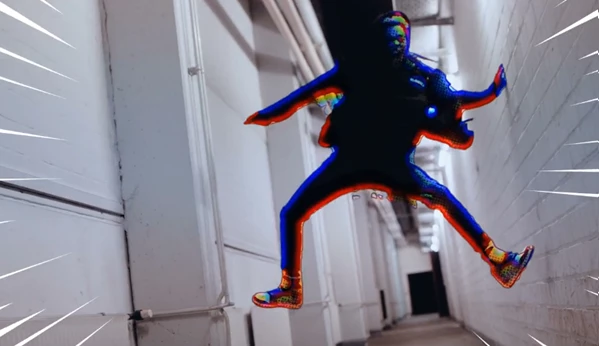
The plugin uses two AI models that run locally on your computer. One detects people in the frame, while the other creates an outline around them. This means you don't need to manually rotoscope your subject or record footage against a green screen.
Once the subject is detected, Comic Vision can apply different treatments to the foreground and background:
Subject Outline: Adds a bold ink line around the detected person.
Rim Light: Creates a coloured glow around the subject's edges.
Background Halftone: Applies stronger dot patterns to the background.
Background Misregistration: Separates colour layers to create a printed comic-book appearance.
This separation helps the subject stand out without relying on traditional background blur.
If you already have a subject matte, you can switch to Matte Layer mode and use the alpha or luma information from another layer.
The plugin also caches AI-generated mattes. Once a frame has been processed, adjusting the visual effects doesn't require the AI to analyze that frame again.
Motion-Based Colour Misregistration
Comic Vision uses movement to control how strongly its comic effects appear.
It compares each frame with the previous one to detect changes. When movement occurs, the red and blue colour plates shift apart in the direction of motion, creating an effect similar to misaligned printing.
The amount of colour separation changes with the action. Moving areas receive stronger misregistration and screen patterns, while stationary areas can retain more of their original appearance.
The Split Softness setting controls how sharp or soft the separated colour plates look. Softer edges resemble ink printed on paper rather than a digital glitch.
You can also change the Activate setting to Always when you want the comic treatment applied across the entire image, regardless of movement.
Create Action Effects with Speed Lines
Speed lines are another important part of the comic-book style, especially in scenes with fast movement.
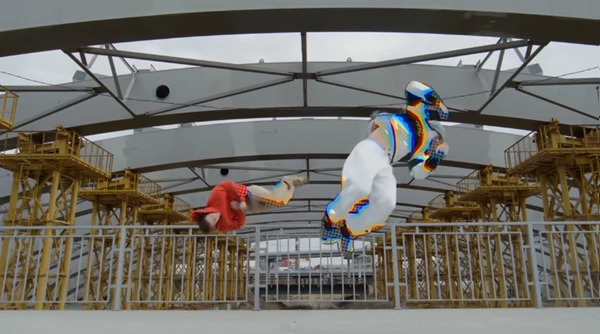
Comic Vision can generate bursts of lines from the edges of the frame when motion exceeds a selected threshold. These lines appear briefly and then disappear as the movement slows down.
You can control their behaviour using several settings:
Speed Threshold: Determines how much movement is needed to trigger the lines.
Force On: Lets you activate speed lines manually and animate them with keyframes.
Count and Length: Control the number and size of the lines.
Width and Colour: Adjust their visual appearance.
Centre: Changes the point toward which the lines are directed.
The plugin also keeps speed lines away from the detected subject, helping maintain a clear view of the main action.
For more controlled sequences, you can keyframe Force On to place speed lines at specific moments rather than depending entirely on automatic motion detection.
Ink Lines, Halftone Patterns, and Animated Frames
Comic Vision includes several effects that recreate the appearance of traditional printed and animated comics.
Its ink effect adds outlines to image details, while colour flattening reduces smooth gradients into more distinct colour bands. This gives footage a more illustrated appearance.
For shading, the plugin offers three main screen styles:
| Shading Style | Visual Effect |
|---|---|
| Halftone Dots | Creates dot patterns similar to printed comic shading. |
| Line Screen | Uses lines to build shading patterns. |
| Crosshatch | Creates shading with intersecting lines. |
You can adjust settings such as ink line width, halftone dot size, screen angle, and rim-light colour. These parameters are keyframable, allowing the look to change throughout a shot.
Animate on Twos
Comic Vision also includes an animation timing effect inspired by traditional hand-drawn animation.
With Animate on Twos, each drawing can be held for two or three frames rather than updating on every frame.
This creates a stepped animation style while keeping the original timing of the footage. It is particularly relevant when you want live-action movement to resemble animated comic-book characters.
11 Presets for Different Comic Styles
Comic Vision includes 11 presets that provide different combinations of its visual effects.
| Preset | Style or Focus |
|---|---|
| Default | General starting look |
| Comic Panel | Comic-panel styling |
| Action Burst | Action-focused effects |
| Motion Only | Motion-based treatment |
| Newsprint | Printed newspaper appearance |
| Noir Hatching | Hatching-based noir styling |
| Line Screen | Line-based shading |
| Neon Rim | Coloured rim-light emphasis |
| Animated on Twos | Stepped animation timing |
| Clean Ink | Ink-focused appearance |
| Speed Lines | Motion speed-line effects |
You can switch between presets from the Preset menu without losing your existing subject settings. This lets you compare different styles on the same footage without setting up subject detection again.
Preview Individual Effects and Control the Final Mix
Comic Vision provides several view modes for checking specific parts of the effect.
You can display the subject matte to inspect AI detection, view the motion mask to see where movement is being detected, or isolate the ink effect to examine the outlines.
These views are helpful when a particular element needs adjustment without the distraction of the complete comic treatment.
The plugin also includes a Mix control that blends the processed result with the original footage. You can use it to reduce the overall intensity while keeping some of the original image visible.

Files Password : gfxplugin.com OR 123456