Downloadable Files
You can download NormLight for free from the bottom of this page.
Pseudo-3D Lighting for 2D Layers in After Effects
NormLight is a GPU-accelerated plugin for Adobe After Effects that adds pseudo-3D lighting and shading to 2D layers using Normal Maps and optional Depth Maps. It works with native After Effects lights and includes edge lighting, reflections, and refractions, giving motion designers more control over how flat artwork responds to light.
How NormLight Uses Normal and Depth Maps
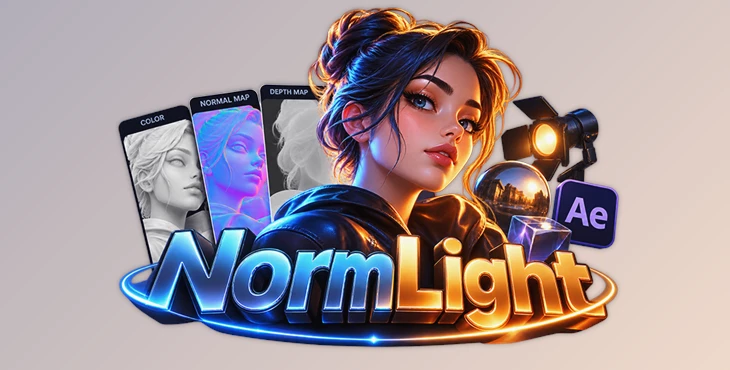
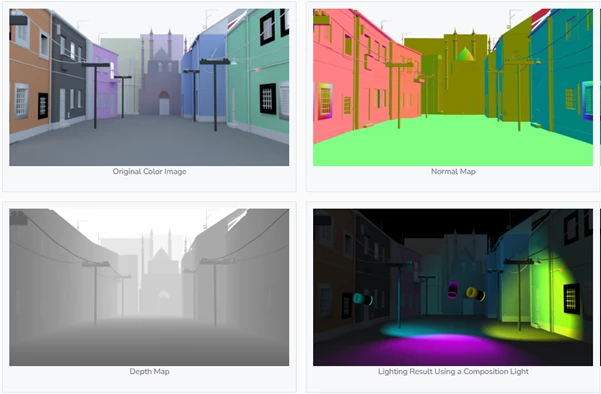
NormLight uses three main inputs to calculate its lighting results:
Original Color Image: The source artwork or footage that receives the lighting and shading.
Normal Map: Provides surface direction information so light can interact with different areas of the 2D image.
Depth Map: Adds depth information for depth-aware lighting.
The plugin uses these inputs with lights in the After Effects composition to create a pseudo-3D appearance without requiring the source artwork to be a fully modeled 3D object.
Normal Map setup is flexible. You can assign channels and invert the X, Y, and Z axes to match the coordinate system used in After Effects. This is important when a Normal Map's channel orientation does not match the expected setup. NormLight also includes visualization tools that help you inspect the map and understand how the lighting is being calculated.
Lighting and Shading Options
NormLight supports several lighting and shading methods, covering basic surface shading, stylized looks, highlights, and edge illumination.
Native After Effects Lights
The plugin works in real time with four types of After Effects lights:
Ambient
Point
Spot
Parallel
This lets you use the lights already available in your composition to control how the 2D artwork is illuminated. For example, a Spot Light can create a focused lighting effect on an image containing architectural details, while other supported light types provide different ways to illuminate the scene.
Lambert and Toon Shading
NormLight offers Lambert shading for natural-looking light and shade transitions, as well as Toon shading for a stepped, cel-shaded appearance.
These options are useful for different visual styles. Lambert shading suits artwork that needs smoother light transitions, while Toon shading can help create a more graphic look for illustrated characters, backgrounds, or stylized motion graphics.
Specular Highlights
The Specular controls add highlights to the rendered surface. Roughness and Metal controls provide additional ways to shape the appearance of these highlights, helping you create different material looks.
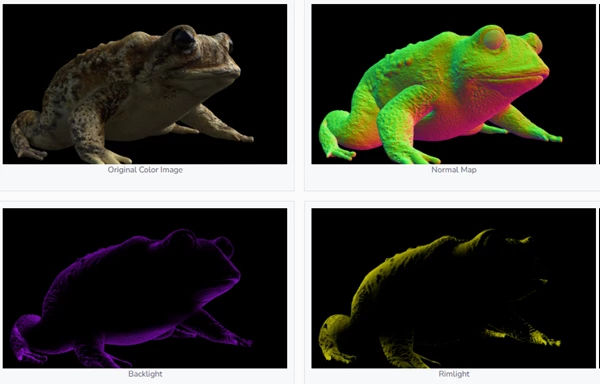
Backlight and Rimlight
NormLight includes two edge-lighting options:
Backlight: Highlights the edges of the artwork's silhouette.
Rimlight: Adds light along the edges to help separate the subject visually from its surroundings.
An Alpha- or Depth-based Edge Mask is available to control how edge lighting is applied. These features are particularly relevant to character artwork and other images where silhouette definition is important.
Reflection and Refraction Effects
Beyond conventional lighting, NormLight includes optical effects that use additional image inputs to simulate how surfaces interact with their surroundings.
| Effect | Required image input | Purpose |
|---|---|---|
| Reflection | HDRI or environment image | Simulates reflected surroundings on the artwork |
| Refraction | Background image | Simulates a background seen through the object |
Both effects include Fresnel controls, providing additional control over their appearance.
Reflection can help create the look of reflective materials by using an environment image as the source of reflected detail. Refraction uses a background image to simulate the appearance of viewing the background through an object.
Combined with the lighting and shading controls, these effects offer options for creating more varied material appearances from 2D source images.
Visualizing Normal Maps and Light Positions
Setting up Normal Maps and depth-aware lighting can be difficult when the underlying information is not easy to inspect. NormLight addresses this with visualization features that display Normal Map information and light positions within the Depth Map.
These guides help you check whether the Normal Map is configured correctly and see how lights are positioned relative to the depth information. This is especially useful when adjusting channel assignments, axis inversion, or the depth-based lighting setup.
Rather than relying only on the final rendered image, you can inspect the information driving the effect and make more informed adjustments.
When to Use NormLight
NormLight is suited to After Effects projects that need lighting and material effects on 2D artwork without turning every element into a fully modeled 3D object. Its Normal Map-based lighting can be used with illustrated characters, background artwork, and other layered images.
NormLight offers different lighting options for different results. Lambert and Toon shading help create different surface styles, while Specular adds highlights to materials. Backlight and Rimlight help light the edges of objects, and Reflection and Refraction create optical effects.
NormLight uses After Effects lights, optional Depth Maps, and GPU-accelerated processing. It helps users add 3D-style lighting to 2D compositions without leaving After Effects.

Files Password : gfxplugin.com OR 123456