
Downloadable Files
You can download Easy Liquids for free at the bottom of this page.
Create Realistic Liquid Simulations in Blender with Easy Liquids
Creating liquid simulations in Blender can be difficult when the liquid does not appear after baking, flows through a glass, or behaves differently from what you expect. Easy Liquids by SuperhiveMarket simplifies this process by setting up Blender's built-in Mantaflow liquid simulation system through a straightforward panel. You choose a container, select a liquid, adjust a few parameters, and create the simulation. The add-on also checks common setup problems before baking and provides tools to fix them.
Create Liquid Simulations with Less Setup
Easy Liquids organizes the main steps of liquid simulation into a more accessible workflow. Instead of configuring every part of a Mantaflow setup manually, you can choose from predefined containers and liquids, select how the liquid should behave, and bake the simulation.
The add-on supports three main liquid behaviors:
Pour: Creates a stream that pours into a glass, cup, or bowl from above.
Fill & Slosh: Starts with a full container and simulates liquid movement when the container is animated, rotated, or moved.
Instant Fill: Fills a container immediately with a still liquid, without requiring a simulation bake.
These options cover different needs, from animated drink shots to static product renders. Each mode provides a different way to create the liquid effect without requiring the same simulation workflow for every scene.
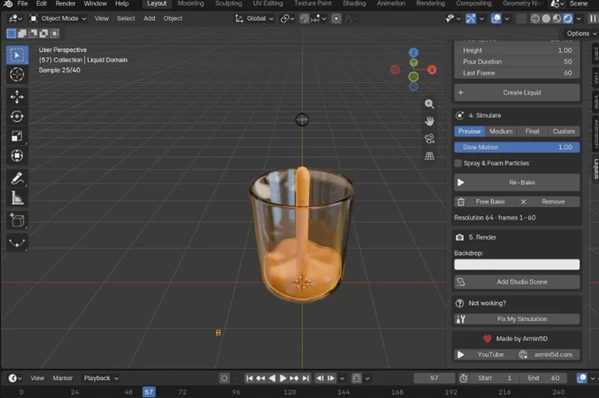
Control Pouring, Movement, and Simulation Quality
For pouring animations, Easy Liquids provides controls for Stream Size, Pour Speed, Height, and Pour Duration. These settings let you adjust the appearance and timing of a stream as it enters a container.
The Fill & Slosh mode focuses on movement inside the container. The liquid starts full and reacts to changes in the container's position and rotation. A setting called Splash Room provides additional space for splashes to develop, which is useful for shots where liquid movement is an important part of the animation.
For more detailed control over simulation quality, the add-on offers several resolution options:
| Setting | Purpose |
|---|---|
| Preview | Check the timing of the simulation. |
| Medium | Provides a resolution suitable for most shots. |
| Final | Produces more detailed simulation results. |
| Custom | Lets you set your own resolution and view the exact voxel size. |
Easy Liquids also includes Slow Motion for slower pouring animations and Spray & Foam particles for additional liquid effects. These options are useful when a shot requires more than a basic stream or a simple movement inside a container.
12 Liquid Presets with Different Materials and Behaviors
Easy Liquids includes 12 liquid presets: Water, Juice, Coffee, Wine, Beer, Cocktail, Milk, Oil, Honey, Serum, Paint, and Slime.
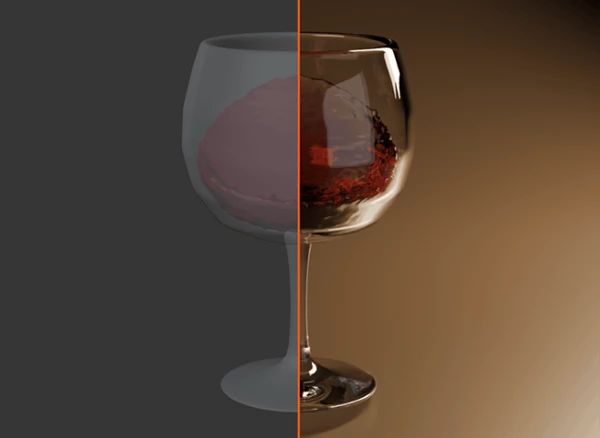
The presets are designed around the material properties and physical behavior associated with each type of liquid. Clear liquids use refraction and absorption, while creamy liquids use subsurface scattering. The presets also account for differences in thickness, so honey, paint, and slime pour more slowly, while water can splash more freely.
The Custom Color option lets you change the liquid's color without replacing its existing material setup. This is useful when a product shot requires a specific color while retaining the material characteristics of the selected preset.
Choose a Built-In Container or Use Your Own Model
The add-on provides eight ready-to-use containers:
Bowl
Glass
Mug
Wine Glass
Cocktail Glass
Jar
Vase
Plate
These containers are built with real wall thickness, making them suitable for liquid simulations. This matters because the container's geometry affects whether the liquid stays inside or leaks through its surface.
You are not limited to the included models. Easy Liquids also supports custom meshes created in Blender. When you select your own container, the panel checks for holes and identifies geometry problems that could interfere with the simulation before you spend time baking it.
Fix Common Mantaflow Simulation Problems
One of Easy Liquids' most practical features is Fix My Simulation. It checks for several common issues that can prevent a liquid simulation from working correctly or producing visible results.
The tool checks for:
Replay cache settings that store no simulation data.
Unapplied object scale.
A liquid stream that is too small for the selected resolution.
A liquid source positioned outside the simulation domain.
Thin container walls that allow liquid to leak.
Flipped surface normals.
When possible, the tool fixes these issues for you. It can also be used with simulations configured manually, so you do not have to create every simulation through Easy Liquids to benefit from its diagnostic features.
This troubleshooting function addresses several common causes of failed or unexpected results and helps make the simulation process more predictable.
Create a Product Studio Scene for Rendering
Easy Liquids includes a one-click studio scene setup for rendering liquid and container shots. It creates a product-style environment with a curved backdrop, three soft lights, a framed camera, and Cycles settings configured for glass and liquid.
This is particularly relevant for product visualization, where the liquid, container, reflections, and overall presentation need to work together. Rather than building the basic studio environment separately, you can generate the scene around your container and prepare it for rendering.
Combined with the liquid presets and the Instant Fill mode, this feature supports both animated liquid shots and still product images.

Files Password : gfxplugin.com OR 123456
![Download Gumroad – Measurable v1.2 [Blender Addon]](https://dls3.gfxplugin.ir/Download_Files/19759/SearchSmall/banner.png)