Downloadable Files
You can download Speed Ramp Pro for free from the bottom of this page.
Smooth and Customizable Speed Effects for DaVinci Resolve
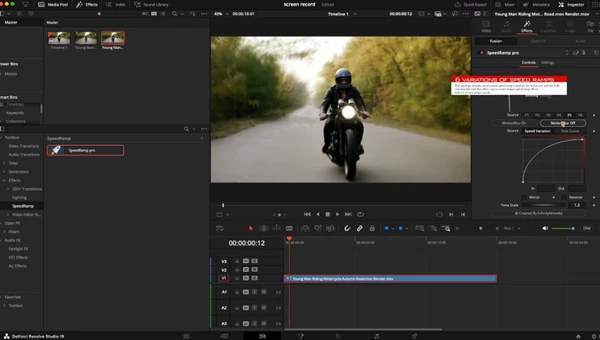
Speed Ramp Pro is a collection of speed ramp effects designed for DaVinci Resolve, helping video editors create smooth changes in playback speed and dynamic transitions between fast and slow motion. With drag-and-drop functionality and customizable speed settings, the pack provides a practical way to add cinematic motion effects to video projects.
Speed Ramp Effects and Customizable Speed Control
Speed Ramp Pro helps you create smooth speed changes in your videos. With speed ramping, you can make parts of a clip play faster or slower. This lets you control the speed of movement at different moments in your video.
The included effects are designed to produce smooth transitions between these speed changes, making them suitable for footage where timing and motion play an important role.
One of the main features of Speed Ramp Pro is its fully customizable speed settings. Editors can adjust the speed behavior to suit the pacing of their footage rather than relying entirely on fixed effects.
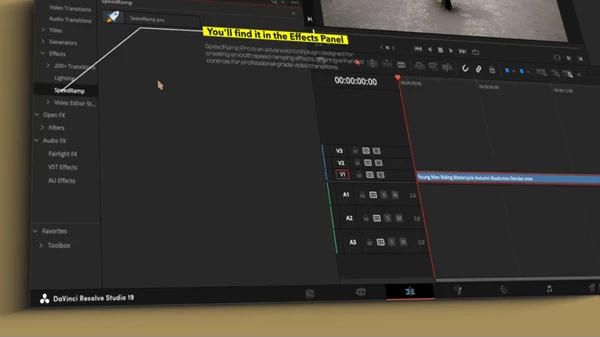
The pack is also easy to use. You can simply drag and drop the speed ramp effects into your DaVinci Resolve project without spending much time on setup.
Key Features
Drag-and-Drop Effects: Apply speed ramp effects through a straightforward drag-and-drop workflow.
Smooth Speed Transitions: Create high-quality transitions between different playback speeds.
Customizable Speed Settings: Adjust speed parameters to match the timing and movement of individual clips.
DaVinci Resolve Integration: Designed specifically for use within DaVinci Resolve.
Tutorial Resources: Includes installation instructions and a video tutorial explaining how to use the effects.
Where Speed Ramp Pro Works Best
Speed ramp effects are particularly effective in footage containing noticeable movement, where changes in playback speed can emphasize specific actions or create a stronger sense of rhythm.
Speed Ramp Pro is suitable for several types of video projects:
Cinematic Videos: Introduce controlled speed changes to emphasize movement and create dramatic sequences.
Sports Edits: Highlight important moments in fast-moving action footage by alternating between different playback speeds.
Travel Videos: Add dynamic pacing to travel sequences and footage featuring movement.
Music Videos: Use speed transitions to create rhythmic changes that complement the editing style.
Commercials: Incorporate smooth acceleration and deceleration effects into promotional footage.
Social Media Content: Create short, energetic edits with noticeable changes in motion and pacing.
Because the speed settings are customizable, the effects can be adapted to different editing styles, from subtle cinematic transitions to more pronounced changes in playback speed.
DaVinci Resolve Compatibility and Requirements
Speed Ramp Pro is designed exclusively for DaVinci Resolve.
The product description lists compatibility with DaVinci Resolve 17 and above. However, its separate system requirements specify DaVinci Resolve 19 or later. Because these statements differ, users should consider version 19 or later the stated requirement until compatibility with earlier versions is confirmed.
Basic knowledge of video editing is also recommended.
Speed Ramp Pro offers a focused set of tools for editors who want adjustable speed transitions without building every effect from scratch. Its combination of smooth speed ramp effects, drag-and-drop functionality, and customizable speed controls makes it relevant to motion-focused editing projects in DaVinci Resolve.

Files Password : gfxplugin.com OR 123456