Downloadable Files
You can download Atmos 3D Pro for free from the bottom of this page.
Turn a Single Photo into Realistic 3D Motion in After Effects
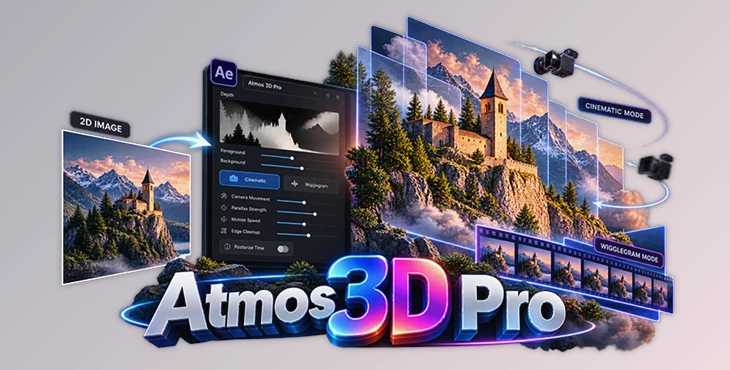
A still image doesn't have to stay still. Atmos 3D Pro is an After Effects plugin developed by Artura.Studio that transforms ordinary images into animated 3D scenes with realistic depth and parallax. It can create looping wigglegrams, subtle cinematic camera movements, and boomerang-style animations using just a single image.
Instead of just moving pixels around like a regular 2D effect, the plugin looks at the depth of your image and turns it into a 3D scene. It separates the subject from the foreground and background, making the result look more realistic. You don't have to cut out objects by hand, warp the image, or upload anything to the cloud.
The initial effect can be generated in just two clicks, while additional controls are available for refining the depth, camera movement, and overall appearance.
Intelligent 3D Depth Reconstruction
One of the main challenges when animating a flat image is making the movement look three-dimensional. Standard displacement maps can simulate depth, but they often stretch or distort objects when the camera moves.
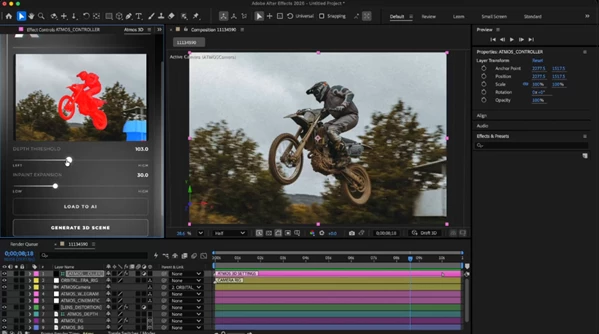
Atmos 3D Pro addresses this through intelligent depth analysis. Rather than simply shifting pixels according to a depth map, it examines the image's spatial relationships to reconstruct a 3D scene.
The plugin identifies three important areas:
Foreground: Elements positioned closest to the camera.
Subject: The primary object or person within the composition.
Background: Distant elements that help establish depth and perspective.
This separation creates the parallax effect, where nearby objects appear to move differently from objects farther away.
Refining Depth and Subject Separation
Automatic depth analysis may need adjustments when an image contains overlapping objects or complicated foreground details.
Atmos 3D Pro includes a two-slider interface for refining how the image is interpreted. These controls help improve spatial separation and give artists more influence over the reconstructed scene.
For more difficult images, the plugin also supports manual subject selection. You can click directly in the preview window to define the subject and generate a cleaner, more precise mask.
This additional control is particularly relevant for compositions with multiple foreground elements or subjects that are difficult to separate automatically.
Cinematic Mode vs. Wigglegram Mode
Atmos 3D Pro provides two distinct motion behaviors. Both use the same depth reconstruction engine, but they produce noticeably different animation styles.
| Motion Mode | Behavior | Visual Result |
|---|---|---|
| Cinematic Mode | Smooth orbital camera movement across three axes | Natural depth and subtle cinematic motion |
| Wigglegram Mode | Repeating horizontal camera movement | Retro stereoscopic wiggle animation |
Cinematic Mode: Smooth Camera Movement
Cinematic Mode creates controlled orbital movement around the reconstructed scene. The camera can move across all three axes, producing gentle shifts in perspective that reveal the image's depth.
This mode works well for photographs, portraits, and compositions where the goal is to introduce motion without making the effect overly noticeable.
Artists can adjust the camera movement to create anything from a subtle perspective shift to a more pronounced three-dimensional sweep.
Wigglegram Mode: Vintage 3D Photography
Wigglegram Mode recreates the distinctive side-to-side movement associated with vintage stereoscopic photography.
The camera moves horizontally in a repeating loop, causing the foreground and background to shift relative to one another. This produces the familiar animated 3D effect often seen in wigglegrams.
For a more authentic analog appearance, Atmos 3D Pro includes an integrated Posterize Time option. It creates the stepped frame movement associated with traditional multi-lens 3D film cameras.
The result is a deliberately less fluid animation that captures the character of classic wiggle photography.
Adjustable Camera Motion and Parallax Controls
Although Atmos 3D Pro can generate an initial animation quickly, its settings aren't limited to automatic presets.
The plugin provides editable parameters for controlling the appearance and movement of the reconstructed scene.
These include:
Camera Trajectory: Adjust the path and direction of the virtual camera.
Motion Speed: Control how quickly the animation moves.
Parallax Strength: Change the intensity of the depth effect.
Edge Cleanup: Refine visible edges to improve the appearance of separated elements.
Camera Movement: Fine-tune the motion to achieve the desired visual style.
These controls are important because different photographs require different amounts of movement. A portrait with a clearly separated subject may work well with noticeable parallax, while a more complicated composition may benefit from smaller camera movements and additional edge refinement.
Creating 3D Animations from Still Images
Atmos 3D Pro operates directly inside Adobe After Effects, keeping the image animation process within the existing composition workflow.
The general process is straightforward:
Start with a still image in After Effects.
Generate the 3D scene using the plugin's automated depth reconstruction.
Refine the depth separation using the two-slider interface or manual subject selection when necessary.
Choose Cinematic or Wigglegram Mode depending on the desired animation style.
Adjust camera movement, parallax, speed, and edge cleanup to refine the result.
The workflow can remain simple for images that produce good automatic depth separation. More complex shots can be adjusted through the additional controls without requiring a separate rotoscoping process.
Another important detail is that the depth analysis runs without cloud processing. The plugin handles the reconstruction directly within the After Effects workflow.
Where Atmos 3D Pro Fits into Creative Projects
Atmos 3D Pro is particularly suited to projects that need to introduce depth and movement into existing photography.
Some practical uses include:
Animated Portraits: Add subtle camera movement to portrait photographs while maintaining the subject as the main focus.
Social Media Visuals: Create looping wigglegrams and boomerang-style animations from still images.
Motion Graphics: Incorporate three-dimensional photographic elements into After Effects compositions.
Retro Photography Effects: Reproduce the horizontal wiggle and stepped motion associated with vintage 3D cameras.
Cinematic Photo Animation: Add controlled perspective changes to landscape, architectural, or other photographic compositions.
The main advantage is the ability to create these effects from a single frame. There is no need to capture several photographs from different camera positions to generate the initial 3D animation.
A Practical Tool for Single-Image 3D Animation
Atmos 3D Pro focuses on a specific task: turning flat photographs into animated scenes with convincing spatial depth.
Its combination of automatic depth reconstruction, manual subject refinement, and two camera motion styles provides a balance between quick results and detailed control.
If you work with portraits, photos, or motion graphics in After Effects, this tool makes it easier to add parallax movement. You can give your images a sense of depth without building a full 3D scene or cutting out every part of the image by hand.

Files Password : gfxplugin.com OR 123456