Downloadable Files
You can download FastRawViewer for free from the bottom of this page.
FastRawViewer – Review RAW Photos Without Waiting for Previews
Sorting through hundreds of RAW photos can take a lot of time, especially when your photo editor needs to generate previews before you can check each image.
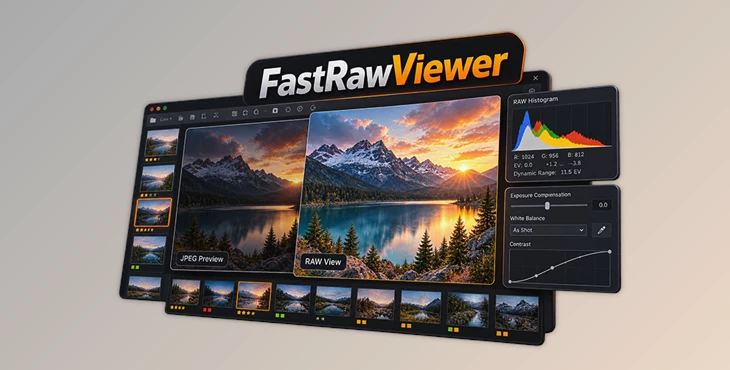
FastRawViewer by LibRaw is designed to make this process faster. It opens RAW files directly and displays images using their actual RAW data rather than relying only on embedded JPEG previews.
This difference matters because a JPEG preview doesn't always show the full exposure and detail captured by the camera. A photo that looks too dark or overexposed in a JPEG preview might still contain useful information in the RAW file.
FastRawViewer helps photographers check image quality, identify exposure problems, compare similar shots, and select the best photos before moving into their main editing software.
Check Exposure, Focus, and Image Details
FastRawViewer includes several tools for checking the technical quality of RAW images. These help you decide which photos are worth keeping and which ones need further editing.
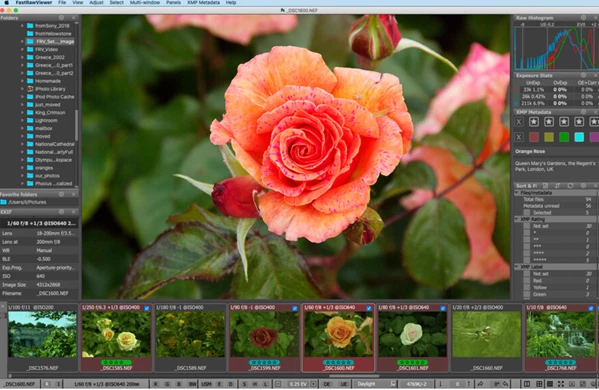
RAW Histogram: Check exposure and dynamic range using actual RAW data instead of a JPEG-based histogram.
Overexposure and Underexposure Indicators: Find clipped highlights and areas with very little shadow detail.
Focus Peaking: Highlight sharp edges and detailed areas to help evaluate focus.
Shadow Boost: Brighten dark areas temporarily to inspect hidden details and shadow noise.
Highlight Inspection: Increase contrast in bright areas to check whether important details are still visible.
Per-Channel View: Examine individual color channels for noise and exposure problems.
These tools are particularly helpful when reviewing photos taken in difficult lighting conditions, where the camera's JPEG preview may not give an accurate picture of the RAW file.
Fast Photo Selection and File Management
FastRawViewer is also built for organizing large collections of photographs. You can browse images, compare shots, and manage files without creating an intermediate photo catalog.
The software provides several viewing and selection options:
Grid and Single Image Views: Switch between a collection of thumbnails and a detailed view of one photo.
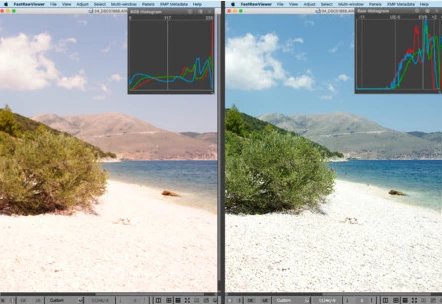
Multi-Window Comparison: View two or four images together to compare focus, exposure, and overall quality.
Ratings and Color Labels: Mark your preferred shots and filter images based on their ratings or labels.
File Operations: Rename, copy, move, rotate, or reject individual photos or groups of files.
RAW and JPEG Comparison: Switch between RAW data, embedded JPEG previews, and external JPEG files.
Zoom and Full-Screen Viewing: Examine small details or use more screen space for image evaluation.
You can also save image selections and load them later, which is helpful when reviewing a large photography session over several stages.
FastRawViewer works with files stored on memory cards, local drives, and network locations.
Make Basic RAW Adjustments Before Editing
FastRawViewer isn't intended to replace a complete RAW editor, but it does include several adjustments that help you evaluate images before processing them.
You can change exposure compensation, white balance, and contrast curves directly in the viewer. There are also options for display sharpening and black-and-white previews.
One important feature is its XMP metadata support.
Exposure and white balance adjustments can be saved in XMP sidecar files, allowing Adobe Lightroom and Adobe Camera Raw to read them when you open the images for editing.
Ratings, labels, titles, and descriptions can also be stored in XMP files for use with compatible RAW converters.
For a series of similar photos, FastRawViewer can copy exposure, white balance, and contrast settings from one image to the others. This is useful for photo sequences captured under consistent lighting conditions.
Supported Formats and System Compatibility
FastRawViewer supports RAW files from a wide range of digital cameras, along with JPEG, TIFF, and PNG images.
According to LibRaw, the software supports RAW formats from more than 1,300 digital cameras and mobile devices. RAW viewing is not supported for Sigma Foveon cameras.
Supported operating systems:
Windows 7–11 (64-bit)
macOS 10.13 or later
The interface is highly customizable. You can change keyboard shortcuts, adjust panel layouts, choose which EXIF information appears, and configure viewing preferences.
FastRawViewer also avoids creating intermediate catalogs, so you can browse folders directly without adding unnecessary files to your storage.
When Is FastRawViewer Most Useful?
FastRawViewer is a practical choice for photographers who need to review large numbers of RAW images before editing.
For wedding, event, sports, or wildlife photography, it helps compare similar shots and check focus without waiting for a full RAW editing application to build previews.
Landscape photographers can also benefit from its RAW histogram and highlight inspection tools when working with scenes that have a wide brightness range.
Its main advantage is simple: you can make photo selection decisions using the information captured in the RAW file, rather than judging images only by their JPEG previews.

Files Password : gfxplugin.com OR 123456