Downloadable Files
You can download PuzziPix Pro for free from the bottom of this page.
Create Custom Jigsaw Puzzle Designs with Six Unique Styles
PuzziPix Pro is a creative photo editing tool from JixiPix that transforms ordinary images into customizable jigsaw puzzle compositions. It goes beyond simply dividing a photo into puzzle pieces, giving you control over their position, size, rotation, shape, and visual appearance. You can even combine multiple photographs within a single puzzle to create more expressive designs.
Turn Photos into Custom Jigsaw Puzzle Designs
PuzziPix Pro automatically converts any imported photograph into a jigsaw puzzle. Once the image is divided into pieces, you can rearrange individual sections, separate them from the original composition, or combine different puzzle styles to achieve a distinctive result.
The software includes six puzzle designs:
Four Classic Styles: Traditional jigsaw puzzle patterns with different piece arrangements.
Hexagon Puzzle: A geometric design featuring hexagonal pieces.
Round Puzzle: A circular puzzle style for more unconventional compositions.
The Auto Generate feature lets you explore different puzzle arrangements without rebuilding the composition manually.
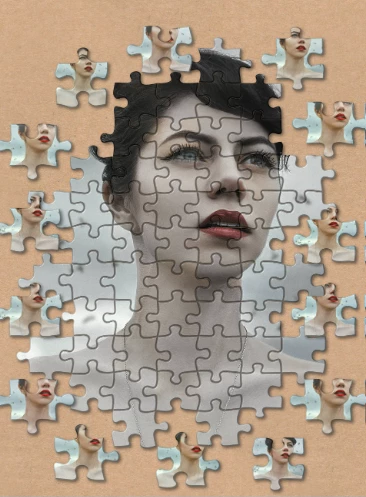
One particularly interesting option is the Fly-off Puzzle Piece Effect, which creates the illusion of pieces flying away from the image. You can direct this effect toward the top, bottom, or sides of the composition, adding movement and depth to an otherwise static photograph.
Edit Individual Pieces and Combine Multiple Photos
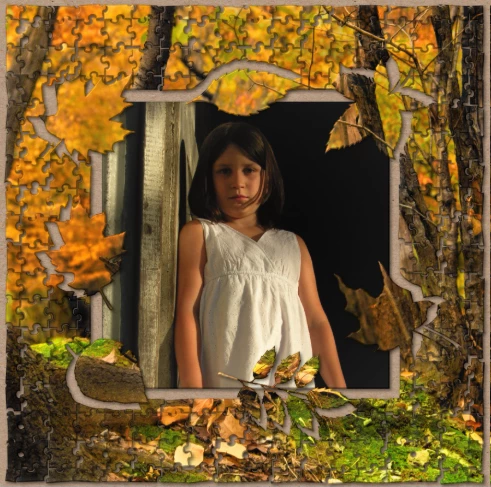
Unlike a basic puzzle filter, PuzziPix Pro treats puzzle pieces as editable elements. You can select a single piece or a group and adjust its position, rotation, and size independently.
The main editing controls include:
Move, Rotate, and Resize: Rearrange individual pieces or entire groups.
Front and Back Controls: Change the stacking order of overlapping pieces.
Auto Snap: Automatically reconnect separated pieces or groups.
Import Photo: Replace the image inside selected pieces with another photograph.
Duplicate Layers: Reuse existing elements within the composition.
The ability to insert different photographs into individual pieces is especially valuable for visual storytelling. A single puzzle can contain multiple images, allowing designers to represent connections between different subjects within one composition.
Create Puzzle Cutouts with Custom Shapes and Logos
Another distinctive feature of PuzziPix Pro is its shape-based editing system. Rather than limiting your design to standard puzzle outlines, the software lets you cut shapes into the puzzle or modify its outer boundaries.
You can select shapes from the built-in library or import your own artwork, including logos and custom graphics.
The process is straightforward:
Open the Shape Library through Auto Generate or import a custom shape.
Position and resize the shape over your puzzle.
Apply the shape to create a cutout or modify the puzzle composition.
Use the Conform tool to fit puzzle pieces to the selected shape.
This feature opens up possibilities for advertising graphics, branded artwork, and promotional designs. For instance, a company logo can become a cutout within a puzzle, while selected pieces can display different photographs related to the brand.
The same approach works with text-based artwork, making it possible to combine typography and puzzle imagery in a single design.
Add Realistic Depth, Lighting, and Texture
PuzziPix Pro includes several visual controls for giving puzzle compositions a more dimensional appearance.
| Feature | Function |
|---|---|
| 3D Edges | Adds dimensional edges to puzzle pieces |
| 3D Lighting | Controls lighting across the puzzle composition |
| Film Grain and Texture | Adds surface texture and grain |
| Exposure | Adjusts the image's exposure |
| Background and Foreground Images | Adds additional imagery around the puzzle |
| Background Settings | Switches between transparent, textured, and solid-color backgrounds |
These controls help create the impression of physical puzzle pieces rather than flat shapes placed over a photograph.
Transparent backgrounds are particularly useful when preparing puzzle graphics for integration into other designs.

Files Password : gfxplugin.com OR 123456