Downloadable Files
You can download Rip Studio for free at the bottom of this page.
Create Custom Torn Paper Edges with Adjustable Fibers and Roughness
Rip Studio by JixiPix is a creative photo collaging application that lets you build realistic paper compositions using torn edges, curled corners, folds, tape, and decorative objects. Unlike basic collage tools that rely on ready-made layouts, Rip Studio gives you direct control over the shape, texture, and appearance of each paper element.
You can create everything from scrapbook pages and artistic photo collages to music covers and advertising graphics. The software works as a standalone application and also includes plugins for popular photo editing programs.
Create Realistic Torn Paper and Cutout Effects
One of the main features of Rip Studio is its ability to create custom paper shapes with natural-looking torn and cut edges. Using the Lasso tool, you can draw directly around an image to define which areas should remain visible.
The edges are not limited to a few preset styles. You can adjust several properties to create different paper textures:
Edge Width: Control the thickness of the torn border.
Fiber Amount: Adjust how many paper fibers appear along the edge.
Fiber Length: Change the length of the visible fibers.
Edge Roughness: Make the torn outline smoother or more irregular.
If you accidentally remove too much of an image, you can reverse the tool and restore the missing area without starting over.
This level of control is particularly helpful when creating irregular photo cutouts, ripped lettering, or custom paper elements that need to fit a specific design.
Add Paper Curls, Wrinkles, and Realistic 3D Shadows
Rip Studio goes beyond flat paper effects by simulating the physical appearance of folded and wrinkled surfaces.
You can curl the edges of a paper element or add surface wrinkles using adjustable sliders. The software also includes a 3D lighting engine that creates shadows based on the folds, creases, and raised areas of the paper.
The light source is adjustable, giving you control over how shadows appear across the composition.
For instance, a curled photograph can appear to lift away from the background, while a creased paper shape can cast shadows that emphasize its uneven surface.
These effects give collage elements a more convincing sense of depth without requiring a separate 3D modeling workflow.
Build Layered Collages with Tape and Decorative Objects
Rip Studio includes a layer-based editing system for combining photographs, paper shapes, text, and decorative elements.
When you drag images into the application, each image is placed on its own layer. You can then reposition, resize, rotate, or combine these elements to build a composition.
The Layer panel provides several element types:
| Layer Type | Purpose |
|---|---|
| Paper and Shapes | Create paper elements and image cutouts |
| Text | Add editable text to the composition |
| Tape | Attach decorative tape elements |
| Objects | Add pins, staples, and other decorations |
The available tape styles include transparent tape, duct tape, and masking tape. You can also decorate your compositions with stickpins, staples, rusty nails, and gems.
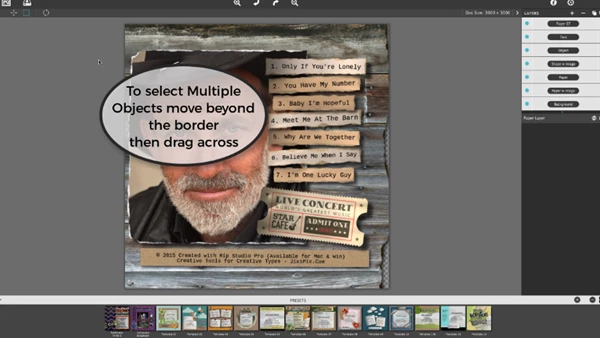
For more complex arrangements, Rip Studio supports selecting multiple objects by dragging a selection area around them. Selected elements can then be moved, resized, or rotated together.
Edit or Replace Photos Without Losing Their Shapes
A particularly practical feature of Rip Studio is its ability to separate the shape of a paper cutout from the image inside it.
After creating a torn shape, you can use the Image Tool to resize, rotate, or reposition the photograph within its existing boundaries.
You can also replace the photograph entirely while keeping the original torn outline.
This is useful when designing reusable collage layouts. You can create a custom paper arrangement once, then change the photographs without rebuilding every torn edge.
Rip Studio also supports saving individual layer presets, allowing you to reuse previously created elements in other compositions. Saved collage designs and templates can be viewed through the preset browser, which includes rollover previews.
Getting Started with Rip Studio
The basic workflow is straightforward:
Create a project: Choose a background style and project size.
Import images: Drag and drop photographs into the application to create layers.
Create paper shapes: Use the Lasso tool to draw torn or cut outlines.
Adjust the appearance: Customize edge fibers, roughness, curls, wrinkles, and lighting.
Arrange the composition: Position your layers and add text, tape, or decorative objects.
Save reusable elements: Store custom layer presets for future projects.
The software supports both individual paper designs and compositions containing multiple overlapping elements.
Creative Projects and Software Compatibility
Rip Studio is designed for artists, photographers, and graphic designers who want to create paper-inspired artwork with detailed textures and realistic depth.
You can use Rip Studio for different creative projects, such as:
Music Covers: Mix torn photos, text, and paper textures to create unique covers.
Advertising Graphics: Make custom paper cutouts and layered designs.
Scrapbook Pages: Add photos, tape, pins, and other decorations.
Art Collages: Combine different paper shapes, folds, and overlapping images.
Invitations: Create personal designs with paper textures and decorative details.
Rip Studio works on Windows and macOS as a separate app. You can also use it as a plugin for Adobe Photoshop, Photoshop Elements, Lightroom, and PaintShop Pro.
With its tools for editing paper edges, working with layers, saving shapes for later use, and adjusting 3D lighting, Rip Studio makes it easier to create digital collages that look like real paper artwork.

Files Password : gfxplugin.com OR 123456