Downloadable Files
You can download Auto IK Rigger for free from the bottom of this page.
Adding IK Constraints to Humanoid Arms and Legs in Blender
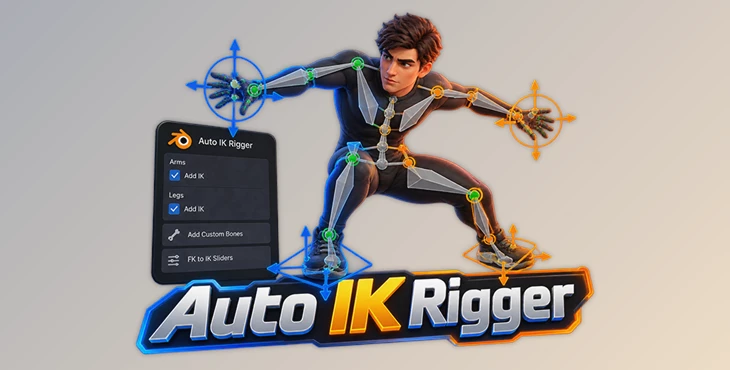
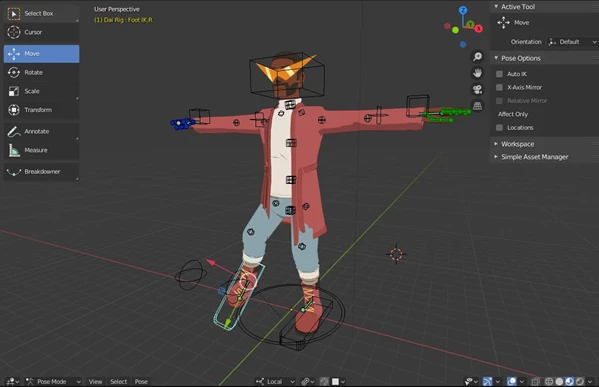
Setting up IK controls for a humanoid character in Blender can take a fair amount of work, especially when you need to configure both arms and legs. Auto IK Rigger is a Blender addon developed by Daitomodachi that helps simplify this process. It adds IK constraints, creates predefined custom bones, and provides FK to IK sliders without requiring you to build the entire setup manually.
The addon works with human-like 3D characters that already have a skeleton (armature). It can also recognize some bone names, making it easier to set up characters with different rigs.
Setting Up IK Controls for Humanoid Characters in Blender
Auto IK Rigger focuses on one specific task: adding IK functionality to an existing humanoid rig.
In Blender, inverse kinematics (IK) lets you control a chain of bones by moving a target. For example, moving a hand controller can affect the position of the arm, rather than requiring you to rotate each bone individually.
Creating this kind of setup manually involves configuring constraints and preparing the necessary control bones. Auto IK Rigger handles much of that work through a simple panel interface.
The addon can add IK constraints to both arms and legs in seconds. This is particularly helpful when you already have a rigged character but need a more convenient way to control its limbs during animation.
However, Auto IK Rigger is not a complete automatic rigging solution. It works with existing armatures rather than creating a full character skeleton from scratch.
Key Features of Auto IK Rigger
The addon includes several tools for preparing and controlling IK limbs.
Automatic IK Constraints for Arms and Legs
The main feature is its ability to quickly add IK constraints to a humanoid model's arms and legs.
Rather than configuring every limb individually, you can use the addon's panel to prepare the IK setup.
This is useful when working with multiple humanoid characters that need similar limb controls.
Predefined Custom Bones
Auto IK Rigger can add predefined custom bones to the character's armature.
These bones help provide the controls needed for the IK setup. However, their positions may need manual adjustment depending on the structure of the original armature.
The addon does not guarantee that every custom bone will be placed correctly on every character.
FK to IK Sliders
The addon includes FK to IK sliders for arm and leg bones.
Forward kinematics (FK) and inverse kinematics (IK) provide different ways of controlling a character's limbs.
FK: Controls a limb through the rotation of individual bones.
IK: Controls a connected bone chain through an IK target.
The sliders provide a way to adjust between these control methods.
One important limitation is that FK to IK snapping is not included. The addon provides sliders, but it does not include a feature for automatically matching the positions of FK and IK controls when switching between them.
Automatic Recognition of Bone Naming Conventions
Another helpful feature is the addon's ability to recognize certain bone naming conventions.
When it identifies a supported naming structure, Auto IK Rigger can automatically fill in menu fields.
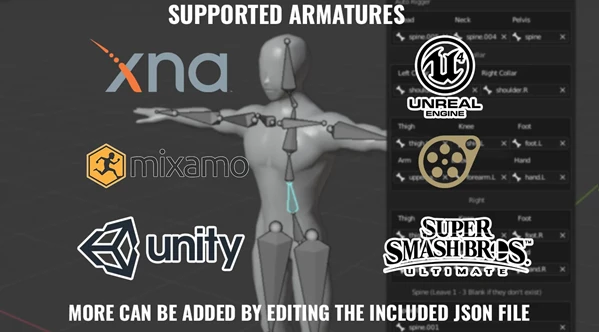
The supported rig naming conventions include:
SFM Bip rigs
XNA rigs
Mixamo rigs
Unity rigs
Unreal Engine 4 rigs
This reduces the amount of manual field selection needed when working with recognized armatures.
For rigs with unsupported or custom naming conventions, some fields may need to be configured manually.
Important Limitations Before Using the Addon
Auto IK Rigger is designed for a specific type of character setup, so it is worth checking its limitations before using it in a project.
Limitation | Details |
|---|---|
Character type | Supports humanoid models only |
Existing rig | Requires a model with an attached armature |
Spine bones | Supports up to four spine bones |
Custom bone placement | May require manual repositioning |
FK to IK snapping | Not supported |
The four-spine-bone limit is particularly important when working with characters that have more complex skeleton structures.
Similarly, because the addon expects an existing armature, it is not intended for unrigged models that still need their initial skeleton.
These restrictions make Auto IK Rigger better suited to adding IK controls to compatible humanoid rigs than handling every stage of character rigging.
Blender Compatibility
Compatibility is another important consideration.
According to the developer, Auto IK Rigger works with Blender 2.8x, and users should stick to Blender 3.6 or earlier.
The developer explicitly states that the addon does not work with Blender 4.0 or newer.
If your animation workflow depends on Blender 4.x or later, this addon is not a suitable option unless its compatibility changes.
When Is Auto IK Rigger Worth Using?
Auto IK Rigger is most relevant when you have an existing humanoid character and want to add IK limb controls without spending too much time configuring constraints.
It can be particularly practical for characters using recognizable bone naming conventions, including Mixamo, SFM Bip, and XNA rigs.
The addon keeps its scope fairly narrow. It does not replace a full rigging system, support non-humanoid characters, or provide FK to IK snapping.
For Blender users working with compatible humanoid armatures, though, it offers a straightforward way to prepare arm and leg IK controls through a single panel.

Files Password : gfxplugin.com OR 123456