Downloadable Files
You can download Cloth Body Deformer for free at the bottom of this page.
Realistic Skin Compression and Soft Tissue Deformation for Tight-Fitting Clothes
Clothing doesn't always sit naturally on a 3D character. A belt might look like it's floating above the waist, or a tight strap might leave the skin underneath completely unchanged. These small details can make an otherwise realistic character feel less convincing.
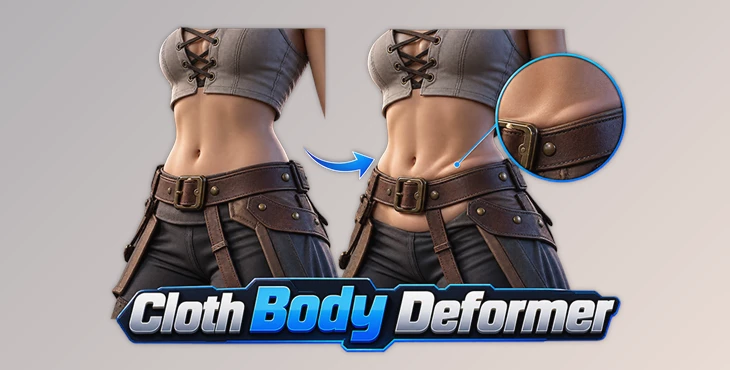
Cloth Body Deformer is a Blender tool that makes clothes look more natural on 3D characters. It shows how tight clothes press against the skin and change the shape of the body. This helps clothes look more realistic.
Make Tight Clothing Press Naturally Against the Body
When clothing fits tightly around a character, the skin underneath shouldn't stay perfectly smooth. A belt pressing against the waist, for instance, usually creates a slight indentation, while the surrounding tissue may push outward.
Cloth Body Deformer helps recreate these details directly in Blender. It changes the body's shape to reflect the pressure of clothing, giving fitted garments a more natural appearance without requiring a complicated simulation.
The tool handles four main types of interaction:
Skin Compression: Creates indentations where clothing presses against the body.
Soft Tissue Bulging: Adds natural-looking volume around compressed areas.
Garment Pressure: Makes tight clothing appear to fit more closely against the character.
Automatic Garment Correction: Helps adjust clothing to match the changes made to the body.
These details are particularly noticeable around belts, straps, socks, and other clothing elements that sit close to the skin.
Cloth Body Deformer Features
The tool also includes several controls that help artists shape and refine the deformation without making permanent changes to the original model.
See Changes Instantly with Live Preview
With Live Preview, you can see how the body responds to clothing pressure while making adjustments.
This is helpful when working on areas where the deformation needs to be precise. You can check how the skin reacts and refine the result as you work, rather than waiting until the end to see how everything looks.
Control Deformation with Paintable Masks
Sometimes you only want the deformation to affect a specific part of the body.
Cloth Body Deformer includes paintable influence masks that let you decide exactly where the effect should appear. You can focus compression around a tight strap, for example, without affecting nearby areas that don't need any changes.
This gives you more control over the final shape, especially when clothing touches the body in several different places.
Adjust Results with Customizable Presets
The included presets give you a starting point for different deformation effects.
You can customize them to suit the character you're working on, rather than creating every adjustment from scratch. This comes in handy when dealing with multiple clothing elements that need slightly different results.
Keep Your Original Mesh with Shape Keys
One of the more practical features is the non-destructive workflow.
Cloth Body Deformer uses Blender Shape Keys to store the resulting deformations. Your original body shape remains available, so you can go back and adjust the effect without permanently changing the mesh.
That's particularly helpful when you're still refining a character's proportions or making changes to their outfit.
Where Can You Use Cloth Body Deformer?
Cloth Body Deformer is most relevant when working with fitted clothing that should visibly affect the character's body.
Here are a few situations where its deformation tools can help:
Clothing element | What the tool helps create |
|---|---|
Belts | Natural compression around the waist |
Straps | Indentations where straps press into the skin |
Tight clothing | Subtle compression and tissue bulging |
Socks | Pressure marks around fitted edges |
Fitted garments | Closer contact between the clothing and body |
These effects can make a noticeable difference in detailed character renders, especially when the camera is close enough to show how clothing interacts with the skin.
Better Clothing Contact Without Complex Simulations
You don't always need a full physics simulation to make clothes look realistic. Sometimes, you just want a belt to fit properly around the waist or tight clothes to look like they are pressing against the body.
That's where Cloth Body Deformer fits into a Blender character workflow.
Rather than trying to simulate every aspect of cloth movement, the tool focuses on how fitted clothing affects the body underneath. You can control where deformation happens, check the result through Live Preview, and keep the changes editable through Shape Keys.
It's important to distinguish this from a complete cloth simulation system. Cloth Body Deformer is designed specifically for clothing-to-body interaction, not for simulating all types of fabric movement.
For character artists who spend time refining outfits and body details, Cloth Body Deformer provides a practical way to make clothing feel more connected to the character wearing it.
Dear user, you must first login to your account to write your comment.
Please click here to Log in

Files Password : gfxplugin.com OR 123456