Downloadable Files
You can download Lens Optics Pro for free from the bottom of this page.
Create Cinematic Lens Effects in Blender with Lens Optics Pro
Lens Optics Pro is a Blender add-on that gives your renders the visual character of different camera lenses. It offers 63 artistic lens looks, including anamorphic, vintage swirl, fisheye, Petzval, and prism effects, all accessible directly inside Blender.
The add-on works with the Cycles render engine and lets you adjust lens characteristics in the rendered viewport. You can change the shape of out-of-focus highlights, control image distortion, adjust focus, and add finishing effects without switching between different tools.
One of its biggest advantages is that each camera in your scene can have its own lens look. You can also save customized settings as presets and reuse them in other shots.
Explore 63 Lens Looks Across 10 Families
The main feature of Lens Optics Pro is its collection of 63 lens looks organized into 10 families. Each family changes the image in a different way, from subtle optical characteristics to more noticeable distortions and reflections.
The Lens Library is built into Blender's sidebar, where you can search for a specific look or filter the collection by family.
Lens family | Available looks | Visual characteristics |
|---|---|---|
Anamorphic | 16 | Cinematic oval highlights and anamorphic styling |
Anamorphic Studies | 8 | Additional variations of anamorphic looks |
Spherical | 4 | Clean and soft-focus lens styles |
Swirl | 4 | Swirling patterns toward the image edges |
Petzval | 3 | Distinctive portrait lens character |
Character | 12 | Vintage bokeh and optical distortions |
Pincushion | 4 | Inward image curvature |
Fisheye | 3 | Wide, curved perspectives |
Prism | 14 | Reflections, image echoes, and split effects |
Creative | 4 | More experimental optical treatments |
You don't have to build these effects from scratch. Select a look from the library, apply it to your camera, and adjust its characteristics to match your scene.
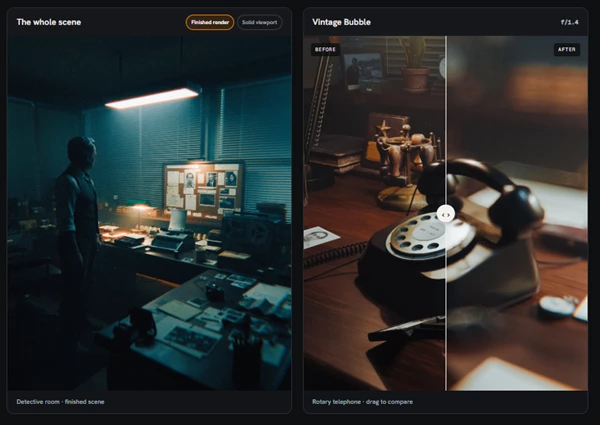
For instance, Anamorphic Cinema creates deep oval highlights, while Vintage Bubble produces filled highlights with luminous rims. Prism Zoom creates a magnified image echo, and Swirl introduces noticeable rotation around the edges.
These differences are particularly noticeable in scenes with bright background lights, shallow depth of field, or strong visual details near the edges.
Customize Lens Character and Bokeh Shape
Lens Optics Pro goes beyond applying predefined lens styles. Its Lens Character controls let you modify how the selected lens affects your image.
The Overall Character setting adjusts the strength of the entire look. You can also fine-tune individual parameters depending on the selected lens family.
Some of the available controls include:
Bokeh Shape: Adjust the appearance of out-of-focus highlights using blade count, roundness, and rotation.
Center Protection: Reduce swirl, prism, and creative blur effects around the middle of the frame.
Fisheye FOV: Control the field of view for fisheye looks.
Prism Arrangement: Change how prism reflections and image echoes appear.
Creative Diffusion: Adjust diffusion characteristics in supported creative looks.
Bokeh customization is one of the more interesting features. The same scene can produce round, triangular, pentagonal, or diamond-shaped highlights depending on the aperture settings.
Center Protection is also worth noting. In a portrait with strong prism reflections, you can keep the central subject clearer while retaining the effect around the edges.
However, Center Protection doesn't disable ordinary depth of field or remove the lens's underlying optical shape.
Camera, Aperture, and Focus Controls
Lens Optics Pro includes camera tools that work alongside its lens effects. These settings remain independent of the selected look, so you can change the lens character without having to rebuild your camera setup.
Precise Focus and Aperture Adjustment
The Focus panel includes a Click Surface option for selecting an exact focus point in any 3D viewport.
You can also enable Track Target to keep focus attached to the selected point. Preserve Focus Plane maintains the focus plane when switching between lens looks, and you can display the plane in color to check its position.
Aperture can be adjusted using common f-stop values such as f/1.4, f/2, f/2.8, f/4, and f/8, or by entering a custom value.
A wider aperture creates larger, softer out-of-focus highlights, which can make the differences between lens styles more visible.
Different Lens Looks for Multiple Cameras
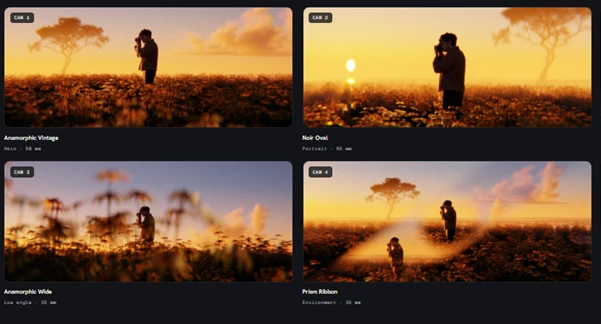
Each camera can retain its own lens look within the same Blender scene.
For example, you could use Anamorphic Vintage for a wide cinematic shot, Noir Oval for a close-up portrait, and Prism Ribbon for a more experimental camera angle.
The Camera panel also lets you create a camera from your current view, switch between cameras, and remove unwanted cameras.
Other camera and output controls include:
Focal length presets ranging from 16 mm to 135 mm.
Sensor presets for full frame, Super 35, medium format, and cinema dimensions.
Output ratios for portrait, square, Cinema Scope, landscape, and vertical formats.
Render Scale for adjusting output resolution.
The sensor presets control dimensions and framing rather than simulating a camera manufacturer's color science.
Create Reflections and Image Echoes with Prism Effects
Prism effects are a particularly distinctive part of Lens Optics Pro. The library contains 14 prism looks, each producing a different arrangement of reflections or repeated image details.
These include Prism Split, Zoom, Triad, Halo, Ghost, Echo, Cascade, Ribbon, Arc, Shard, Edge, Fan, Crescent, and Kaleido.
Prism Split creates twin reflections around the image periphery, while Prism Zoom produces a magnified echo of the scene. Other variations introduce different reflection patterns and arrangements.
These looks can change the composition quite dramatically without requiring additional objects in the scene.
For a portrait, you might use Prism Halo to surround the subject with reflected details. For a product close-up, Prism Zoom can introduce a magnified secondary image that draws attention to the object's shape.
The Prism Arrangement controls provide further adjustment over how these effects appear.
Add Finishing Effects to Your Renders
Beyond lens simulation, Lens Optics Pro includes five finishing effects that can be adjusted independently.
Effect | What it does |
|---|---|
Bloom | Creates soft diffusion around bright highlights |
Halation | Adds a glow-like treatment around highlights |
Streaks | Introduces light streak effects |
Cinematic Aberration | Adds color fringing |
Film Grain | Adds a grain texture to the image |
Bloom includes controls for diffusion, spread, and highlight threshold. The threshold determines which bright areas contribute to the glow, while spread controls how far it extends.
You can combine finishing effects with the selected lens character and depth of field to create a more developed photographic look.
Finishing is disabled by default, and its settings apply across the scene rather than being assigned separately to each camera.
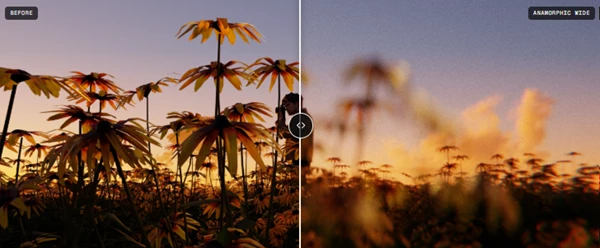
The Show Before option provides a quick comparison by bypassing the lens treatment and displaying a neutral view of the same camera.
Save and Reuse Custom Lens Presets
After adjusting a lens, you can save the result in the My Presets panel.
Give the preset a name, and it becomes available for use on other cameras. You can also export and import the entire preset library as a JSON file.
Lens Optics Pro provides two preset application options:
Look Only applies the saved lens look and Lens Character settings while preserving the current camera's aperture, focal length, sensor, and tracked focus.
Full Camera Setup is available when you want to restore a more complete saved camera configuration.
Saved finishing settings can also be restored, but applying a preset does not automatically enable Finishing.
This is helpful when working on several shots that need a consistent lens style but have different camera positions or focus settings.
Compatibility and Important Limitations
Lens Optics Pro is designed for Blender 5.2 or later and uses the Cycles render engine.
CPU rendering and NVIDIA OptiX are tested configurations. Other render engines and GPU configurations have not yet been verified.
It's also important to understand that the included looks are artistic interpretations of optical characteristics, not measured replicas of specific manufactured camera lenses.
The add-on focuses on giving artists control over the visual appearance of their renders rather than reproducing the exact behavior of physical camera equipment.
Give Your Blender Renders a Distinct Lens Style
Lens Optics Pro is a practical choice for Blender artists who want more control over how their renders look through a virtual camera.
Its strongest feature is the combination of a varied lens library with detailed optical controls. You can start with a recognizable anamorphic or vintage style, modify its bokeh and distortion, and save the result for future scenes.
For cinematic environments, portraits, product renders, and creative 3D compositions, it offers a way to develop a consistent visual style while keeping camera and focus adjustments inside Blender.

Files Password : gfxplugin.com OR 123456