Downloadable Files
You can download RipPix for free from the bottom of this page.
Create Vintage Photo Collages with RipPix
RipPix by JixiPix is a photo editing application that combines aged textures, vintage tones, and torn paper effects to give ordinary pictures a handmade appearance. It goes beyond applying a filter by letting you cut out subjects from photos and place them over textured backgrounds, creating artwork that looks like a combination of old photographs and paper collage.
You can use RipPix to highlight a person, flower, bird, or any other object by tracing around it and turning it into a separate paper piece. The cutout can then be moved, resized, or rotated to fit your composition.
The application is designed for both casual users and creative professionals who enjoy experimenting with nostalgic photography and artistic photo manipulation.
Torn Paper and Cutout Effects
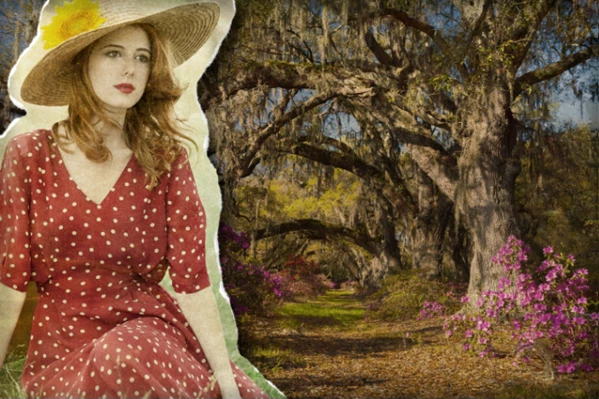
One of the main features of RipPix is its ability to turn selected parts of a photograph into realistic paper cutouts.
Using the tracing tool, you can draw around a subject and separate it from the surrounding image. Once the selection is created, RipPix offers three different edge styles that change how the cutout appears.
Rip Effect: Creates irregular, hand-torn edges that resemble paper ripped by hand.
Cut Effect: Produces cleaner edges, similar to cutting a photograph with scissors.
Border Outline: Replaces the cut edges with a defined outline for a stronger visual appearance.
You can switch between these styles without losing the cutout you have already created.
The Rip Tool also lets you add or remove edges from cut photos, giving you more control over the final shape.
Adjusting Cutouts and Shadows
After creating a cutout, you can use the Move Image Tool to change its position, size, and rotation.
RipPix also includes an adjustable Drop Shadow effect. You can control the shadow's height and strength to create separation between the paper piece and the background.
For instance, a flower cut from one photograph can be placed over an aged paper background with a soft shadow underneath. The result resembles a physical paper decoration resting on an old photograph.
Vintage Textures and Aged Paper Effects
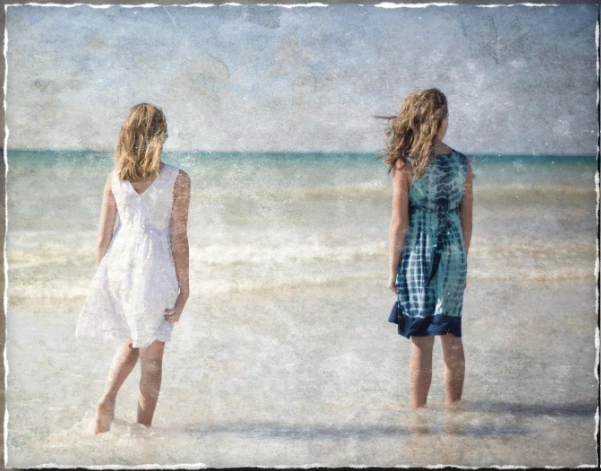
RipPix includes a collection of textures designed to reproduce the imperfections found in old photographs.
These effects range from gentle color toning to heavily distressed surfaces with scratches, stains, and worn details.
The application provides:
55 Worn Textures: Add scratches, stains, and surface imperfections to photographs.
34 Aged Papers: Provide different paper surfaces for creating vintage-style compositions.
20 One-Touch Presets: Combine textures and tones for foreground and background images.
The presets offer a quick starting point, while the customizable settings let you adjust the appearance of your artwork.
A photograph can have a lightly faded appearance or a more distressed finish, depending on the textures and tones you choose.
The combination of paper textures and cutout effects is what gives RipPix its distinctive look. The image doesn't simply appear old; it can resemble a handmade collage assembled from different photographs.
Combining Foreground and Background Photos
RipPix works with foreground and background images, making it possible to create compositions using more than one photograph.
You can replace the foreground image with another picture and use the tracing tools to select the subject you want to include.
Supported foreground image formats include JPG, TIF, and PNG.
This approach opens up several creative possibilities. You can place a person from one photograph into another scene, combine different landscape elements, or create a collage featuring friends and family.
For example, you could take a portrait, cut around the person, and place the result over a textured photograph. Adding a torn edge and a soft shadow gives the composition the appearance of a layered paper collage.
Because the foreground and background can use different textures and tones, you can also create contrast between the main subject and its surroundings.
Additional Editing Controls
Alongside its paper effects, RipPix includes several controls for managing the editing process.
Feature | Function |
|---|---|
Multiple Undo | Reverses previous editing actions |
Randomize | Generates different effect combinations |
Quick Preview | Lets you check the appearance of your edits |
Customizable Settings | Provides control over the applied effects |
High-Resolution Support | Supports high-resolution images and output |
These controls are helpful when working with combinations of textures, tones, and paper effects.
The Randomize feature is particularly convenient when you want to explore different visual treatments without choosing every setting individually.
Creative Projects You Can Make with RipPix
RipPix works well for artwork that benefits from a nostalgic, handmade, or slightly imperfect appearance.
Some practical uses include:
Vintage Portraits: Turn personal photographs into aged paper compositions with decorative cutout edges.
Family Photo Collages: Combine people from different pictures into a single arrangement.
Scrapbook-Style Artwork: Create layered photo compositions using worn paper textures and torn edges.
Nature Photography: Highlight flowers, birds, trees, or other subjects with individual paper cutouts.
Artistic Landscape Compositions: Blend scenery from different photographs into one image.
The application is particularly suited to projects where the paper itself is part of the visual style rather than just a background texture.

Files Password : gfxplugin.com OR 123456