Downloadable Files
You can download DreamGlare for free from the bottom of this page.
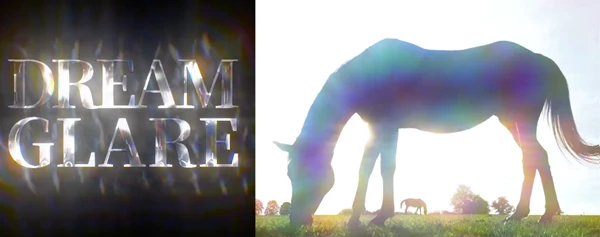
Physically Based Rainbow Glare from Your Footage’s Highlights
DreamGlare is a spectral glare plugin for Adobe After Effects and Premiere Pro that creates colorful, realistic lighting effects using the highlights already present in your footage. It can produce soft halation, rainbow rings, prism streaks, and glowing edges without requiring additional layers or precompositions.
Unlike a basic RGB split effect, DreamGlare uses physically based spectral dispersion to separate light into different wavelengths. The result is a more natural interaction between colors, highlights, and the edges of objects.
Create Spectral Lighting Effects with DreamGlare
DreamGlare works directly with the bright areas of an image. Rather than placing a fixed glow over the entire frame, it uses existing highlights to generate different lighting effects.
The plugin combines several glow engines that can work together or independently. Four of these engines share the same glow buffer, while Edge Lift has its own blending controls.
Five Main Lighting Engines
Halation: Creates a soft, multi-stage bloom around bright highlights, with color dispersion across different blur levels.
Glory Ring: Produces circular rainbow halos around point light sources, including multiple ring orders.
Prism Streak: Generates directional light streaks with adjustable symmetry, ranging from a single beam to a 12-way pattern.
Edge Wrap: Adds a spectral glow around the silhouette of a subject, following the areas where light is present.
Edge Lift: Extracts an object's outline, offsets it from the original image, and separates it into spectral colors.
These effects can be combined to create anything from subtle cinematic lighting to more noticeable rainbow glare.
Control Rainbow Dispersion and Glow Direction
One of the main controls in DreamGlare is Dispersion, which determines how far the spectral colors spread and in which direction.
The control supports three different behaviors:
Dispersion | Result |
|---|---|
Positive | Places red wavelengths toward the outside, creating a sunlit rainbow appearance |
Negative | Places blue wavelengths toward the outside, producing a look closer to film halation |
Zero | Removes spectral separation and produces a white glow |
This gives you control over the color structure of the glare without having to adjust individual RGB channels.
Edge Wrap and Edge Lift
DreamGlare includes two different ways to create glowing outlines, each designed for a specific purpose.
Edge Wrap: Light That Follows the Subject
Edge Wrap reads the alpha or luminance edges of an image and generates a spectral rim only where the subject is illuminated.
For instance, a person standing in front of a bright background can receive a colorful rim along the backlit parts of their silhouette rather than an evenly glowing outline.
You can adjust the width from a thin fringe to a broader glow.
The Luma Edge Threshold determines which brightness level the effect follows. Lower values can work with bright skies, while higher values may be more suitable for night scenes.
Edge Lift: Separate and Offset the Outline
Edge Lift takes the contour of an object, moves it away from its original position, and splits it into different wavelengths.
It includes three direction modes:
Directional: Moves the extracted outline in one direction.
Outward: Pushes the effect outward from all edges.
From Light: Directs the outline away from the light source.
The Distance control determines how far the extracted outline moves.
Edge Lift is disabled by default and only processes when enabled.
Add Movement with Prism Motion and Waver
DreamGlare also includes controls for creating animated light effects.
Prism Motion works on the combined glow after the lighting engines have generated their effects.
Its Shift control moves the accumulated glow along a chosen angle, while Flow spreads it across different spectral bands.
Flow Roughness changes the appearance of this movement. At zero, the result is a smooth, continuous streak. At 100, the glow separates into broken copies.
Waver behaves differently. It animates the individual lighting structures rather than moving the finished glow.
Glory Ring orders, Prism Streak arms, and Sparkle stars can rotate, shift, and change independently. This creates organic movement similar to sunlight reflecting on water.
Waver runs automatically based on time, so it doesn't require manual keyframes. It also supports Multi-Frame Rendering.
The plugin includes a Boil effect that breaks the glow into smaller, constantly changing pieces.
23 Presets for Different Lighting Styles
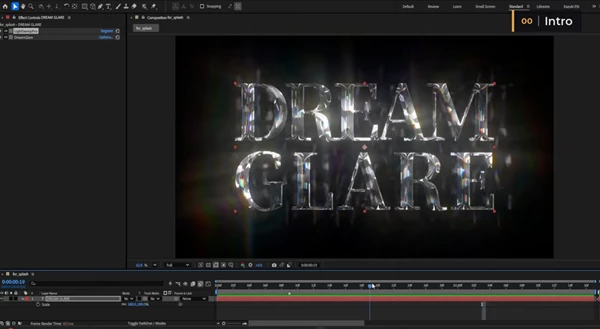
DreamGlare comes with 23 presets that provide starting points for different visual styles.
The collection includes restrained lighting adjustments alongside more stylized effects, such as:
Anamorphic light streaks
Eclipse-style rainbow rings
Subtle spectral glow
Effects designed to add variation to flat AI-generated footage
Presets are available directly from the effect's Preset menu, and their settings remain adjustable after application.
The plugin also includes Sparkle effects and Lens Dirt, which can be generated procedurally or taken from a custom layer.
Highlight Detection and Practical Controls
DreamGlare offers additional settings for controlling how the effects react to different types of footage.
One important option is Highlight Compactness.
When a shot contains large, uniformly bright areas, such as an open sky, this control helps prevent streaks from spreading excessively. It favors smaller, concentrated highlights as light sources.
Setting Highlight Compactness to zero disables this restriction.
By default, Halation, Edge Wrap, and Sparkle are enabled. Glory Ring and Prism Streak are also active at low intensities, while Edge Lift remains disabled.
DreamGlare works on a single layer, so there's no need to create precompositions to generate its lighting effects.
Compatibility and Important Limitations
DreamGlare supports:
Adobe After Effects: 2024 and later
Adobe Premiere Pro: 2026 and later
Operating systems: Windows and macOS
Color depth: 8, 16, and 32 bits per channel
Rendering: Multi-Frame Rendering
The Windows build requires an AVX2-capable CPU, while the macOS build supports both Apple Silicon and Intel processors.
There are also a few technical considerations worth knowing.
Linear working spaces: DreamGlare interprets its input as sRGB-encoded. Linearized or linear OCIO workflows can produce different highlight detection and may not match the included presets. A non-linear working space is recommended.
Moving layers: When Expand Bounds is enabled, moving layers can occasionally cause Sparkle stars to change angle or streak textures to shift slightly.
Partial-frame rendering: Rendering a Region of Interest in After Effects may produce slightly different glow results compared with rendering the full frame.
Bring More Character to Highlights
DreamGlare is designed for projects where lighting plays an important visual role, including cinematic footage, motion graphics, glowing typography, logos, and stylized compositions.
Its main advantage is the way it builds spectral effects from the image's existing highlights rather than relying on a simple RGB color separation.
With several lighting engines, adjustable dispersion, animated glow controls, and customizable presets, DreamGlare offers a flexible way to create both subtle optical effects and more expressive rainbow lighting directly inside After Effects or Premiere Pro.

Files Password : gfxplugin.com OR 123456