Downloadable Files
You can download AI Text To Image Generator Pro for free from the bottom of this page.
Turn Your Ideas into Images with AI Text To Image Generator Pro
Creating an image from a written description is much easier when you have the right tools. AI Text To Image Generator Pro is a desktop application that turns text prompts into AI-generated artwork directly on your computer. You can create realistic portraits, anime characters, landscapes, abstract illustrations, and other visual styles simply by describing what you want to see.
The software lets you use popular AI image models like Flux, Stable Diffusion, Juggernaut XL, and Animagine XL in one place. You can easily switch between models, change the settings, and generate images without having to deal with complicated setups.
One of its main advantages is local image generation. Once the required models are downloaded, the application can run offline, keeping your prompts and generated images on your own computer.
Generate Different Art Styles with Multiple AI Models
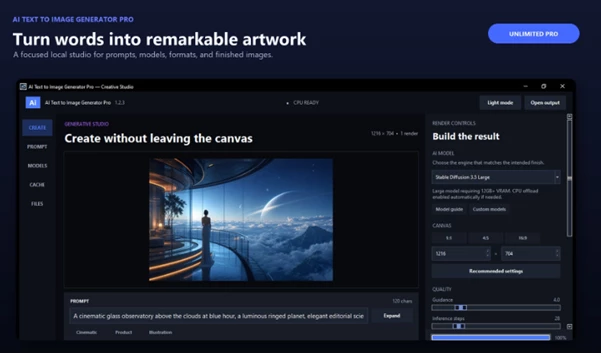
Different AI models are better suited to different types of images. AI Text To Image Generator Pro gives you access to several models, so you can choose one based on the style you're trying to create.
The application supports:
Flux: An AI image generation model for creating visuals from text descriptions.
Stable Diffusion: A flexible model for generating various types of digital artwork.
Juggernaut XL: Designed for photorealistic results, including realistic portraits and detailed scenes.
Animagine XL: Focused on anime-style characters and illustrations.
Having these models available in one application gives you more options when working on different projects.
For instance, you might use Juggernaut XL to create a realistic character portrait and switch to Animagine XL when working on an anime illustration.
You can also explore different visual styles without changing applications.
Adjust Image Generation Settings
AI Text To Image Generator Pro isn't limited to entering a prompt and generating an image. It includes several settings that give you more control over the final result.
Image Size
Set the dimensions of your generated images based on the type of artwork you want to create.
Guidance Scale (CFG)
Control how closely the AI follows your text prompt. Higher guidance values generally encourage the model to follow your description more strictly.
Inference Steps
Adjust the number of processing steps used during image generation. This setting can affect image quality and generation time.
Seed Control
Use a specific seed to reproduce results when working with the same model, prompt, and settings.
These controls are particularly helpful when you want to refine an image rather than start from scratch every time.
For example, keeping the same seed while changing your prompt or generation settings can help you explore variations of an existing idea.
Add Custom Models from Hugging Face
The application also supports custom AI models, so you're not restricted to the models included by default.
You can add Diffusers-compatible models from the Hugging Face Hub to expand the available image generation options.
This is helpful when you want to work with a particular artistic style or experiment with models that aren't part of the application's standard selection.
Model compatibility is important here. The custom model must support the Diffusers format used by the application.
Create Images Offline and Keep Your Work Private
Unlike image generation services that rely on remote servers, AI Text To Image Generator Pro processes images locally on your PC.
After downloading the necessary AI models, you can generate images without an internet connection.
This approach offers two important benefits:
Offline image generation: Continue creating artwork even when you don't have internet access.
Local privacy: Your text prompts and generated images remain on your computer rather than being sent to an external image generation service.
Local processing is particularly relevant when working with private concepts, unpublished designs, or creative projects you prefer to keep on your own device.
The initial model download still requires an internet connection, but the application can operate offline afterward.
A Simple Interface for Managing AI Artwork
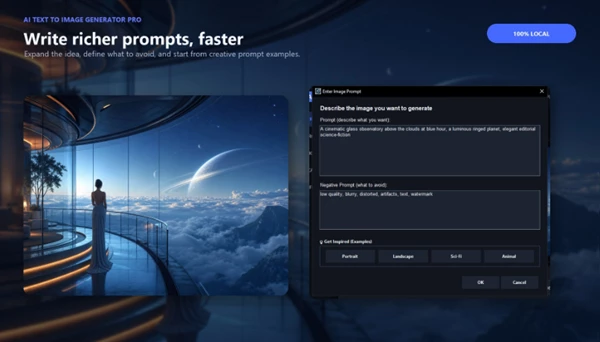
Although the software includes advanced generation controls, its interface is designed to be approachable for beginners.
The layout brings the main tools together, making it straightforward to write prompts, choose AI models, and adjust generation settings.
It also provides tools for organizing generated artwork, helping you manage images created during different sessions.
You don't need to work directly with complex model configurations to begin generating images. At the same time, more experienced users can explore the available settings for greater control over their results.
What Can You Create with AI Text To Image Generator Pro?
The combination of multiple AI models and adjustable generation settings makes the application suitable for several types of creative work.
Creative project | How you can use the software |
|---|---|
Photorealistic portraits | Generate realistic faces, characters, and portrait concepts |
Anime illustrations | Create anime-inspired characters and artwork using Animagine XL |
Landscape artwork | Produce natural scenery, fantasy environments, and scenic compositions |
Abstract art | Explore experimental shapes, colors, and artistic concepts |
Concept design | Turn written ideas into visual references for creative projects |
Digital illustrations | Generate artwork in different styles using supported AI models |
The software can serve as a starting point for developing visual concepts or creating standalone AI artwork.
A Flexible Desktop Tool for AI Image Creation
AI Text To Image Generator Pro combines local image generation, multiple AI models, and adjustable controls in a single desktop application.
Its biggest advantage is the ability to create and experiment with AI artwork directly on your computer while keeping your prompts and images private. The option to add custom Diffusers-compatible models also gives you room to explore additional styles beyond the built-in selection.
For digital artists, designers, and anyone interested in AI-generated visuals, it provides a practical way to turn written ideas into images without relying on an online generation service.

Files Password : gfxplugin.com OR 123456