Downloadable Files
You can download SpringFX – High-Performance Bone Physics for free from the bottom of this page.
Bring Natural Secondary Motion to Blender Characters with SpringFX
Animating a character's body is one thing, but making the hair, ears, tails, and clothing react naturally to movement is another. These smaller movements help characters feel more believable, especially when they need to respond to sudden turns, jumps, or changes in direction.
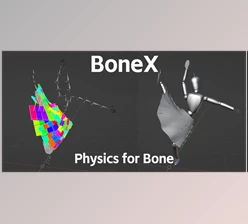
SpringFX – High-Performance Bone Physics is a Blender add-on that adds real-time physics to character bones. It uses a compiled solver to create natural spring motion directly in the viewport, without adding extra objects, drivers, or constraints to your rig.
You can select the bones you want to animate, click Add Physics, and play the animation to see the results. Once you're happy with the movement, you can bake it into keyframes or export the physics settings to VRChat PhysBones.
Real-Time Bone Physics Without a Complicated Setup
One of the main advantages of SpringFX is how little setup it requires. You don't need to build a separate physics rig or create additional objects to control secondary motion.
The add-on works directly with existing armatures and supports both rotation and location springs. As the character moves, the affected bones react with natural lag, bounce, and settling motion.
SpringFX uses a compiled physics solver that processes the entire rig once per frame. According to the developer's measurements, the solver takes approximately 0.537 milliseconds per frame with collisions enabled.
The simulation runs live in Blender's viewport, so you can adjust settings and immediately see how they affect the animation. There's no need to bake the movement just to preview it.
Another important detail is that SpringFX produces repeatable results. Its analytical integrator is designed to keep simulations stable and deterministic, meaning the same setup produces the same motion when you replay, scrub, or bake the animation.
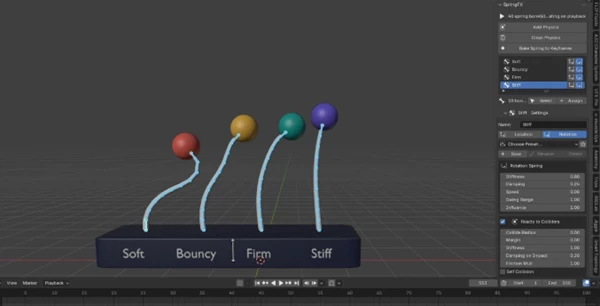
Control How Different Bones React to Movement
Not every part of a character should move the same way. Hair might need loose, flowing motion, while ears or accessories may require a stiffer response.
SpringFX provides several controls for adjusting these behaviors.
Stiffness: Control how strongly bones resist movement, from soft and flexible to more rigid.
Per-Axis Stiffness: Adjust spring behavior independently along different axes.
Chain Falloff: Change how physics properties behave along a chain of bones.
Lag: Control how much the secondary motion follows behind the character's movement.
Air Drag: Adjust the resistance that slows moving bones.
Wind and Turbulence: Add external forces that influence the movement.
Self-Collision: Manage collisions between simulated parts of the rig.
Simulation Precision: Adjust viewport and render precision independently.
These controls are particularly helpful when working with longer bone chains, such as ponytails or tails, where movement needs to travel naturally from the base to the tip.
Organize Physics with Groups and Presets
SpringFX lets you organize bones into separate, renamable groups. Each group has its own physics settings, so different parts of a character can behave independently.
For instance, a character can have separate groups for bangs, side locks, twin tails, and ears. You can change the stiffness of one group without affecting the others.
The add-on also includes presets for common character parts, including hair and breast motion, providing a starting point for different types of secondary animation.
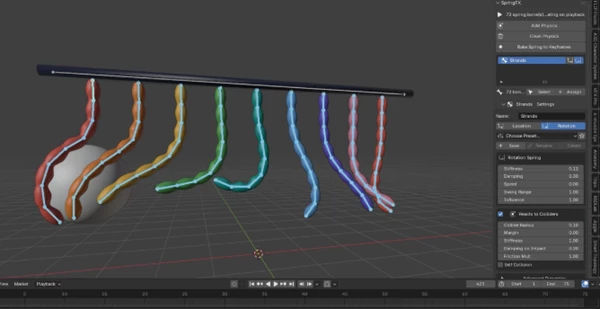
Collision Detection for More Believable Movement
Secondary animation can look unnatural when simulated bones pass through the character's body or surrounding objects.
SpringFX addresses this with segment-based collision detection and multi-pass collision resolution. Rather than checking only individual bone endpoints, its collision system considers bone segments to help prevent penetration.
The add-on supports several collider types:
| Collider Type | Purpose |
|---|---|
| Bone | Handle collisions involving bones |
| Sphere | Create rounded collision boundaries |
| Capsule | Define elongated collision regions |
| Plane | Create flat collision surfaces |
| Mesh | Use mesh geometry for collision detection |
For character hair, a head collider can keep moving strands from passing directly through the head. The same collision system can handle multiple hanging bone chains interacting with a moving collider.
According to the developer, SpringFX achieved zero penetrations across thousands of controlled collision test samples.
Bake Animation or Export to VRChat PhysBones
SpringFX supports two different ways to use your finished physics setup, depending on where the character animation is going.
Bake Physics into Keyframes
For animations that need fixed movement, SpringFX can bake the simulated motion directly into keyframes.
The baking system includes an optional pre-roll warm-up, which helps the simulation settle before recording begins. This is particularly useful when preparing looping animations.
You can also apply post-bake noise to add variation after the physics has been converted to keyframes.
Importantly, baking preserves existing animation on other bones, so you can work on secondary motion without overwriting unrelated parts of the character's animation.
Export Physics Settings to VRChat
SpringFX also supports direct export to VRChat PhysBones.
Instead of baking the simulation into animation keys, you can tune the physics inside Blender and export the settings needed for PhysBones.
The export supports:
Bone endpoints
Radius curves
Colliders
Angular limits
This gives VRChat avatar creators a way to prepare and adjust secondary physics inside Blender before transferring the settings to their avatar workflow.
Where SpringFX Works Best
SpringFX is designed for character rigs that need responsive secondary motion. Its features cover several common animation scenarios.
Anime-style hair: Animate bangs, side locks, ponytails, and twin tails with independent settings and head collision.
Tails and ears: Create delayed motion that follows body movement and gradually settles when the character stops.
Soft clothing and accessories: Add spring behavior to rigged clothing elements and accessories that need to react to movement.
Character body motion: Apply location and rotation springs to selected bones for bouncing and overshooting effects.
VRChat and VTuber avatars: Prepare bone physics for avatars that need flexible hair, accessories, or other moving elements.
Because SpringFX doesn't add extra objects, drivers, or constraints, it also fits workflows where keeping character rigs clean and linkable is important.
A Practical Way to Add Physics to Blender Rigs
SpringFX focuses on a specific part of character animation: giving rigged elements natural movement without making the rig more complicated.
Its combination of live viewport simulation, adjustable spring behavior, collision detection, and keyframe baking makes it suitable for both animation projects and character preparation.
For VRChat creators, the PhysBones export provides an additional option for transferring physics settings without baking the motion first. For Blender animators, the ability to keep rigs clean while working with real-time secondary motion is one of its most useful qualities.

Files Password : gfxplugin.com OR 123456