Downloadable Files
You can download Fog & Mist - Photoshop Brushes for free from the bottom of this page.
Add Realistic Fog and Mist to Your Photoshop Artwork
Adding fog or mist to an image can completely change its atmosphere. A simple landscape can feel mysterious, a fantasy scene can become more dramatic, and a portrait can gain a softer, more cinematic look. Fog & Mist - Photoshop Brushes is a collection of 10 Photoshop brushes designed to create these effects with natural-looking results.
The brushes help you add anything from light haze to thick fog without having to build the effect from scratch. You can download Fog & Mist - Photoshop Brushes for free from the bottom of this page.
Create Realistic Fog and Mist in Photoshop
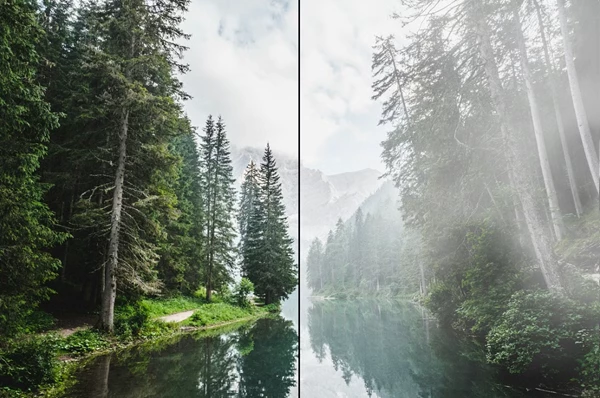
The main purpose of this brush set is to add realistic atmospheric effects directly to your images. Each brush produces soft transitions, helping the fog blend naturally into the surrounding scene rather than looking like a solid white shape.
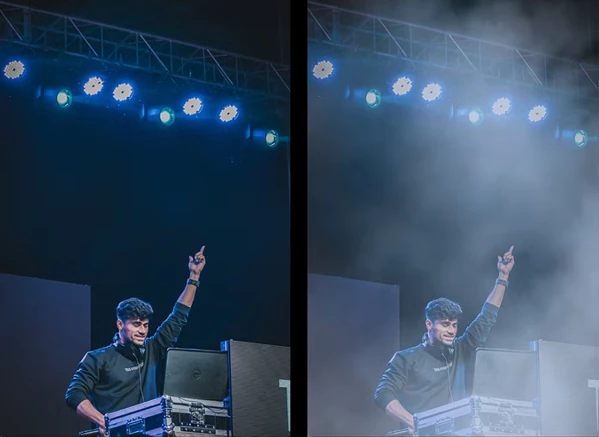
You can use the brushes to create different levels of atmosphere. A little mist can soften a distant background, while several layers of fog can give an image a darker, more mysterious appearance.
The set also works well when you want to create a sense of depth. By placing mist between different elements of a composition, you can make the foreground and background feel more separated.
Pressure-Sensitive Brushes for Natural Control
One of the main features of Fog & Mist - Photoshop Brushes is its dynamic, pressure-sensitive brush behavior.
When using a compatible drawing tablet, the brushes respond to how much pressure you apply with your pen. This gives you more natural control over opacity and flow while painting.
You can create lighter, softer mist with gentle strokes or build up a denser fog effect by applying more pressure and layering your strokes.
This is particularly helpful when working around objects, characters, or landscape elements where you need the fog to change gradually rather than appear at the same intensity everywhere.
Where Can You Use These Brushes?
The brush set is suitable for several types of creative projects:
Photo Manipulation: Add fog around subjects, buildings, or natural environments to create more atmospheric compositions.
Cinematic Scenes: Use mist and haze to give scenes a dramatic, film-inspired appearance.
Fantasy Artwork: Create mysterious forests, foggy landscapes, and atmospheric environments.
Landscape Editing: Add subtle mist to mountains, valleys, and distant backgrounds.
Posters and Album Covers: Create moody backgrounds and atmospheric details that support the overall design.
Digital Illustrations: Paint soft fog and mist directly into illustrated environments.
Because the brushes support both subtle haze and heavier fog effects, you can adjust the atmosphere to match the style of your project.
What's Included in Fog & Mist - Photoshop Brushes?
The package contains:
10 Fog and Mist Brushes: A collection of dynamic Photoshop brushes for creating different fog, mist, and haze effects.
Help File: An included guide to help you get started with the brush set.
All 10 brushes are designed for use inside Adobe Photoshop, allowing you to paint atmospheric effects directly into your existing artwork.
A Simple Way to Add Atmosphere to Your Artwork
Fog & Mist - Photoshop Brushes is a practical choice for artists and designers who want more control over the atmosphere of their images. The combination of soft brush textures and pressure-sensitive painting makes it possible to create both gentle background haze and more noticeable fog effects.
For photo editing, fantasy compositions, and digital painting, the set provides a straightforward way to add depth and mood while keeping the results natural.

Files Password : gfxplugin.com OR 123456