Downloadable Files
You can download Hex Scatter for free from the bottom of this page.
Advanced Texture Scattering for Blender
Making realistic materials in Blender can be difficult when the same texture keeps repeating. Even a good texture can look fake if you notice the same patterns everywhere.
Hex Scatter helps fix this by spreading textures across your 3D models in a less repetitive way. It uses hexagonal cells, random changes, and blending to make surfaces look more natural.
It comes with Blender node groups, so you don't need to create seamless textures or manually set up UV maps. It also supports height blending, normal correction, and different texture maps for creating more detailed PBR materials.
How Hex Scatter Works in Blender
Hex Scatter breaks texture distribution into hexagonal cells rather than applying a single repeating texture pattern. Each cell can have a different rotation or scale, helping to hide obvious repetition.
The node groups also blend neighboring cells together, so the boundaries between different texture regions become less noticeable.
This approach works particularly well for materials with irregular surface details, such as rocks, clay, skin, and fabrics. These surfaces naturally contain random variations, making them good candidates for hexagonal texture scattering.
Hex Scatter provides two main ways to work with textures:
Image Scattering: Distributes a single image texture across a surface.
Material Scattering: Distributes multiple texture maps together, allowing you to build more complex materials using a PBR workflow.
The Material option is particularly important when working with normal, height, roughness, and other maps that need to stay consistent across the surface.
Height Blending for More Natural Texture Transitions
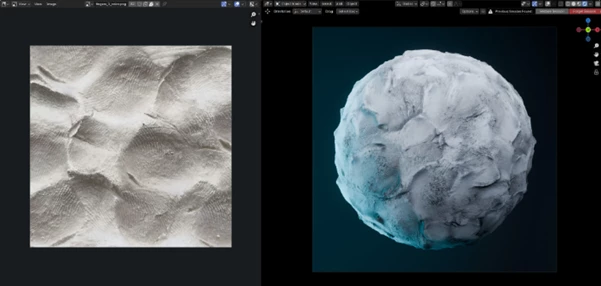
One of the main features of Hex Scatter is its height blending system.
Traditional dithering can help mix neighboring texture regions, but the transitions may become noticeable when displacement is applied.
Height blending takes a different approach. It uses a grayscale height map to guide how neighboring texture regions blend together.
This produces more convincing transitions between cells, particularly when displacement is used with adaptive subdivision.
For materials such as clay or rough stone, where surface height plays an important role in the final appearance, height blending can produce a more believable result than regular dithering.
However, this technique requires a suitable height map. Hex Scatter does not generate that map automatically.
Automatic Normal Map Correction
Randomly rotating textures creates another problem when working with normal maps.
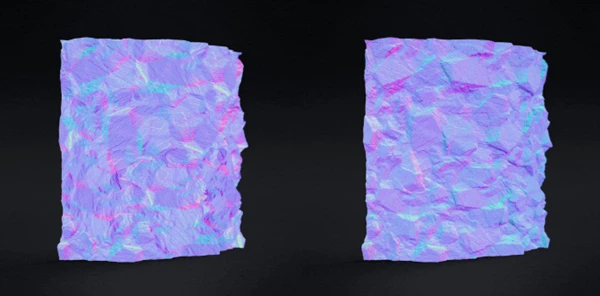
A normal map contains directional information that controls how light interacts with the surface. When the texture rotates, its normal information must also be adjusted to match the new orientation.
Without this correction, lighting and surface details can appear inconsistent between neighboring cells.
Hex Scatter automatically corrects normal maps when random rotations are applied.
This keeps the normal information aligned with the scattered textures and helps maintain consistent surface shading.
It is an important feature for PBR materials that rely on normal maps to represent fine surface details.
Triplanar and Biplanar Mapping Without UVs
Hex Scatter supports both triplanar and biplanar projection, allowing textures to wrap around 3D objects without requiring traditional UV mapping.
Both methods project texture information onto the object, but they have slightly different characteristics.
| Projection Method | Main Characteristics |
|---|---|
| Triplanar | Projects textures from three directions and blends them across the surface. |
| Biplanar | Uses fewer image samples while producing results that are often very close to triplanar projection. |
Biplanar projection generally requires fewer image samples, making it an alternative when you want similar visual results with less sampling.
However, it can sometimes introduce minor visual artifacts, such as slight pinching in certain areas.
Hex Scatter also accounts for potential mirrored details when random rotations are used with these projection methods.
Working With Non-Seamless Textures
Another advantage of Hex Scatter is that your source textures do not need to be seamless.
Its blending methods reuse pixels from neighboring cells to help conceal visible boundaries. Combined with randomized rotation and scale, this can create the appearance of a continuous material from an ordinary texture image.
This is particularly helpful when working with photographic texture sources that were not originally prepared for seamless tiling.
Which Materials Work Best With Hex Scatter?
Hex Scatter is most effective with textures that contain naturally irregular or semi-random details.
Some suitable materials include:
Clay: Irregular handmade surfaces and organic variations.
Rock: Natural stone textures with uneven details.
Skin: Surface patterns that benefit from reduced repetition.
Fabric: Materials with subtle, irregular texture variations.
Ceramics: Surfaces with naturally varied texture details.
However, not every material is suitable for hexagonal scattering.
Bricks, tiles, and other materials with precise, predictable patterns may produce less convincing results. Their structured arrangements can be disrupted by randomized rotation, scale, and blending.
For these materials, traditional texture mapping may be more appropriate.
Included Files and Material Setup
Hex Scatter includes several node groups for different texture scattering and blending techniques.
Because setting up these nodes can be more involved than creating a regular Blender material, the package also includes convenience Python scripts to help create new materials.
An embedded readme explains the setup process.
The included Blender file contains a sample handmade clay material with four texture maps. This provides a practical starting point for understanding how the node groups work together.
Keep in mind that Hex Scatter does not create texture maps. You need to supply your own normal, height, roughness, and other required maps when building custom PBR materials.
Blender Compatibility
Hex Scatter is designed for Blender 4.2 and newer.
When working with older Blender versions, you may need to manually change the material displacement setting to Displacement and Bump.
This is worth checking if your material uses displacement and the surface does not appear as expected.
Is Hex Scatter Worth Using?
Hex Scatter is a practical option for Blender artists who work with organic materials and want to reduce visible texture repetition.
Its main strength is the combination of hexagonal distribution, height-based blending, projection mapping, and automatic normal correction within a single node-based system.
It is particularly well suited to turning photographic texture sources into more convincing digital materials.
For surfaces like bricks or tiles, regular texture mapping may work better. But if you're working with materials like clay, stone, fabric, or skin, Hex Scatter makes it easier to spread texture details across your 3D models.

Files Password : gfxplugin.com OR 123456