Downloadable Files
You can download Nextext for free from the bottom of this page.
Text Animator for Blender
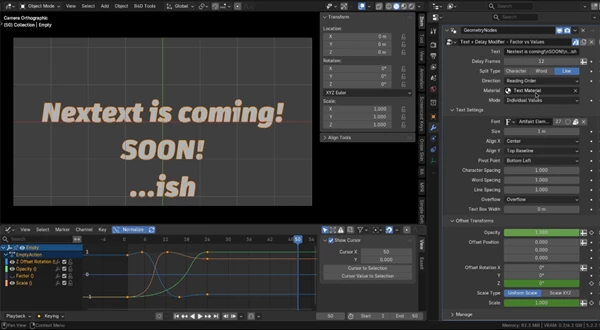
Animating text in Blender doesn't have to involve complicated setups. Nextext is a Geometry Nodes modifier that lets you animate letters, words, and lines of text, much like the text animator in After Effects.
You can change the position, rotation, size, and opacity right from Blender’s modifier panel. You don’t need to install any add-ons or write code. Just add the included .blend file to your project, and you’re ready to start animating.
How Nextext Works
Nextext lets you choose which parts of your text you want to animate. You can work with individual characters, complete words, or entire lines.
For example, you can make letters appear one after another, have words slide into place, or animate each line of a title separately.
You can also add overshoot and anticipation to your animations. This means letters can move or scale slightly beyond their final position before settling into place, giving the animation a more natural feel.
Two Ways to Animate Text
Nextext gives you two options for creating animations.
The first is Direct Keyframing, where you animate position, rotation, and scale properties individually. This gives you more control over how each property moves.
The second option is Factor Animation. Here, a single Factor value controls the animation, so you don't have to keyframe every property separately.
You can also choose between uniform scaling and separate XYZ scaling, depending on how you want the text to change size.
Create Staggered Text Animations
One of the most useful parts of Nextext is its delay system.
You only need to create an animation once. Nextext then applies that same movement to each character, word, or line with a delay between them.
The original easing and overshoot are preserved, so every element follows the same motion.
There are five ways to control the animation order:
Reading Order: Animates text in its normal reading order.
Reverse: Starts from the opposite end.
Center Out: Starts in the middle and moves outward.
Outside In: Starts from both ends and moves toward the center.
Random: Animates elements in a random order.
For instance, you could animate a title so its letters appear from the center, or make each word enter the screen one after another.
Text Styling and Other Controls
Nextext isn't limited to animation. It also includes the standard Blender String to Curves settings inside the modifier panel.
You can change the font, text size, alignment, spacing, overflow, and text box settings without leaving the panel.
It also supports multiline text using inline line-break substitution. This means you can work with titles containing multiple lines and animate those lines separately.
For opacity animation, Nextext includes a companion material that works with the modifier.
Getting Started with Nextext
Using Nextext is fairly simple. Open your Blender project, append the Nextext object from the included .blend file, and add it to your scene.
From there, you can adjust the text settings, choose how you want the animation to work, and start adding keyframes.
The package also includes a demo animation, so you can open the file and see how the modifier works before creating your own animation.
Nextext has been tested with Blender 5.2 LTS. The developer hasn't specified compatibility with other Blender versions.
Is Nextext Worth Using?
Nextext is a good option for Blender users who want to create animated titles, moving typography, or text reveals without building their own Geometry Nodes setup.
Its main advantage is the way it handles staggered animation. You can animate a movement once and reuse it across letters, words, or lines while keeping the same timing and easing.
For motion designers who like the text animation controls in After Effects but prefer working in Blender, Nextext offers a familiar approach without needing an additional add-on.

Files Password : gfxplugin.com OR 123456