Downloadable Files
You can download Superhero Collection for free from the bottom of this page.
Cinematic Digital Backdrops for Superhero Photography
Creating a convincing superhero scene requires more than a costume and a dramatic pose. The environment plays an important role, whether your character is standing above a city, facing a giant robot, or surrounded by flames and destruction.
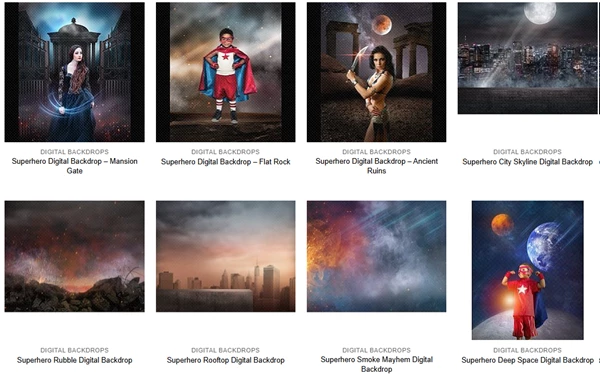
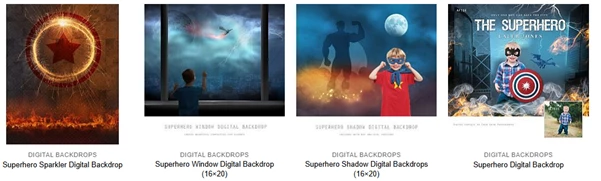
Superhero Collection by Squijoo brings together 20 superhero-themed digital backdrop products designed for creative photo composites. The collection includes dramatic cityscapes, destructive storms, powerful enemies, fiery environments, and other cinematic settings.
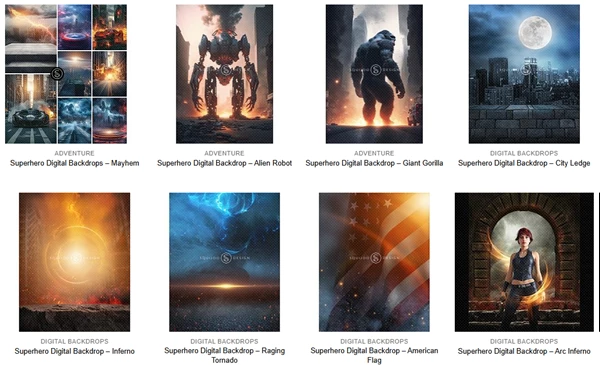
Explore 20 Superhero-Themed Digital Backdrops
The collection offers a variety of environments, making it possible to create different superhero scenes without building every background from scratch.
Some backdrops focus on action and destruction, while others provide atmospheric locations for character portraits.
The included products can be grouped into several categories:
Category | Included Backdrops |
|---|---|
Urban environments | City Ledge, City Skyline, Rooftop, Window, Mansion Gate |
Action and destruction | Mayhem, Inferno, Arc Inferno, Smoke Mayhem, Rubble |
Superhero enemies | Alien Robot, Giant Gorilla |
Weather and atmosphere | Raging Tornado, Shadow, Sparkler |
Fantasy and dramatic settings | Deep Space, Ancient Ruins, Flat Rock, American Flag, Superhero Digital Backdrop |
Action Scenes and Destructive Environments
Several backgrounds are designed around large-scale superhero action.
Mayhem features an urban environment associated with burning buildings, smoke, lightning, storm clouds, and damaged streets. Alien Robot introduces a giant robotic threat into a city setting, while Giant Gorilla provides a similar scenario involving an oversized creature.
For more dramatic environmental effects, Inferno features flames, rocks, sparks, and fiery elements. Raging Tornado focuses on powerful storms, tornadoes, clouds, and lightning.
These scenes provide different visual settings for superhero-themed photo composites.
How to Use Superhero Collection in Photoshop
The workflow described by Squijoo is straightforward: cut out your subject, place them onto the selected backdrop, and adjust the lighting as needed.
Cut out subject
Place on backdrop
Adjust lighting
For instance, a superhero photographed against a simple background can be placed on the City Ledge backdrop to create a rooftop-style portrait. Alternatively, the same subject could be positioned in the Inferno environment for a more intense action scene.
Matching the subject's lighting to the selected environment is particularly important. A fiery scene and a moonlit cityscape require different lighting treatments to make the final composition appear consistent.
File Format and Technical Details
The detailed product descriptions provided for the individual backdrops specify the following:
File format: JPEG
Resolution specification: 300 DPI
Editing workflow: Subject cutout and background compositing
Suggested software: Adobe Photoshop
Content type: Digital photography backdrops
The 300 DPI specification is provided for the described backdrop files. Exact pixel dimensions are not specified for most items, although the Window and Shadow products include a 16×20 designation in their names.
Where Can You Use These Backdrops?
Superhero Collection is suited to photography projects that need fictional, action-oriented environments.
It can be used for superhero costume portraits, children's themed photography, character composites, promotional artwork, and creative photo manipulation.
The collection's main advantage is its range of settings. A single superhero character can appear in a city battle, on a rooftop, inside a storm, or in a deep-space environment simply by changing the backdrop and adapting the composition.
If you create superhero-themed artwork, Superhero Collection gives you a set of ready-made cinematic backgrounds to work with. You can use them to build different scenes around your characters without creating every background from scratch.

Files Password : gfxplugin.com OR 123456