Downloadable Files
You can download Data Kit for free from the bottom of this page.
The Reimagined Save Game System
Saving game progress sounds simple until you need to manage multiple save slots, different data types, player settings, and previous game states. Things become even more complicated when you need to inspect saved values or figure out why certain data isn't loading correctly.
Data Kit - The Reimagined Save Game System makes it easier to save and load game data in Unity. It gives you a visual way to organize and manage saved information, works across different platforms, and lets you control what data gets stored.
One of its most interesting features is the visual debugger. You can inspect, modify, delete, and restore serialized data in real time while testing your game inside the Unity Editor, without constantly digging through files or writing additional debugging tools.
Organize Your Game Data with DataKit
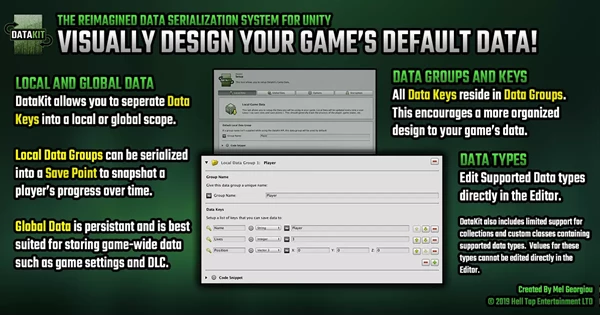
DataKit separates saved information into two main categories: Global Data and Local Data. This distinction helps you decide which information should remain consistent throughout the game and which should belong to a particular save point.
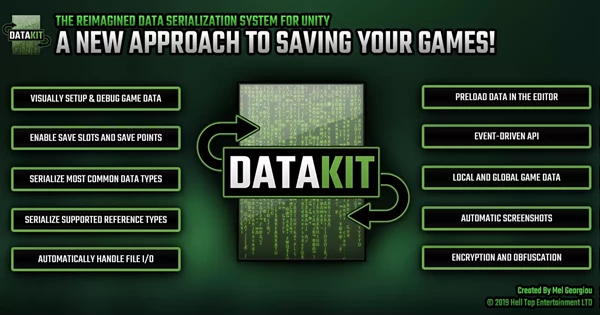
Global Data: Stores information such as graphics settings and In-App Purchases.
Local Data: Manages information associated with individual save points.
Data Groups and Keys: Organize stored values into groups for easier management and efficient access.
DataKit provides visual editors for setting up these structures, so you can see how your saved information is organized rather than managing everything through code alone.
Save Slots and Save Points
DataKit also gives you control over how players save and restore their progress.
Feature | How it works |
|---|---|
Save Slots | Manage separate characters, player profiles, or accounts |
Save Points | Store snapshots of local game data |
Save Point Limits | Automatically remove the oldest save points when a maximum limit is reached |
Storage Options | Save information to local files or Unity PlayerPrefs |
The distinction between save slots and save points is particularly important.
A save slot can represent an individual player or character, while save points preserve different states within that slot. This lets players return to an earlier point in their progress without replacing their entire profile.
DataKit can also automatically capture screenshots, which can be incorporated into save-related interfaces.
Serialize More Than Basic Data Types
Unity's PlayerPrefs system supports integers, floats, and strings, but many games need to store more complex information.
DataKit supports serialization of most common value and reference types, including arrays and custom classes. This gives developers more flexibility when working with structured game data.
It also provides an optional Reference Database System that can reference specific assets stored in Unity's Resources folder.
For projects that need to save assets externally, DataKit supports that functionality when using local file storage.
The system automatically handles file input and output operations and supports multithreaded file operations, reducing the amount of file-management code developers need to maintain.
Visual Debugging and Faster Testing
One of DataKit's biggest advantages is how it handles debugging.
Working with serialized data can be frustrating because saved information isn't always easy to inspect. When a value loads incorrectly, finding the source of the problem can take longer than expected.
DataKit addresses this with an interactive visual debugger inside the Unity Editor.
You can:
View serialized data while testing your game.
Edit stored values directly.
Delete or restore saved information.
Inspect organized data groups and keys.
Preload data in the Editor for faster testing.
This is especially helpful when checking save and load behavior across different game states. You can examine the stored information directly and make changes without rebuilding your entire testing setup.
Protect Saved Data with Encryption and Obfuscation
Some games need additional protection for stored values, particularly when those values affect gameplay progression.
DataKit provides two optional protection methods:
Method | Description |
|---|---|
128-bit AES Encryption | Provides stronger encryption for saved data |
XOR Obfuscation | A faster but less secure method of obscuring values |
These options can help discourage casual manipulation of saved information, although neither should be treated as a complete anti-cheat solution.
If your project doesn't require encryption, DataKit also supports excluding its encryption functionality from the codebase through a platform define in Unity's Player Settings.
Where Does DataKit Fit Best?
DataKit is particularly relevant to Unity projects that require more than a basic save-and-load function.
Games with multiple characters or player profiles can benefit from its save slot management. Projects with checkpoints or multiple saved states can use save points, while games that store a mixture of settings, progress, and complex data structures can take advantage of its Global and Local Data organization.
Its visual debugging tools also make it a practical option during development, when saved values frequently need to be inspected or adjusted.
Ultimately, Data Kit - The Reimagined Save Game System brings serialization, data organization, save management, and debugging into one Unity system. Its main strength is not simply storing game data, but making that data easier to manage and understand throughout development.

Files Password : gfxplugin.com OR 123456