Downloadable Files
You can download Diorama 3D for free from the bottom of this page.
A Real-Time 3D Viewport for After Effects
Working with 3D layers in After Effects can get complicated, especially when you need to position objects precisely, adjust camera angles, or create realistic interactions between multiple elements. After Effects has built-in 3D tools, but certain tasks, such as rigid-body simulations and complex object arrangements, require additional work.
Diorama 3D by AnvilFX brings these capabilities into a real-time 3D viewport inside After Effects. You can navigate your composition like a 3D scene, manipulate layers using transform gizmos, simulate physics, and arrange objects using mathematical formulas.
The important part is that your changes are written directly to standard After Effects layers and keyframes, so you can continue editing everything in your existing timeline.
Work Directly in a Real-Time 3D Viewport
Diorama 3D adds a dockable viewport that displays your After Effects composition as an interactive 3D scene.
You can orbit around objects, pan across the environment, and zoom in to inspect details. The viewport remains interactive during playback, and changes made in either Diorama or After Effects stay synchronized.
The viewport includes several controls:
Transform Gizmos: Move, rotate, and scale 3D layers, cameras, and lights directly in the scene.
Snapping: Position objects accurately relative to other elements.
Display Modes: Switch between textured, solid, and wireframe views.
Real-Time Shadows: See how objects cast shadows while arranging the scene.
Camera Focus: Adjust the camera's focal plane using a draggable control.
Keyboard Shortcuts: Choose standard transform shortcuts or Blender-style controls.
You can also edit 3D motion paths directly in the viewport. Position keyframes appear as spatial paths with adjustable Bezier handles, allowing you to reshape an object's movement from different viewing angles.
To insert another position keyframe, simply Alt-click the path.
Create Realistic Motion with Rigid-Body Physics
One of the most interesting features of Diorama 3D is its built-in physics system, powered by the Jolt physics engine.
You can apply rigid-body physics to ordinary 3D layers, parametric shapes, and imported models. This means objects can collide, fall, bounce, and react to physical forces without requiring you to animate every movement manually.
The physics tools include:
Rigid-body collisions and constraints
Force fields for influencing object movement
Trajectory previews, including predicted bounces
Transitions from keyframed animation into physics simulations
Baking simulated motion into regular After Effects keyframes
Unbaking to restore the original animation
For instance, you could animate a bowling ball moving toward a set of pins and let the physics engine calculate what happens when it hits them.
Once you're happy with the simulation, you can bake the motion into keyframes and make further adjustments through the After Effects timeline.
Arrange Hundreds of 3D Layers with Formulas
Positioning a large number of objects individually can be tedious, particularly when you're building geometric patterns or complex 3D structures.
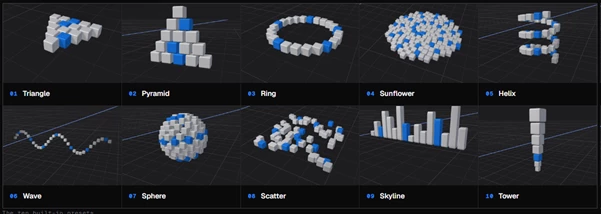
Diorama 3D includes an arrangement system that distributes selected layers using presets or custom mathematical formulas.
There are 10 built-in arrangement presets:
Triangle
Pyramid
Ring
Sunflower
Helix
Wave
Sphere
Scatter
Skyline
Tower
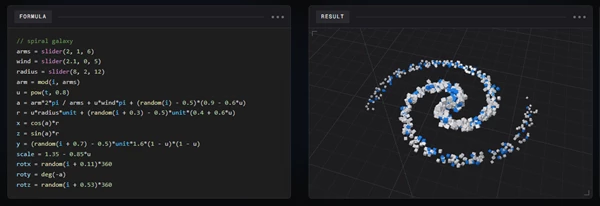
You can also write formulas to control each layer's position, scale, rotation, and orientation.
Formulas support mathematical operations, lists, loops, and random values. They can also define custom sliders that appear in the Diorama Tools panel.
When you apply an arrangement, Diorama parents the selected layers to a null object containing those slider controls. You can then animate the arrangement or move the entire structure together.
For more complicated patterns, the Copy LLM Instructions feature provides a prompt that you can use with ChatGPT or another AI assistant to generate formulas from a written description.
The tool also includes conventional 3D alignment and distribution options, allowing you to arrange layers relative to the world, camera, or current selection.
Integrate 3D Objects into Live-Action Footage
Diorama 3D also provides tools for combining 3D elements with recorded footage.
Using data from After Effects' 3D Camera Tracker, the plugin can generate a point cloud representing the tracked environment.
This point cloud acts as a spatial reference, helping you position 3D layers against real surfaces in the footage.
The Reconstruct Scene feature can generate a denser reconstruction of the tracked environment, although this particular feature is available only on Windows.
You can also tilt the ground plane to match the perspective of your footage. The adjusted ground plane is then used for object placement, snapping, and physics calculations.
These capabilities are particularly relevant when adding 3D objects to live-action shots where accurate positioning matters.
Additional Tools for Building 3D Scenes
Beyond viewport navigation and physics, Diorama 3D includes several practical tools for everyday scene creation.
Feature | Function |
|---|---|
Model Import | Displays GLB, GLTF, and FBX models with textures and materials |
3D Primitives | Create cubes, spheres, and cylinders by dragging in the viewport |
Effect Overflow | Displays glows and blurs extending beyond layer boundaries |
Copy and Paste | Duplicate layers within or between compositions |
Performance Controls | Pause or freeze the viewport during playback |
Undo Support | Uses the standard After Effects undo system |
The viewport works with both Classic 3D and Advanced 3D renderers, and its panels can be docked alongside your existing After Effects workspace.
Is Diorama 3D Worth Adding to Your Workflow?
Diorama 3D is particularly relevant for After Effects artists who work with 3D motion graphics, object simulations, geometric animations, or tracked live-action footage.
Its main advantage is bringing interactive scene manipulation, physics, and procedural arrangements into one workspace while keeping the resulting animation editable through ordinary After Effects layers and keyframes.
For projects that involve many 3D objects or complex spatial movement, it offers a more direct way to build and control scenes without constantly switching between different tools.

Files Password : gfxplugin.com OR 123456