Downloadable Files
You can download Lazy Cloud for free at the bottom of this page.
Create Realistic 360° Clouds in Blender with One Click
Creating a realistic sky in Blender isn't always straightforward, especially when you need clouds that look natural from different camera angles, match your existing lighting, and don't make rendering unnecessarily slow.
Lazy Cloud makes it easier to create clouds in Blender. You can start with ready-made presets, change how the clouds look, and animate them without having to build everything from scratch.
One of its biggest advantages is that it works alongside your existing HDRI, Sky Shaders, and world textures. You can improve the atmosphere of your scene without replacing the lighting setup you've already created.
Build a Complete Sky Without Complicated Setup
Lazy Cloud takes a preset-based approach to cloud creation. Choose a cloud layer, add it to your scene with one click, and adjust the details using numerical controls.
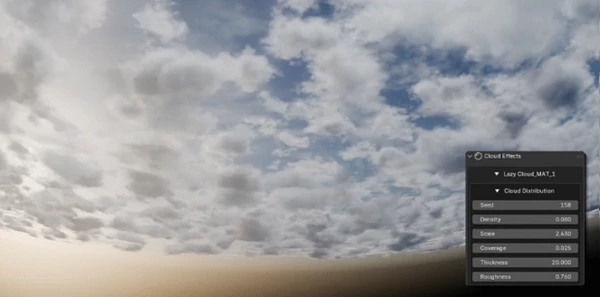
Unlike cloud setups that only look convincing from a particular viewpoint, Lazy Cloud supports 360-degree cloud coverage. This means you can move your camera around the environment while maintaining a consistent sky.
The addon also includes a procedural seed control. Changing the seed generates a different cloud arrangement while keeping your other settings intact. It's a convenient way to explore alternative cloud formations without rebuilding the scene.
Customize Cloud Layers and Add Movement
Lazy Cloud isn't limited to static cloud presets. You can control how the clouds look, where they appear, and how they behave in your scene.
Some of its main controls include:
Density: Adjust how thick or transparent the clouds appear.
Scale: Change the overall size of cloud formations.
Position: Move cloud layers to fit your composition.
Visibility: Show or hide individual cloud layers.
Blending: Combine cloud layers to create different atmospheric looks.
Procedural Seed: Generate new cloud patterns without changing the rest of your settings.
Another interesting feature is support for animated cloud effects. You can introduce movement into cloud layers, making the addon suitable for cinematic sequences and animated environments as well as still renders.
For projects that need a particular sky composition, these controls provide more flexibility than relying on a fixed background image.
Render Optimization and Engine Support
Cloud rendering can be demanding, particularly when you're working with detailed atmospheric effects.
Lazy Cloud includes an optimization tool that lets you adjust parameters to balance rendering quality and performance. The best settings depend on your hardware and the complexity of your scene.
There's also a one-click Auto button that applies appropriate render settings automatically, reducing the need to configure everything individually.
The addon supports both Blender rendering engines:
Render Engine | Support |
|---|---|
Cycles | Supported |
EEVEE | Requires Blender 4.2 or higher |
Most of the promotional examples were rendered using Cycles. According to the developer, EEVEE can achieve similar results with minor adjustments.
Compatibility and Important Details
Lazy Cloud is compatible with Blender 3.4.1 and above, with shader support for Blender 5.0 and newer.
Before using the addon, there are a few things worth remembering:
EEVEE cloud rendering requires Blender 4.2 or later.
Rendering speed varies depending on your hardware and quality settings.
Objects created by the addon should keep their default names to ensure its tools continue working correctly.
Existing HDRI lighting, Sky Shaders, and world textures can remain in your scene.
These details are particularly important when integrating Lazy Cloud into an existing Blender project.
Where Does Lazy Cloud Fit Best?
Lazy Cloud is a practical option for Blender artists who want more control over their skies without spending too much time on manual cloud setup.
Lazy Cloud creates clouds that cover the full 360-degree environment, so they still look good when you move the camera or change its angle. You can also animate the clouds, which is useful for cinematic scenes and moving shots.
For still renders, you can choose a preset and adjust the cloud layers to get the atmosphere you want.
The nice thing about Lazy Cloud is that you don't have to build everything yourself. You can add a cloud layer with one click, then change its look, movement, and render settings to fit your scene.

Files Password : gfxplugin.com OR 123456