Downloadable Files
You can download Smooth Operator - SDF Voxel Remesher for free from the bottom of this page.
Smooth Out Messy Geometry Without Losing Control
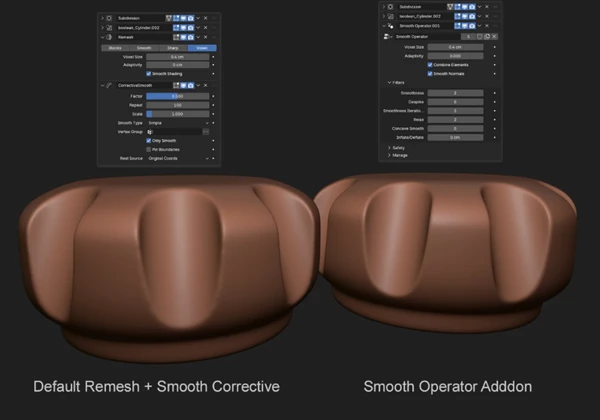
Blender's built-in Voxel Remesh is useful for rebuilding messy geometry, but it doesn't offer much control over surface smoothing, material transfer, or shading. You might end up with unwanted ripples, sharp artifacts, or details that need extra cleanup.
Smooth Operator - SDF Voxel Remesher takes a different approach. Built on Blender 5.1's new SDF grid nodes and the OpenVDB level-set toolkit, it brings remeshing, surface filtering, and shading controls together in a single live modifier.
You can clean up boolean operations, smooth irregular surfaces, remove unwanted spikes, and prepare your geometry without constantly switching between separate tools.
More Control Over Surface Smoothing
One of the most useful parts of Smooth Operator is its collection of filters. Rather than applying the same smoothing effect everywhere, you can choose how different surface problems should be handled.
Here are the main controls:
Smoothness: Polishes the overall surface. A value of 2 produces the classic OpenVDB smoothing look, while higher values create stronger smoothing at the cost of thin details.
Despike: Removes unwanted spikes, needles, and scanning artifacts while preserving larger, sharper edges.
Relax: Softens tight bends, pinched areas, seams, and marks left by boolean operations.
Concave Smooth: Smooths recessed areas without affecting convex edges.
Smoothness Iterations: Controls the effective smoothing radius for Smoothness and Despike. A width of 2 can produce an effect comparable to tripling the iterations in a single pass.
Inflate/Deflate: Expands or contracts the surface by a specified real-world distance without changing its topology.
These filters are particularly helpful when working with 3D scans, complicated boolean models, or objects with uneven surfaces.
For instance, if a boolean operation leaves visible pinching around an intersection, Relax can target those areas without requiring you to smooth the entire object.
Managing Heavy Remesh Operations
High-resolution voxel remeshing can put considerable pressure on Blender's viewport, especially when multiple objects contain live modifiers.
Smooth Operator includes several tools for keeping these scenes manageable.
Preview Mode
Preview Mode temporarily applies preview Adaptivity to the final remesh in each modifier stack. This combines flatter areas into larger polygons, reducing the geometry Blender needs to display.
Earlier remeshing passes remain suitable for baking, and disabling Preview Mode restores the full-quality grid.
Importantly, the Collapse operation always uses final-quality settings, even when Preview Mode is enabled.
Visibility Toggles
You can temporarily disable heavy remeshing operations across the entire scene or only on selected objects.
This is helpful when you need to continue modeling without evaluating every computationally expensive remesh.
Collapse and Decimate Your Geometry
Smooth Operator also provides tools for turning procedural results into finished meshes.
Collapse creates a new copy of the object with its modifiers applied, places it inside a collection named Collapsed Meshes, and hides the original procedural object.
Unlike permanently applying every modifier to the original, this workflow preserves your editable setup. You can unhide the original whenever you need to make changes.
Decimate combines uniform remeshing with quadric decimation to reduce polygon counts. The tool adds a preconfigured decimation setup while preserving the smooth normals.
This approach can produce cleaner low-poly results than relying on adaptive remeshing alone.
Blender Compatibility and Project Portability
Smooth Operator requires Blender 5.1 or newer because it relies on SDF grid nodes that aren't available in earlier releases. Older Blender versions cannot enable the add-on.
Another important feature is how it stores its remeshing setup.
The remesher uses a Geometry Nodes group embedded directly inside the .blend file. As a result, projects can be opened, evaluated, and rendered on other computers without requiring Smooth Operator to be installed.
Existing modifiers can also migrate automatically when older project files are opened after an add-on update, preserving their settings.
When Is Smooth Operator Worth Using?
Smooth Operator is particularly suited to Blender projects involving complex boolean geometry, 3D scans, and surfaces that need more precise cleanup than the standard Voxel Remesh provides.
Its biggest advantage is the combination of SDF-based surface filtering and a non-destructive remeshing workflow. You can target specific surface problems, manage expensive geometry in the viewport, and create finalized meshes while keeping the original procedural setup available for future edits.
For Blender artists who frequently work with imperfect or complicated geometry, it offers a more flexible alternative to the default voxel remeshing workflow.

Files Password : gfxplugin.com OR 123456