Downloadable Files
You can download Shutter Drag for free from the bottom of this page.
Create Expressive Slow Shutter Motion
Sometimes, a video looks more interesting when movement leaves a trail behind it. Instead of every frame looking sharp, moving objects can leave soft, blurry trails, giving the footage a different feel.
Shutter Drag lets you create this look using footage you've already shot. It combines slow shutter effects, AI-powered motion interpolation, and stepped frame timing to create smooth motion trails without making your video longer or shorter.
How Shutter Drag Creates Its Motion Effects
Shutter Drag works by recreating two camera techniques: long exposure and slower capture rates.
Long exposure gathers movement into a single frame, producing visible trails. A slower capture rate introduces a stepped rhythm, where each captured frame remains on screen until the next one appears.
The plugin uses neural motion interpolation to estimate movement between the original frames. It then combines those moments into a new exposure, creating trails that follow the movement in your footage.
The result is a combination of motion blur and deliberate frame stepping. You can make movement feel smooth and dreamy or give it a stronger, more rhythmic appearance.
Importantly, Shutter Drag keeps the original clip duration, so you can change the visual character of a shot without changing its overall timing.
Three Presets for Different Motion Styles
Shutter Drag includes three ready-to-use presets, each offering a different balance between motion trails and frame rhythm.
Preset | Sensor FPS | Shutter Angle | Visual Style |
|---|---|---|---|
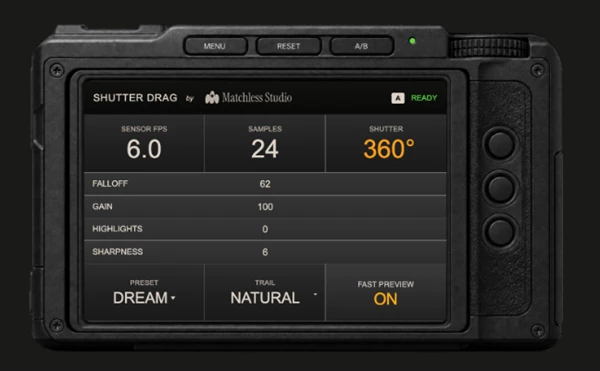
Dream | 6 FPS | 360° | Long, soft trails with a pronounced held-frame effect |
Step Print | 8 FPS | 270° | Stronger frame rhythm with more defined motion endpoints |
Clean | 12 FPS | 180° | Shorter exposures and a more restrained finish |
Dream works well when you want movement to feel suspended or atmospheric. Step Print gives gestures, performances, and moving scenes a more noticeable pulse. Clean keeps more visual detail while introducing a subtler version of the effect.
These presets are starting points rather than fixed styles. You can adjust the camera settings to create your own look.
Fine-Tune the Exposure and Motion Trails
One of Shutter Drag's main strengths is its camera-inspired control system. Rather than relying on a single effect intensity slider, you can adjust several properties that influence how movement appears.
The main controls include:
Sensor FPS: Determines how frequently a new exposure is captured, controlling the stepped rhythm.
Shutter Angle: Adjusts how much movement is gathered into each exposure.
Samples: Provides control over the exposure sampling.
Falloff: Changes how the motion trails fade.
Gain: Adjusts the intensity of the trail effect.
Highlights: Provides additional control over the brighter areas of the effect.
Sharpness: Helps refine the visual definition of the result.
You can also choose between four blending modes: Natural, Lighten, Screen, and Add. These change how the generated trails interact with the original image.
Together, these settings give you control over both the timing and appearance of the effect.
Compare Two Looks with A/B Controls
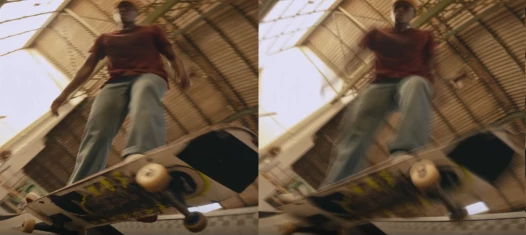
Shutter Drag also includes an A/B comparison system that stores two independent looks within each effect instance.
You can create one version with longer exposures and another with shorter, more defined trails, then switch between them to compare the results.
This is particularly helpful when you're deciding how strongly the effect should influence a particular shot. You can refine both versions without losing your previous settings.
Software Compatibility
Shutter Drag is available for several editing and motion graphics applications.
Software | Integration |
|---|---|
Adobe After Effects | Adobe Effect |
Adobe Premiere Pro | Adobe Effect |
DaVinci Resolve | OpenFX Effect |
Final Cut Pro | Motion Effect Template |
Apple Motion | FxPlug Effect |
Make sure to choose the appropriate download for your software and operating system.
For After Effects and Premiere Pro users, there's also an installation detail worth knowing. If Shutter Drag doesn't appear after installation through aescripts Manager, manual installation is available using the ZIP package and its included installation guide.
Where Does Shutter Drag Work Best?
Shutter Drag is particularly suited to footage where movement plays an important visual role.
A performance can take on a more rhythmic appearance with Step Print, while a moving subject can leave flowing trails with Dream. For footage that needs a more controlled treatment, Clean provides a less pronounced effect.
The important distinction is that Shutter Drag changes how motion is visually represented, not how long the clip plays.
For editors and motion designers who want to explore long-exposure aesthetics and stepped motion using existing footage, it offers a practical way to control both effects through familiar camera-style settings.

Files Password : gfxplugin.com OR 123456