Downloadable Files
You can download HtoA - Arnold for Houdini for free from the end of this page.
Bringing Arnold Rendering into Houdini
HtoA - Arnold for Houdini integrates the Arnold rendering environment with Houdini, providing tools for shading, viewport previews, volume rendering, GPU rendering, AOVs, USD workflows, and procedural content. Its feature set covers both classic HtoA workflows and Solaris, allowing Arnold materials and rendering features to work within different parts of a Houdini production pipeline.
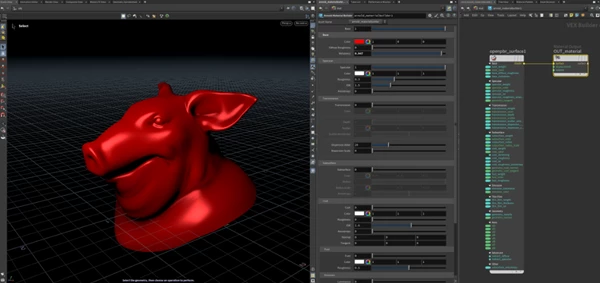
One of its notable shading options is OpenPBR Surface, an implementation of the OpenPBR specification. OpenPBR Surface evolves the Standard Surface approach with improvements including a better sheen/fuzz model and improved parameterization for metal reflectivity. HtoA also provides conversion scripts for converting Standard Surface shaders to OpenPBR Surface shaders.
Shader and Viewport Workflow
HtoA provides viewport shader previews for both OpenPBR Surface and Standard Surface in the classic HtoA environment. Shader parameters need to be promoted for the viewport preview functionality to work. Custom shader developers can also use houdini.ogl_tag metadata to automatically associate VOP parameters with OpenGL tags.
Solaris receives viewport support as well, with shader parameters and textures represented more accurately in the viewport. These capabilities help keep the viewport representation closer to the shader configuration used for Arnold rendering.
Ramp shaders provide additional controls for procedural shading. Three 3D ramp modes are available:
3d_linear
3d_spherical
3d_cylindrical
These modes calculate ramp input according to the distance between the shading point and a user-defined reference point or line. Ramp inputs can also be offset, making it possible to incorporate noise into the ramp.

Volume Rendering and Scattering Controls
Volume rendering is another important area of HtoA - Arnold for Houdini. The standard_volume shader includes scatter_diffusion and scatter_diffusion_roughness parameters for controlling how light scatters through volumes.
scatter_diffusion accelerates scattering, while scatter_diffusion_roughness extends this behavior for anisotropic volumes. The latter can help produce realistic cloud-like results with fewer volume bounces. Gain and bias curves provide additional control over these effects.
HtoA also uses stochastic interpolation for tricubic volume sampling. This method reduces the amount of voxel data read during individual sample calls and can improve rendering speed in certain scenes. Because the stochastic method does not always create a perfectly matching image compared with the alternative behavior, it can be controlled through the stochastic_volume_interpolation render option.
Denoising and GPU Rendering
Intel Open Image Denoise is available for improving rendered output, with support designed to produce sharper denoising results with fewer artifacts in scenes containing specular reflections and transmission. GPU acceleration for the denoiser includes Apple Metal GPUs on macOS and supported AMD GPU architectures on Windows.
Arnold GPU also includes rendering capabilities relevant to complex Houdini scenes. Global Light Sampling can be used for groups of lights linked to a shape, improving performance in scenes that use light linking. Scenes containing large numbers of nodes can benefit from reduced time to the first rendered pixel, and the motion vector AOV is supported during GPU rendering.
AOVs, Imagers, and Render Memory
For render analysis and visualization, the tonemap imager provides a Heatmap mode. It generates a spectrum based on a selected AOV quantity, with values represented across a range from blue at the minimum to red at the maximum.
AOV handling is also designed to reduce memory requirements in specific non-progressive rendering configurations. Non-progressive adaptive renders using the box filter consume less AOV memory, while reductions also apply to non-adaptive renders using filters including Gaussian, triangle, sinc, Catmull-Rom, Mitchell, and Blackman-Harris.
For multi-part OpenImageIO files, Arnold uses AOV output names for the corresponding subimages, making the relationship between rendered outputs and their AOVs more explicit.
Working with Alembic, OSL, and Procedural Data
Heavy Alembic scenes can benefit from parallel data reading in the Alembic procedural, which is intended to optimize initialization when files contain many objects.
For OSL workflows, the OSL VOP provides a manual Compile control. Node inputs and outputs are also updated when a scene is loaded while working in manual cook mode.
The procedural viewport API can return a boundary mesh for a volume when a procedural contains OpenVDB volume nodes. This gives procedural volume data a representation that can be used for previews in a DCC viewport.
USD and Solaris Workflows
HtoA - Arnold for Houdini includes several capabilities for USD-based pipelines. Geometry memory usage is reduced when rendering a single frame through Husk, while skeleton binding works with USD BasisCurves and points.
Primvars attached to lights can be imported as user data on Arnold light nodes. Mesh lights are exported as meshes carrying light attributes rather than as GeometryLight objects, providing another relevant capability for USD scene translation and rendering workflows.
These USD features, combined with the Solaris viewport improvements and Arnold shading tools, make HtoA suitable for Houdini workflows that extend beyond traditional scene rendering into USD-based production pipelines.
A Flexible Arnold Rendering Environment for Houdini
HtoA brings Arnold’s rendering tools into Houdini, giving you access to materials, volumes, GPU rendering, denoising, AOVs, OpenVDB, USD, and more.
It works with both traditional Houdini workflows and Solaris, so you can use Arnold’s shading and rendering features without leaving Houdini.
For artists working heavily with volumetrics, procedural scenes, USD data, complex shading networks, or GPU-assisted Arnold rendering, HtoA - Arnold for Houdini provides a broad set of tools within a single Arnold for Houdini workflow.