Downloadable Files
You can download Boundary Aligned Remesh for free from the bottom of this page.
Remesh Geometry Without Losing Its Characteristic Edges
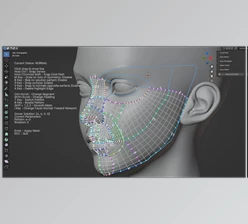
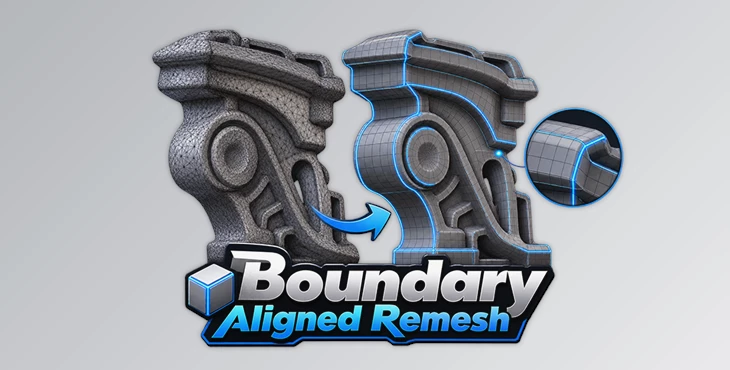
Boundary Aligned Remesh is a Blender add-on designed for remeshing geometry while retaining boundary edges, edge angles, and other characteristic edges of the original mesh. Rather than treating every part of the geometry uniformly, it provides options for identifying edges that should remain distinct during the remeshing process.
This approach is particularly relevant when working with meshes extracted from high-poly models or geometry generated from Cloth, Text, and Vector Curves data. These types of meshes can require cleaner topology while still containing boundaries or structural edges that are important to the shape.
The add-on can hold open edges during remeshing and also provides several ways to define additional edges that should be preserved. Alongside these controls, it includes options for reducing border polygons, transferring UVs, and applying mirroring after the remesh.
Preserve Important Edges During Remeshing
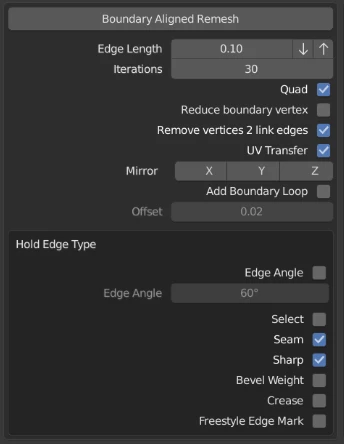
A central feature of Boundary Aligned Remesh is its ability to preserve distinctive edges. The add-on handles this by separating specified edges in advance to prevent them from being remeshed in the same way as the surrounding geometry.
Several types of edges can be used for this purpose:
Edge Angle
Selected Edge
Seam
Sharp
Bevel Weight
Crease
This gives you multiple ways to determine which parts of a mesh should retain their edge characteristics. Depending on how the source geometry is constructed, preservation can therefore be based on geometric angles, manually selected edges, or existing mesh properties such as seams and creases.
Open boundary edges can also be retained, making the add-on suitable for geometry where preserving the shape of exposed borders is important.
Border Reduction and Remesh Options
Boundary Aligned Remesh includes several options for controlling how the resulting geometry is handled.
Remove 2 Side Vertices is available as one of the remeshing options.
The add-on can also reduce polygons on the border. When this option is used, reducing polygon count takes priority over completely maintaining the original boundaries. As a result, feature-edge retention may not be fully preserved in this mode. This trade-off is important when deciding whether border reduction or stricter boundary preservation matters more for a particular mesh.
For meshes that already contain UV information, the Transfer UV option can preserve UVs by using a mesh transfer modifier.
Mirroring is also integrated into the workflow. The add-on can use a Mirror Modifier after remeshing, with support for the X, Y, and Z axes.
Where to Access Boundary Aligned Remesh
The add-on can be accessed from several locations in Blender, allowing it to fit into different modeling and sculpting workflows:
Property → Mesh Data → Remesh → Boundary Aligned Remesh
3D View → Sculpt Mode → Side Bar (N) → Tool → Remesh → Boundary Aligned Remesh
3D View → Header → Object → Boundary Aligned Remesh
Having access through both mesh-related properties and the 3D View makes the remeshing controls available from multiple parts of the Blender interface.
Useful for High-Poly and Generated Geometry
Boundary Aligned Remesh is intended for situations where geometry needs to be remeshed without simply discarding its recognizable edge structure.
One stated use is working with meshes extracted from high-poly geometry. It can also be used with geometry generated from Cloth, Text, and Vector Curves data. In these cases, the ability to retain boundaries and specify characteristic edges provides more control over what happens to important parts of the mesh during remeshing.
A practical workflow can be kept relatively direct:
Prepare the mesh → Define characteristic edges when needed → Choose boundary and remesh options → Run Boundary Aligned Remesh → Transfer UVs or apply mirroring when required
The exact setup depends on which properties of the source mesh need to survive the operation.
Important Limitations
There are several limitations to consider when using Boundary Aligned Remesh.
Its topology quality is lower than Voxel Remesh, so it should not be treated as a direct replacement when topology quality is the primary requirement.
The add-on can also work with meshes that do not contain open edges. However, according to the provided product information, it may not work properly in some cases with these meshes.
Another consideration applies when reducing polygons along borders. Because polygon reduction is prioritized in that mode, complete boundary preservation and feature-edge retention cannot always be maintained.
These limitations make Boundary Aligned Remesh more specifically focused on remeshing scenarios where retaining boundaries and designated characteristic edges is an important part of the process.

Files Password : gfxplugin.com OR 123456